


I’ve had plenty of useful Gemini conversations, only to forget where they were a few weeks later. The problem was finding that one old chat when I needed the information again.
Gemini’s chat history lets me go back, but searching for an old conversation isn’t always as straightforward. I might remember the general topic but not the exact wording I used, and a search can turn up several conversations that mention the same word for different reasons.
So I started doing one small thing whenever a conversation was worth keeping. And it has made finding those useful chats a lot less frustrating.
Gemini can find my chats, but not always the one I need
Finding an old chat wasn’t as easy as it sounded
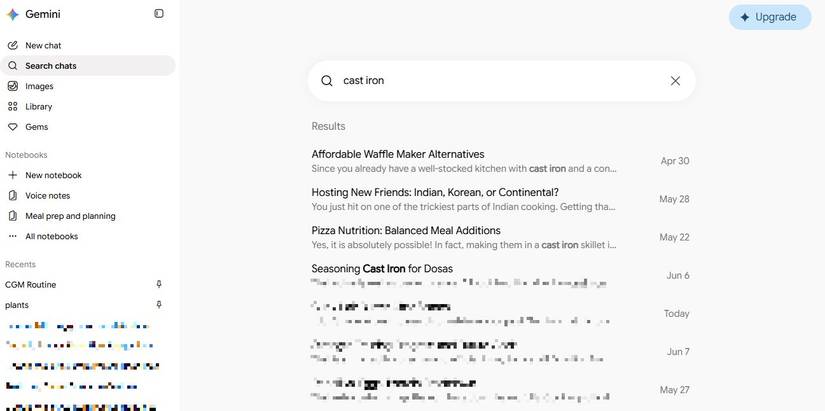
Gemini’s chat search should make finding an old conversation easy. If I remember roughly what I talked about, I can search my history and look through the results. The problem is that remembering the topic isn’t always enough to find the exact chat I want.
I ran into this when I wanted to find a Gemini conversation about seasoning my cast iron pan. I searched for cast iron, expecting it to take me to that chat.
Instead, I got a bunch of results where those words had appeared in different contexts. At one point, I saw a conversation about a cast iron plant rather than the pan I wanted to find.
The frustrating part was that I would scroll through them, open the ones that looked promising, and still not find the conversation I remembered.
It would also fail to retrieve older chats even when I remembered distinctive words from them.
So I started thinking. Instead of relying on myself to remember the exact words I used weeks or months ago, I could organize those conversations in Google Keep.
I had to connect Google Keep to Gemini first
The missing link between the apps
Before making Gemini save my useful conversations to Keep, I had to connect Google Workspace to Gemini.
In the Gemini app or website, open Settings, select Personal Intelligence, then Connected Apps, and toggle on Google Workspace.
That connection gives Gemini access to services including Keep, Gmail, Calendar, Drive, Docs, and Tasks.
I started using Google Keep as my Gemini index
I stopped relying on Gemini to remember everything
I didn’t want to copy the entire chat into Google Keep. So I made Gemini do the work.
When I finish a Gemini conversation that’s worth keeping, I type:
Summarize this chat and add it to Google Keep.
Gemini pulls out the important points and creates a new Google Keep note with the summary.
But then I noticed something that made this trick a game-changer.
At the bottom of the Keep note, it adds a Gemini tag that links to the original conversation. I’ve tried this with multiple chats, and the link has given me a quick way to jump to the full conversation whenever the summary isn’t enough.
So my Keep note becomes a simple index. I get the important information in a form that’s easy to search, but I still have the original Gemini conversation one tap away.
Searching my Gemini chats was straightforward
Keep was better at finding my Gemini notes
After I started saving important Gemini conversations to Google Keep, I wondered how to make the process easier.
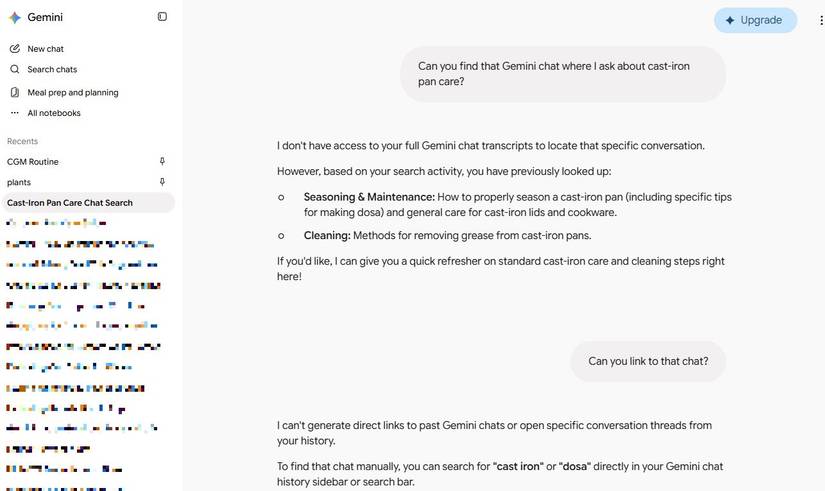
Instead of searching through Gemini’s chat history, I asked Gemini to find an old conversation. I asked it to look for the chat where I’d worked through some cast-iron-pan information.
Sometimes, Gemini went in the wrong direction and told me it couldn’t find anything. When I asked it to search through my Gemini conversations, it said it couldn’t search or retrieve my past Gemini chat history and pointed me to the search icon in the sidebar.
Another time, Gemini summarized the conversation I was looking for. That seemed promising, so I asked it to provide a link to the original chat. Instead, it told me, “I can’t generate direct links to past Gemini chats or open specific conversation threads from your history.”
That was a little ironic. I was asking Gemini to find something I’d already spent time figuring out, and it told me to search for it myself.
Then I tried something different. I asked Gemini to search Google Keep for my cast-iron pan information.
It found the note immediately.
So, instead of relying on Gemini’s chat-history search, I now have a second route to useful conversations.
My Gemini chats finally feel searchable
Now, when Gemini gives me information I know I’ll want later, I can ask it to summarize the conversation and add it to Keep. I get the useful points in a searchable note, along with a link to the original Gemini conversation.
And because Gemini can work with my connected Keep notes, I can ask it to find that information later instead of trying to remember which old chat contained it.
The best part is that I don’t have to maintain some elaborate system or copy everything manually.










