


Google has rolled out several improvements to Google Photos in recent months. This includes a new editor to celebrate its tenth anniversary, better handling of Ultra HDR images when using AI-editing tools, and an improved Gemini-powered Ask Photos search experience with wider availability. Google isn’t done tweaking its photo backup solution just yet — it has now announced a redesigned Photo view.
Google says the redesigned photo view in Google Photos brings a “simpler, more modern, and more intuitive UI.” It features a new light mode, with the app now automatically matching your phone’s light or dark mode preferences. Plus, the redesigned view makes it easier to view a picture’s date, time, and location details by placing them right at the top. In its current iteration, you must swipe up on a picture in Google Photos to view these details.
For consolidation and simplicity, Google has moved several options to the three-dot menu button located in the top-right of the header. It now includes options to trigger Google Lens, Cast the content to a compatible device, save it locally on the device, delete it, and more. To add an image to an album, archive it, or move it to the Locked Folder, use the Add to (+) button at the bottom.
Another three-dot menu button will now appear next to a photo stack or burst photo at the bottom. From here, you can remove pictures from a stack, multi-select and delete unwanted images, and change the top pick.
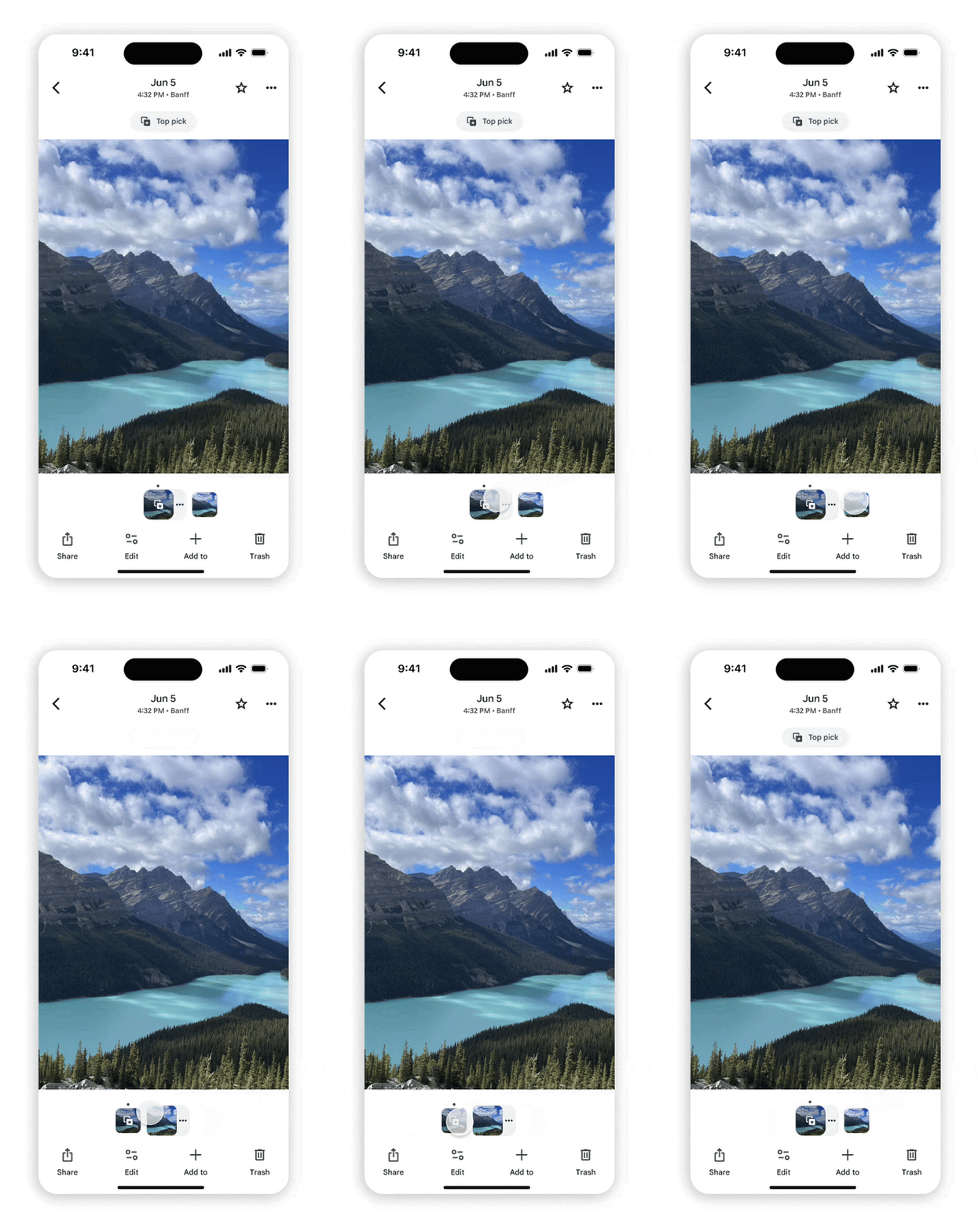
You’ll also see badges in the redesigned photo view. Tapping it will allow you to change a picture’s category, play or pause a Motion photo, save a shared image to your library, or back it up to the cloud.
Android users will have to wait for this change
The redesigned Photo view in Google Photos is currently rolling out for iPhone and iPad. Google says it’s “coming soon” to Android, which can mean anything from a few days to a few weeks. The wait will be worth it, though, as the revamped photo view surfaces key controls and information up front while tucking away the rest for a cleaner, more streamlined experience.










… [Trackback]
[…] Find More Info here on that Topic: geeksforgeeks.org/google-photos-revamped-photo-view-puts-simplicity-first/ […]
… [Trackback]
[…] Here you will find 46072 additional Info on that Topic: geeksforgeeks.org/google-photos-revamped-photo-view-puts-simplicity-first/ […]
… [Trackback]
[…] Read More here on that Topic: geeksforgeeks.org/google-photos-revamped-photo-view-puts-simplicity-first/ […]
… [Trackback]
[…] Read More on that Topic: geeksforgeeks.org/google-photos-revamped-photo-view-puts-simplicity-first/ […]