


Listening to music relieves stress, and I don’t want to mess it up. I told my partner the same thing when she asked, during our initial dating phase, why I was picky about music streaming.
I fiercely defended YouTube Music and told her that she would get better music recommendations than Spotify if she switched. Although I couldn’t make her a convert, she loves YouTube Music more than she ever did.
She loves using YouTube Music, especially on her laptop, after I gave her some tips to run it better on her PC. Of all those, my favorite is the one I learned only a few days ago.
This isn’t a hidden feature built into YouTube Music. Instead, the trick is a web extension that can improve your music listening experience on YouTube Music.
I made YouTube Music a far better player using a free web extension. Here is how I did it.
How I used Velvetone to make YouTube Music a better player
The same YouTube Music I know, but better
Velvetone is a Chrome extension that you can download and install in your web browser. I did it, and my YouTube Music experience is much better now.
After installing YouTube Music on Chrome, I pinned it to the browser toolbar for easy access. Click the Velvetone icon in the toolbar to start customizing how YouTube Music appears in your browser.
It lets you change the accent color and background. You can control brightness, dimming, and blur, though I like how YouTube Music looks by default.
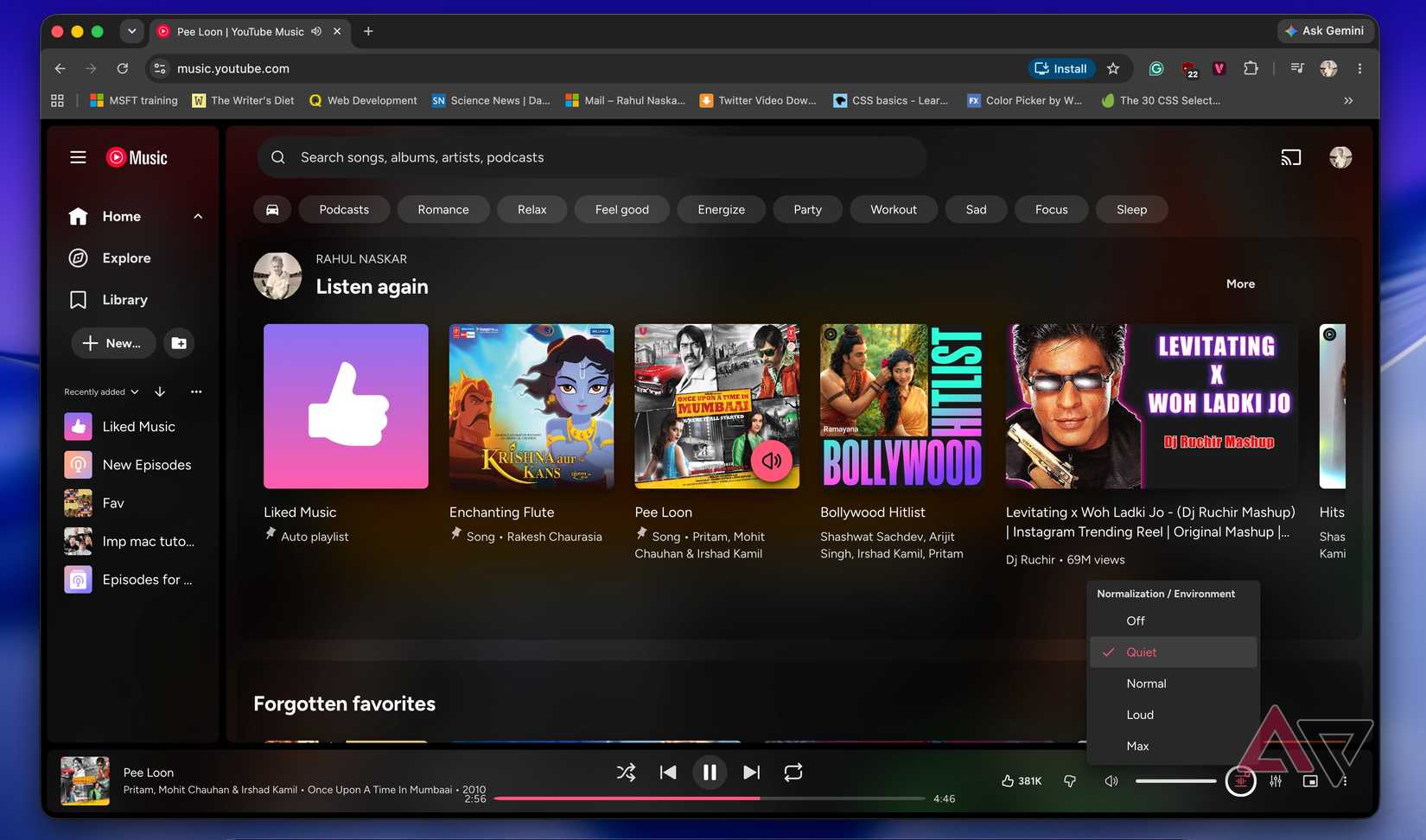
I am more interested in the additional Playback controls that it introduces to YouTube Music. For example, I can control loudness with a single click.
It has four Volume normalization options, including Quiet, Normal, Loud, and Max. This is better than adjusting the volume slider.
Instead of using the volume slider, I set YouTube Music to Quiet mode when I want to lower the volume.
The best part is that the volume slider in the YouTube Music player will not change, no matter which option you choose. But if you need to use the slider, click the speaker icon and use the mouse wheel volume control. No need to drag the slider.
While I love the Volume normalization feature, I don’t use it every day. My favorite feature in this extension is support for Crossfade, which I always envied on my partner’s Spotify.
YouTube Music doesn’t have built-in crossfade capability. This is one of my biggest complaints about the streaming platform, and the extension has finally brought it. Velvetone also lets you control how long the overlap between two songs lasts.
The extension also brings an equalizer to the bottom bar, so you can quickly adjust the sound to suit your listening device and taste. It offers 22 presets to choose from.
Velvetone addresses a huge playlist problem I often face on YouTube Music
Every song matters
Search online complaints about YouTube Music, and you’ll find many users saying the streaming service sometimes queues only a portion of a large playlist.
I faced this issue multiple times, though I have only a handful of large playlists on YouTube Music. However, this doesn’t make the issue any less important to me.
Because Velvetone introduces a true shuffle that applies to the whole playlist and every song gets a chance to play, I’m now less hesitant to make large playlists on YouTube Music.
Velvetone also lets you search inside any playlist on YouTube Music. I also love playlist folders. I can nest folders and drag playlists into them.
These features are natively available on Spotify but not on YouTube Music. Velvetone bridged the gap, but that’s only on the web, not on mobile.
I also use the extension to pin my favorite playlists and folders to the top. In my Library, I can also hide the rows I never use.
The extension also adds more small additions to YouTube Music, though the ones I mentioned above have the most impact.
Velvetone isn’t a holistic solution
While I love the extension, it isn’t a complete solution because Velvetone will enable the missing features in YouTube Music only on the web. The YouTube Music app, which more people use than the web client, still lacks these capabilities.
I don’t agree that all the above features make sense on mobile, but crossfade support, true shuffle, and the ability to search within a playlist are worth adding.
On the web, I don’t want to use a third-party solution forever to use these features on YouTube Music; I want built-in solutions. I’m glad Velvetone has shown Google how to do it.










