


Samsung debuted its Android 16-based One UI 8 operating system with its latest and greatest foldables last month. Although running stable on the Galaxy Z Fold 7 and Z Flip 7, the OS is still in its beta phase on some of the older devices it has rolled out to, and it seems to be causing some issues.
For reference, Samsung began rolling out the One UI 8 Beta 4 to the Galaxy S25 series roughly two weeks ago. Since then, avid beta testers have found that the OS introduces a peculiar camera bug that only affects a very specific type of shot.
Samsung’s software optimizations often result in images that are on the brighter side, potentially even overexposed, but what S25 Ultra users taking moon shots are reporting right now isn’t just simple overexposure, it’s a bizarre purple tint that points to a more complex image processing issue.
Reported by several users on Samsung’s own community forum, images of the moon taken with an S25 Ultra running the One UI 8 Beta 4 update are turning out purple. The bug doesn’t seem to affect the S25 and S25+.
Samsung wants your reports
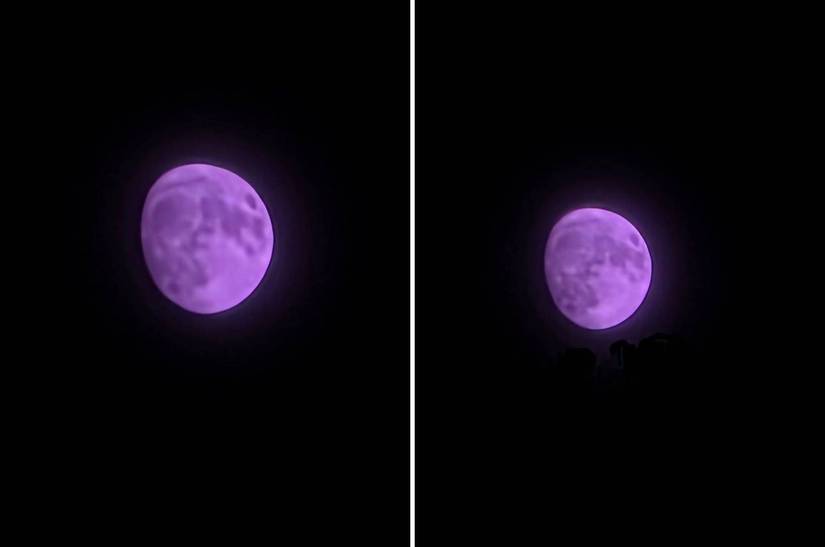
As pointed out by GizmoChina, the issue persists regardless of the zoom level used to shoot the image. Said images appear as intended on the camera screen and in the preview after the shot, but laden with a purple tint in the gallery, suggesting that the main issue lies in Samsung’s post-processing.
Even though the issue doesn’t seem to be affecting every single S25 Ultra running One UI 8, it is affecting a wide enough userbase for this to be high on Samsung’s priority list for its next beta build. Samsung knows about the issue, and a community moderator is currently asking affected users to report the issues through the Samsung Members app. If you’re affected,
- Open Samsung Members.
- Navigate to One UI Beta Program > Beta Feedback.
- Attach any relevant screenshots or screen recording/video (if possible).
- Ensure “Send system log data” is checked, then submit the report.
Are you running One UI 8 Beta 4 on your Galaxy S25 Ultra? Share your moon shots in the comments below!










… [Trackback]
[…] Info on that Topic: geeksforgeeks.org/samsung-s-latest-one-ui-8-beta-has-a-strange-camera-bug-affecting-moon-photos/ […]
… [Trackback]
[…] There you can find 56190 additional Information to that Topic: geeksforgeeks.org/samsung-s-latest-one-ui-8-beta-has-a-strange-camera-bug-affecting-moon-photos/ […]
… [Trackback]
[…] There you will find 15422 more Information to that Topic: geeksforgeeks.org/samsung-s-latest-one-ui-8-beta-has-a-strange-camera-bug-affecting-moon-photos/ […]
… [Trackback]
[…] Find More Information here on that Topic: geeksforgeeks.org/samsung-s-latest-one-ui-8-beta-has-a-strange-camera-bug-affecting-moon-photos/ […]