


Back in October, YouTube announced that it would be bringing some big changes to its app by providing a more seamless experience so that users could better enjoy their content. Today, that same philosophy is rolling out to TV’s, giving users a revamped YouTube interface on TVs.
While the YouTube experience on TV wasn’t bad, it was definitely behind some of the changes that were being made on the web and mobile. The new UI rolling out to users was spotted by 9to5Google, and brings a cleaner interface that makes interacting with elements much clearer.
It’s subtle but things look good
Credit: Google
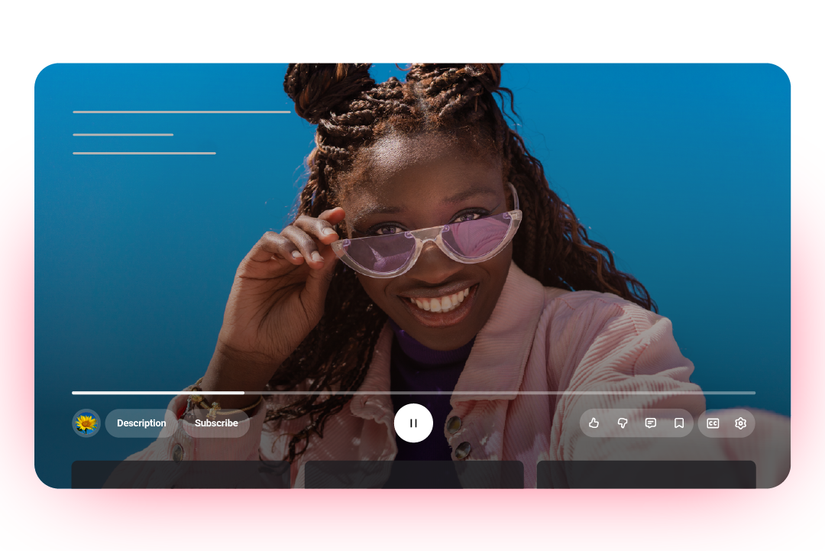
You can see an example of what the new UI looks like in the image above, with the video title being relocated to the upper portion of the screen, separating it from the controls. The main UI elements have also been reorganized as well.
The left section will now house the elements that include the channel name, description, and there will also be a subscribe button. The center will house all the playback controls, like previous, pause, and next. And the right section will handle: likes, dislikes, comments, captions, and settings.
Subscribe and Multiview
The final two changes for YouTube on TV come in the form of the subscribe button, which will now always be visible, according to Google. It also shares that the button will “adapt for pay-gated content and “Notify Me” for upcoming live streams.” Furthermore, live sports content will now get multiview support, and there will also be a “Display Mode” for Premium subscribers.
Not a bad way to end the year
While the changes might be subtle, they will go a long way in making YouTube on TV more enjoyable. We doubt this is going to be the only change coming, since Google manages to deliver small feature updates throughout the year.
We saw YouTube’s UI overhaul come to mobile and web, and it’s now finally hit TVs as well. The brand also added some new ways to watch videos on the platform, with the most notable being a way to upscale 240p videos to 1080p.
Of course, we look forward to seeing what else YouTube has in store. It’s already a fairly complete platform for the most part, but there are always things that can be tweaked in order to improve the experience.
If you haven’t yet, we recommend checking out the UI revamp on TV by downloading the latest update. You can also update YouTube on mobile to enjoy the new look there as well.










