


I love to play video games, but as I’ve gotten older, the chances to play have lessened.
With the advent of full-time work and children, my days of eight-hour gaming sessions have disappeared. Instead, it’s all about grabbing chances to play when I can.
And you’d think that gaming on my smartphone would perfectly fit into that. But it doesn’t.
Between awkward controller cradles and annoying on-screen controls, I’ve never quite zinged with even the best smartphone games.
I don’t like that, and I’m always looking for ways to fix it. So when the Abxylute M4 popped up, I knew I had to try it.
Here’s what I thought, and whether you should buy one too.
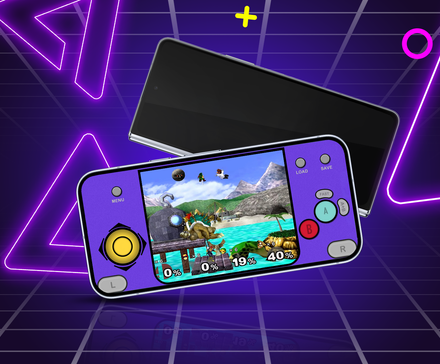
Handheld gaming has become huge in the last few years

I’m pretty old school when it comes to games. I grew up with game consoles and eventually shifted to PC, and I’ve never quite shaken off that influence.
As such, I’ve always struggled to enjoy gaming that isn’t connected to a mains plug somewhere.
That ended with the Nintendo Switch, and there’s been no going back since.
From there, I got a Steam Deck, and eventually picked up a Retroid Pocket 4 Pro, which I’ve been using to burn through my old stack of PS1 and PS2 games.
I’ve become addicted to being able to pick-up-and-play at a moment’s notice, and when I saw the Abxylute M4, I knew I had a real chance to give it a go.
By using magnetic attachment, the M4 sidesteps the awkward cradles I’ve always hated, and the adorable retro looks immediately caught my eye.
So, is it any good?
A sturdy design, with drawbacks

It’s hard to say it doesn’t look good.
It’s small and boxy, and clearly inspired by retro game controllers of the past. The purple colorway is a callback to the Gamecube controller, and it looks great.
It’s small, even narrower than my Pixel 10 Pro, and that does mean the buttons are a little crammed in there.
Still, you get a pair of analog sticks, four face buttons, four shoulder buttons, a D-pad, a plus and minus button, and two utility buttons that help with pairing.
The power button is on the side, and there’s a USB-C port at the bottom for charging.
It comes in two parts, the controller and the magnetic ring.
The ring attaches to the controller with a pair of smaller magnets. The higher magnet is for when you’re gaming, while the lower one tucks everything in to make it easier to transport.

The magnetic ring also has a second ring around it, which can be pushed out to work as a stand, so you don’t need to keep it attached to play games.
This is one of the better ways to use it, as it becomes very top-heavy when your phone is attached to the top of the controller.
Unfortunately, the magnets holding the controller and ring together aren’t anywhere near strong enough to defy gravity, so if you turn it upside-down, the magnet ring will come off and take your phone with it.
You’ll need to be aware of that in everyday use, but it’s not a dealbreaker for me — though it does mean you won’t be holding it above your head in bed like you can with a Switch or Steam Deck.
Gaming on the go

The M4 is clearly meant for portable gaming, and the design reflects that. It’s small and portable, and it’s ready to go in a few seconds.
But that focus on convenience does come with some downsides.
I can’t see myself having long gaming sessions with the M4.
It’s too small for good ergonomics, and my regular-sized hands were often curled into claws to use it properly.
I booted up the Netflix versions of Red Dead Redemption and Dead Cells, and while the M4 works well with automatically assigned controls, the button setup is not great for modern games.
The two analog sticks at the top of the controller are a little awkward to reach, and using the shoulder buttons is difficult when you don’t have good ergonomics to brace against.
You might get used to it with time, but I never quite got the hang of it.

However, it works very well for retro-style games that use the D-pad and face buttons.
Playing a Pokémon game on an emulator? The M4 is perfect. The Android port of Chrono Trigger? Great. Stardew Valley? It’s like it was made for it.
There’s still the fact that it’s too small for long use, but the M4 absolutely shines when you play something a bit slower paced that doesn’t use more modern controls.
A specialized gamepad that’s not for everyone

The Abxylute M4 is a good little gamepad. It’s small enough to fit in a pocket or bag, sets up in a few moments, and works well with a wide range of games.
But those points in its favor mean it won’t be a perfect fit for everyone.
It is too small for long periods of gaming, and the cramped button setup means more modern games that rely on analog sticks and shoulder buttons will struggle.
For certain games and gamers though? The M4 is great.
It’s excellent for playing slower games like Stardew Valley, and the rapid setup means I could conceivably whip it out on the bus and be gaming in a few moments.
Will it be part of my everyday carry? No, it won’t be. Will I chuck it in a bag when I go out for the day? Yeah, that’s an easy decision to make.
I’d forgotten how much I love Stardew Valley, and with the M4, I can potter around my farm any time I get the chance.
At just $49, the Abxylute M4 is well priced for what it is, and despite a few drawbacks, it’s worth buying if you’re the sort of person who likes to dive into Stardew Valley or an older Final Fantasy while waiting for an appointment, or commuting on the train.
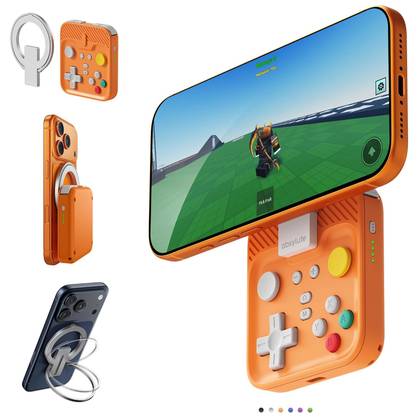
Abxylute M4
The Abxylute M4 is a magnetic game controller that clips onto the back of your Qi2-compatible phone. Small but sturdy, it’s the perfect complement for on-the-go gaming.










