


We’ve all been there. When starting a new project, be it a personal hobby project or something related to work, you’ve got a burst of inspiration in the beginning.
Predictably, if you’re anything like me, you’ll end up with a few dozen note files and folders, a bunch of bookmarked pages, and a Google Drive folder full of inspiration.
That chaotic approach towards completing a project has probably been instrumental in making me drop half of the ideas I’ve come up with.
There’s only that much time that I have and most of that time is spent on catching up with these notes instead of working on the project itself.
The transition from the brainstorming phase to the actual execution was where my projects went to die. The friction was just too much.
However, I’ve recently stumbled upon a workflow using NotebookLM that changed how I view the brainstorming stage of creativity.
It’s not just about summarizing my notes, which pretty much any AI tool can do.
Instead, I’m using NotebookLM to bridge the gap between a brain dump and a proper project structure. Surprisingly, it’s rather excellent at it.

Solving the problem of unstructured data
Replacing fragmented tools with NotebookLM
As I described above, the biggest hurdle with any new project is the sheer volume of unstructured data we generate.
In my case, that tends to be a mix of voice memos, article snippets, bullet lists from notes apps, bookmarks, and YouTube videos.
Traditionally, I would have spent hours manually sifting through these disparate elements and sorting them out into segment or section-wise notes that made more sense for my project.
With NotebookLM, I’ve found a way to jump past that step.
The hack isn’t necessarily in individual features of the app, but more about how you use a NotebookLM notebook as a project dump.
Basically, I’ve stopped using different tools and my entire brain dump happens directly in NotebookLM.
By uploading every single scrap of information related to the project, I’ve created a closed loop system.
NotebookLM by function defaults to the information sources you feed into it, which means this project dump is geared specifically to the project I’m working on.
That’s a massive departure from working with something Gemini or ChatGPT that would poison my curated data by integrating information from the internet.
Can it be useful? Yes. However, the likelihood of it hallucinating or pulling irrelevant data is just too high for me to trust it.
Using NotebookLM as a data-driven co-worker
Turn your notes into a usable project framework
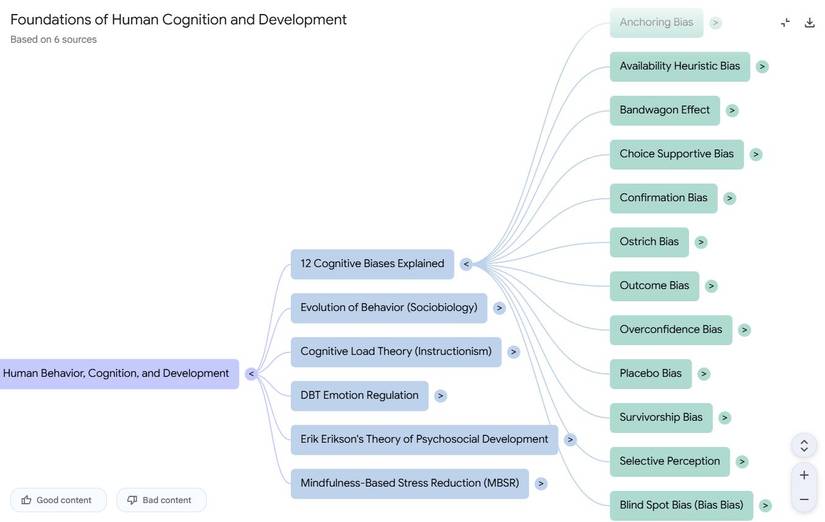
The first step in the workflow is the curation phase, where I gather every note, PDF, voice note transcription and dump it into my NotebookLM project.
After these are uploaded as sources, the notebook transforms into a searchable, interactive database trained on my notes.
The real magic begins when you move on from the info dump into the working phase.
You can start by asking the AI to summarize your notes and find contradictions in it.
You can ask questions, even non-data-driven questions, like if you’re being optimistic about a certain timeline, or estimating the time it would take to accomplish a project.
You can also ask it to assist with connecting different elements of a project too.
I effectively use it like a co-worker for auditing my work, and it helps me clean up my logic before I start work.
Because NotebookLM is grounded strictly in the sources you provide, you avoid some of the pitfalls of general AI.
Specifically, other AI tools tend to be overtly positive and optimistic. That’s not the case here.
NotebookLM takes a more data-driven approach to help you achieve timelines. More specifically, your own data.
For example, if I ask NotebookLM to help me draft a project timeline based on my notes, it’s not pulling a generic template from the web.
Instead, it looks at the constraints defined in my project.
Be it procurement or the time needed to analyze data, and it uses that to give me a realistic roadmap that is close to what I’d come up with, except, usually, it is even better organized.
This makes NotebookLM a fantastic tool for builders and productivity enthusiasts.
Similarly, I use NotebookLM to help me generate the bones of a project.
This outline could include anything from a TOC to FAQ or essential information that I would want to include before handing over the project to a client.
Why using NotebookLM beats traditional project management
At the end of the day, NotebookLM is just a tool and a tool that is only as good as you use it and the information you provide it.
NotebookLM, in particular, requires a fair amount of heavy lifting and organization before it becomes useful. But that’s precisely why I like it, because it removes any scope of misinformation.
All it does is act as a productivity multiplier by acting on my own work and giving it just enough organization and polish.
It helps you save hours by eliminating the noise from your data and getting to the crux of the matter, making it a grounded, practical way to use modern tools to solve the ever-present problem of actually getting started.











