


The Google Pixel Watch 4 is the best smartwatch from Google yet. It’s available in two cases sizes, in different colors, and is one of the most comfortable wearables you can get.
The question is, if you don’t own a Google Pixel phone, is it still a good idea to get a Pixel Watch 4?
After all, if you don’t own a Samsung phone, you will miss out on a few features if you buy a Galaxy Watch 8.
I’ve been using the Pixel Watch 4 with a non-Pixel phone to find out if you have anything to worry about.
What about setting it up?
A simple process

To really put the Pixel Watch 4 to the test, I’ve paired it with the Asus Zenfone 10, a phone released in 2023 and only able to be updated to Android 15.
The Pixel Watch 4 requires the Google Watch app and Fitbit to fully operate, and both installed without any problem.
I transferred the Pixel Watch 4 over from another device, which took just seconds, and after changing a few settings, the smartwatch was ready and working.
The speed and simplicity of connection is a credit to Google, and its work on making Wear OS more user-friendly.
It never used to be anywhere near as quick and easy to link a smartwatch.
The onscreen prompts and fast-pairing tool guides you through the process, so you don’t have to be an expert to set the smartwatch up.
Since first reviewing the Pixel Watch 4, I’ve used it with Pixel phones, Samsung phones, and other models. It has never been a problem to pair, and I’ve not noticed any ongoing issues with connection.
At this stage, it doesn’t matter what phone you use with the Pixel Watch 4, the experience is equally flawless.
Using it every day
Any differences to know?

The Pixel Watch 4 has been a faithful partner since pairing it with the Zenfone 10.
It’s operated using the touchscreen, the rotating crown, and a single button on the side of the case.
Swipe across the screen to see different Tiles, up to see notifications, and down to see Quick Settings. The rotating crown can also reveal notifications and the settings screen.
Press the crown to see your apps, or press the button above it to open Fitbit’s workouts. Long-press the button to open Gemini, and double-tap the crown to open Google Wallet.
It’s all very straightforward, but unfortunately the button cannot be reconfigured for other features.
Google Play is onboard and apps have installed without issue, and calls have shown up on the smartwatch and can be answered.
Notifications are reliable, and you can reply to messages, Gmail emails, and WhatsApp messages from the smartwatch.
I’ve come to the Pixel Watch 4 directly from the Samsung Galaxy Watch 8 Classic, and although the Pixel Watch 4 feels less feature-packed, it does have a more streamlined, simpler user experience.
Samsung packs in a lot of health features with dubious benefits, and the Pixel Watch 4 isn’t worse by not including them.
Health features and Fitbit
Everything you need

The Pixel Watch 4 uses Fitbit for all health and fitness features, and everything appears to work as normal, even without a Pixel phone.
You can take an electrocardiogram (ECG) on your wrist, check your sleep stats if you wore the smartwatch overnight, and start a multitude of different workouts.

Open the Fitbit app on the Pixel Watch 4 and you can check activity, steps, and Cardio Load, plus also see data on body temperature and blood oxygen, along with body response to stress levels.
The Fitbit app on your phone doesn’t appear to have missing features, and if you subscribe to Fitbit Premium, you’ll find more in-depth data points and various workout plans unavailable without a subscription.
Any other differences to know?
Nothing major is missing

There are a few small feature differences when you use a Pixel Watch 4 with a non-Pixel smartphone, but none dramatically change the way you’ll use the smartwatch.
The Camera app, where you can use the smartwatch as a remote viewfinder and shutter release for the camera on your phone, only works with Pixel devices.
Open the app on your smartwatch when it’s connected to a different phone, and you’ll get a message stating it won’t work, after which the app will disappear completely.
In the Watch app, the setting to enable Watch Unlock mode, where your phone uses the smartwatch connection to stay unlocked, is not available when it’s connected to a non-Pixel phone.
The Call Screen feature requires a Pixel phone to work, and is also only available in some countries.

There has been some confusion about syncing Do Not Disturb and Bedtime modes between the smartwatch and a non-Pixel phone.
The feature is available in the Watch app, under the Watch Preferences and Modes options.
It seems like this feature has been a Pixel-exclusive in the past, but more recent software updates appear to have changed this.
That said, timers started on the Zenfone 10, regardless of whether I use the Asus or Google clock app, do not sync across.
Some online reports and comments suggest the Pixel Watch 4 may not allow remote operation of some Google Nest products when not connected to a Pixel phone.
Is it worth buying without a Pixel phone?

I’ve lived with the Pixel Watch 4 connected to the Zenfone 10 for a week, and can happily say it’s a highly recommended purchase even if you don’t own a Pixel phone.
It’s also the better smartwatch buy compared to the Galaxy Watch 8 if you don’t own a Samsung phone, from having all the major health features available (if you pay for Fitbit Premium), to Google Wallet as the default contactless payment method.
Choosing the Pixel Watch 4, even when you don’t own a Pixel phone, ensures you are not missing out on any major features, just because of your choice of phone.
The Galaxy Watch 8 requires a little more thought about your requirements prior to purchase, but the Pixel Watch 4 is a much safer buy.
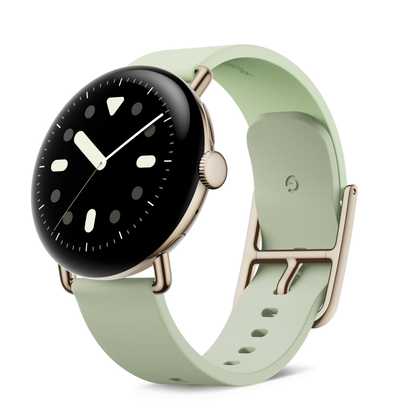
Google Pixel Watch 4

- Case size
-
41mm / 45mm
- Case Material
-
Aluminum
- Display
-
AMOLED
- CPU
-
Snapdragon W5 Gen 2
- RAM
-
2GB
- Storage
-
32GB









