


I didn’t set out to use NotebookLM as a DIY or repair tool. It just happened because I got tired of pausing YouTube videos, rewinding the same 10 seconds over and over, and trying to remember which step applied to my situation.
Most repair guides assume you’re following a single source, start to finish. But when I’m trying to fix something, I usually have a manual open, a Reddit thread bookmarked, and a few forum posts.
NotebookLM turned that mess into something I could work with. Instead of hunting for answers, I started dumping manuals, guides, and notes into one place and asking the relevant questions.
From fixing everyday household annoyances to figuring out whether a repair was worth attempting at all, here’s how NotebookLM saved me time, money, and a lot of frustration.

My setup: Turning my notebook into a repair library
Before I start troubleshooting now, I’ve developed a small ritual.
I gather the official user or service manual first, then add the purchase invoice or product page, so the exact model details are easy to reference.
After that, I drop in a couple of reliable repair guides, YouTube videos, and Reddit threads that look credible and relevant to my issue.
If I’ve already inspected the appliance or gadget, I’ll add my own notes or photos as well, so I have everything in one place.
My refrigerator was the first appliance where this approach really clicked.
A few weeks ago, I noticed that the cooling felt uneven. It wasn’t a complete failure, just enough inconsistency to make me suspicious that something needed attention.
That’s usually the point where I would start Googling symptoms and opening dozens of tabs.
Instead, I created a dedicated notebook for the refrigerator and began collecting sources as if I were building a reference folder.
Whenever I found that the information I had was insufficient or contradictory, I used the Search the web option in the left panel of NotebookLM to pull in additional sources directly into the notebook.
It lets me add new articles or troubleshooting pages without leaving the workspace or starting my research from scratch.
That preparation changed how I approached the repair itself, and it made the next step feel manageable.
Fixing appliances without guesswork
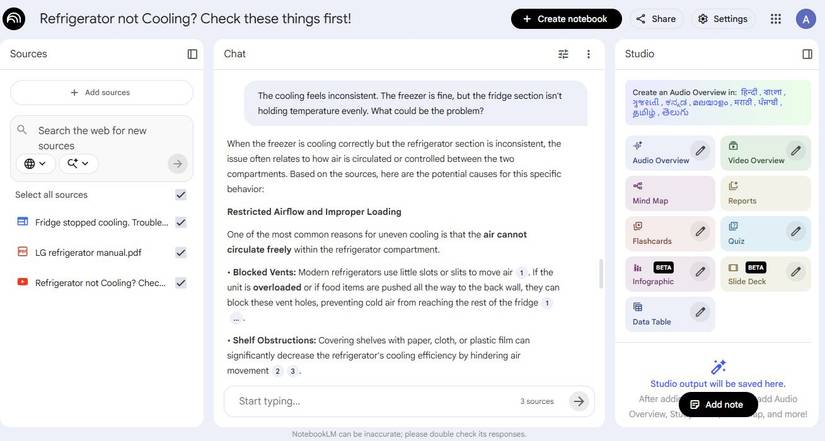
After my repair notebook started filling up with sources, I started using it for troubleshooting.
The real test came when my refrigerator started behaving strangely. Instead of falling into the usual spiral of random Google searches, I opened my notebook and typed this prompt:
The freezer is fine, but the fridge section isn’t holding temperature evenly. What could be the problem?
Because NotebookLM was already referencing the sources I had saved earlier, it didn’t give me generic advice.
It analyzed those materials and generated a list of possible causes. It flagged common issues, like blocked vents, shelf obstructions, and worn door gaskets.
I started ruling out the simpler possibilities first. The vents were clear, the shelves weren’t blocking airflow, and the door seal looked intact.
When I checked the condenser coils at the back, however, they were coated in dust.
After cleaning them thoroughly, I placed a thermometer inside the fridge compartment to track temperature changes.
Within about half an hour, I could see the cooling stabilizing and returning to normal levels.
That said, NotebookLM still has limitations. While it summarizes and connects information extremely well, it doesn’t always display or directly cite diagrams from sources.
If I want to reference component layouts or part placements, I still need to open the source manually.
For hands-on repairs, visual guidance can sometimes be just as crucial as written instructions.
Still, having a centralized troubleshooting assistant dramatically reduced the stress and uncertainty that usually comes with appliance issues, and it made minor repairs feel far more approachable.
Using it as a second pair of eyes

Credit: Lucas Gouveia / Android Police | VectorMine / Shutterstock
One of the most practical ways I’ve started using is for double-checking my thinking.
When you’re troubleshooting appliances or working through repair steps, it’s surprisingly easy to overlook minor details or jump to the wrong conclusion.
It also helps me slow down when I’m about to overcorrect. Repair guides often list multiple fixes, and it’s tempting to try them all quickly.
NotebookLM can help me sequence troubleshooting steps and explain which symptoms connect to which components.
Another advantage is how it connects details across sources.
A Reddit thread might mention a symptom casually, while a service manual explains its underlying mechanism.
NotebookLM often bridges those pieces together, helping me understand why a fix works.
Still, I treat it as guidance rather than authority. Repairs, especially anything involving electrical systems or refrigerants, carry risks.
But as a way to cross-check my observations and keep me from missing obvious possibilities, NotebookLM has become one of the most helpful tools in my repair workflow.
Everyday problems you can use this for (before calling a technician)
Credit: Lucas Gouveia / Android Police | Digital Genetics / Shutterstock
The refrigerator issue is what convinced me to try NotebookLM for repairs, but it’s far from the only situation where it’s useful.
After I realized how well it connects documentation and real-world advice, I started using it for all sorts of small household and gadget problems that are often simple enough to fix yourself if you have reliable guidance.
Take something like a wobbly ceiling or pedestal fan. Instead of guessing whether the issue is loose screws, worn bearings, or blade imbalance, I can upload the fan manual, a couple of repair discussions, and a teardown video.
Then I can ask what typically causes vibration in that specific model or style of fan.
It helps narrow down the likely causes before I even reach for a screwdriver.
It’s equally handy for gadgets that suddenly stop behaving correctly.
Maybe a router keeps dropping connection, a smart device refuses to pair, or a kitchen appliance starts displaying unfamiliar error codes.
Instead of scanning multiple support pages that often contradict each other, I can build a small notebook with official documentation, manufacturer FAQs, and trustworthy community posts.
That makes troubleshooting feel structured instead of overwhelming.
There’s also a financial benefit I didn’t expect. I’m far less likely to call a technician as the first step now.
NotebookLM helps me troubleshoot safely and rule out simple issues first, such as cleaning clogged components, checking settings, or spotting maintenance problems that are easy to fix at home.
If the issue does turn out to be serious, I’m at least better informed before getting professional help.

Repairs feel less intimidating now
Using NotebookLM as a repair and troubleshooting companion changed how I approach problems.
Instead of jumping straight to panic searches, conflicting advice, or expensive service calls, I now start by building a repair library.
Having manuals, repair guides, forum discussions, and my own notes sitting in one searchable space makes troubleshooting feel more straightforward.










