


My notes app is essentially a dumping ground for everything from ideas to bookmarks, half-written thoughts, links, and random reminders for things to do.
I’ve tried pretty much every note-taking app on the market, and there hasn’t been a fundamental transformation of what the app is supposed to do in a very long time.
These notes pile up over time and are often buried under other notes, lost to time and action. I’ve tried fixing that by switching apps.
Google Keep is a solid choice. It’s quick. But it doesn’t really offer much more than basic note-taking.
Then there’s Notion. Notion is powerful but surprisingly heavy for a note-taking app.
Obsidian is another popular choice. But having gone down that rabbit hole, Obsidian is an option only if you have enough time to maintain the installation.
But app-specific issues aside, there’s a bigger problem at hand. No matter the tool, the problem of capturing a lot but not being able to connect the dots remains.
That’s where NotebookLM steps in.
NotebookLM changed note-taking for me, and not because it’s a better place to store notes. Honestly, it’s not.
It’s not a note-taking app at all. It’s a thinking tool, and it helped me move from collecting information to actually working with it.
Between how it pulls in sources, handles mind maps, and links ideas, NotebookLM encourages you to think of the broader picture instead of treating notes as isolated entries.
After you get used to incredibly smart notes like that, it’s hard to go back.

Capturing notes is easy; making sense of them is not
Turning saved information into connected ideas
Most notes apps are built to make it incredibly quick to capture information. Write something down quickly so you don’t forget it. That’s useful, but it’s also a solved problem.
The real value comes from what you can do with that information. When you need to make sense of what you saved. That’s precisely where traditional notes apps fall apart.
Take Google Keep, for example. You can scroll, search, and hope you are searching for the right keyword to find what you noted down.
Notion will let you build a database with some filtering, but that’s the end of it. Moreover, as I mentioned earlier, nobody wants to build a project management system to handle basic notes.
NotebookLM changes that up. Instead of blank pages of notes, it gives you a spot to enter sources.
Contrary to what you might be thinking, these sources don’t need to be research documents.
I’ve created notebooks based on activities and tasks. From there, I just add material to it. This can be articles, links, PDFs, research, or even a copy-pasted version of a long email.
All of these sources become the foundation of the notebook. Everything else just builds on top of it.
Unlike conventional notes apps, NotebookLM encourages you to explore relationships between your uploaded sources.
Since these sources are your own personal notes, you basically have a full-fledged AI model helping you make sense of your notes.
You can ask it questions, generate summaries from multiple documents, and crucially, you can create mind map-like structures that visually show you how ideas connect.
And that’s a transformative tool when it comes to making sense of notes.
Instead of writing down individual notes in a notes app, I now build clusters of ideas. Each note links to another in a way that makes the most logical sense.
This is particularly useful if a lot of your note-taking is heavy research work.
If you’re taking notes for an article, generally exploring new topics, or collecting information for your own curiosity, you no longer need to do the heavy lifting of interconnecting your sources. NotebookLM does that for you.
See your ideas take shape with mind maps
Learning and writing without losing context
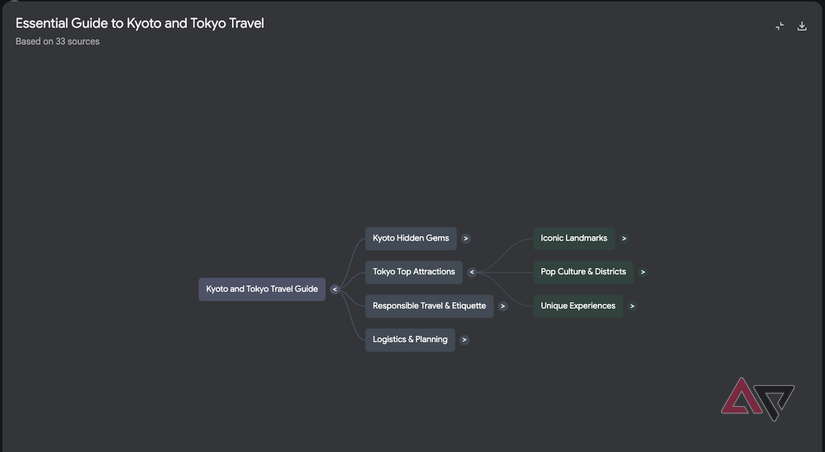
NotebookLM’s mind map views are particularly useful for personal or professional research. Instead of scrolling through texts, it gives you a broad look at an idea and how it’s shaping up.
Moreover, it also shows how your other notes connect back to it. This has been especially useful for writing.
When I’m working on an article, I can map out sections as nodes. Each node links back to research, quotes, or earlier thoughts.
If I need to rearrange the structure, I can use these mind maps to learn better.
Similarly, these mind maps are excellent for learning from my notes. I can add multiple perspectives to my notebook. Sometimes I’ll even add PDFs or books to the mix because why not?
NotebookLM then builds the interconnections between these to help me learn from the information.
NotebookLM also reduces duplication. In my old system, I’d often repeat information from different contexts. NotebookLM helps me avoid that.
And despite all that functionality, the app is simple to get started with and use. That’s a big plus point in my books.
When context matters more than capturing links
Perhaps the biggest reason I’ve switched to NotebookLM for note-taking, or at least note-taking of a specific kind, is because I’ve started trusting it.
I know I’ll be able to come back to it weeks later and understand the topic as I left it. The sources and connections are all there, and context doesn’t get lost.
That’s a marked difference over a collection of links without much context in a conventional notes app.
With that said, NotebookLM isn’t the note-taking tool you’d use for making grocery lists. Google Keep works fine for that.
But when you need to take deep, insightful notes, this might be your new best option.







