


I’ve tried many note-taking apps over the last decade. I use Google Keep for quick ideas, Notion for dashboards, and Obsidian for long-form projects.
Still, no matter how polished or powerful those apps felt, they all shared the same limitation: they depended entirely on how much effort I put in.
Note-taking isn’t the hard part; processing the notes is. That’s why pairing NotebookLM with YouTube made things way easier.
Instead of taking notes while watching videos and manually trying to summarize or connect ideas, NotebookLM took on all the work I normally procrastinate.
Here’s how it helped me learn faster.

YouTube videos finally slowed down enough for me to learn from them
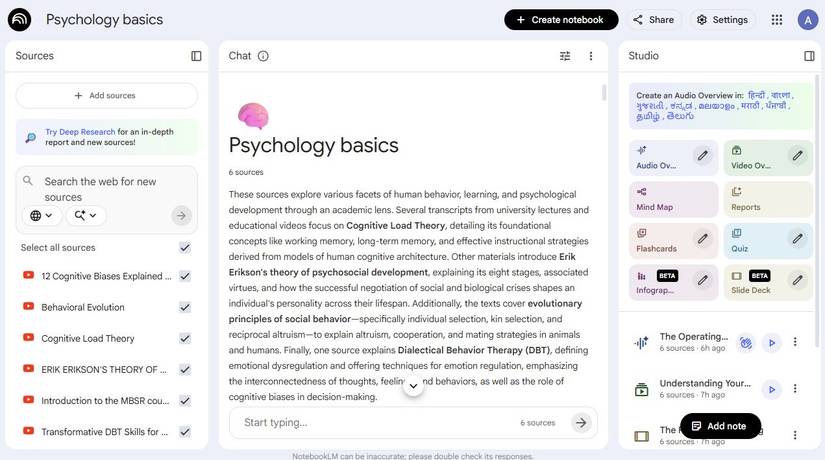
YouTube has been my go-to app for learning anything visual, whether it’s fixing something at home, understanding a new software tool, or studying a complex concept.
However, I had trouble catching up because of the pace of the content. Creators move fast, skip steps, or assume viewers can follow along in real time.
Although I could rewind or slow the playback speed, it would break the flow.
Pairing YouTube with NotebookLM finally changed everything. Instead of struggling to keep up with the video, I add the link to a notebook and let NotebookLM turn the creator’s rapid-fire explanations into something I can digest.
If a section moves too quickly, I ask NotebookLM to expand that part. If I missed a foundational idea earlier in the video, I can connect the dots.
Turning multiple videos into one cohesive lesson
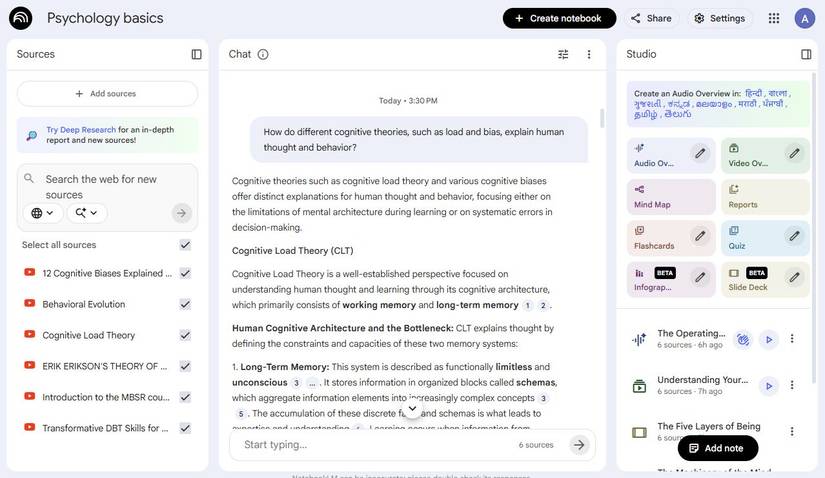
Learning from YouTube used to feel like I was jumping from one topic to another without retaining most of the information.
NotebookLM finally gave me a way to stitch all those lessons into something that made sense.
When I wanted to learn the fundamentals of psychology, I fed NotebookLM a batch of videos on cognitive biases, attachment styles, reinforcement theories, habit loops, and emotional regulation.
It helped me link ideas across creators automatically. For instance, how confirmation bias ties into anxious attachment, or how reinforcement theory can replace unhealthy coping habits.
It formed a kind of “master lesson,” pulling patterns out of hours of content in a way that made everything feel more linear.
The best part is that it breaks down themes, highlights contradictions between creators, and shows how each piece of information relates to the others.
Now, I have a single, organized explanation that ties everything together.
Use the YouTube to NotebookLM Chrome extension to speed up your workflow
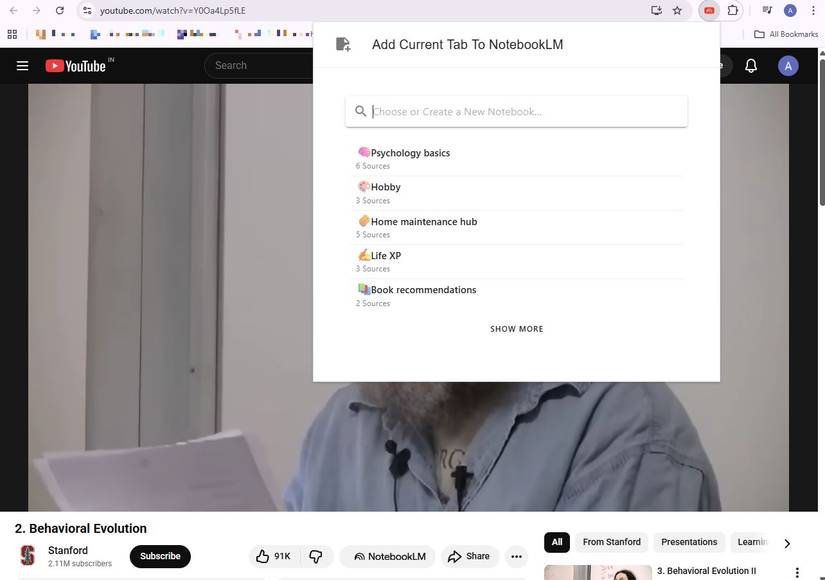
One of the most powerful upgrades to the NotebookLM + YouTube workflow is the YouTube to NotebookLM Chrome extension.
Instead of copying URLs manually or juggling tabs, the extension lets you send any YouTube video or playlist directly into a NotebookLM notebook with a single click.
When I’m watching a playlist on personal finance or psychology, I’ll use the extension to add videos to NotebookLM.
Build a mind map that keeps everything connected
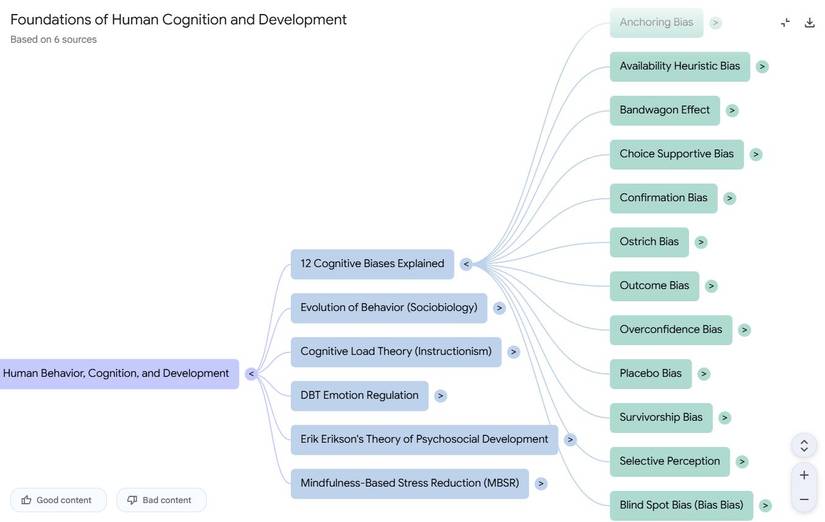
One of the most unexpectedly powerful results of pairing NotebookLM with YouTube is how easily it can turn video insights into a visual map of connected ideas.
Mind maps help when you’re learning complex topics that branch into multiple subtopics.
Instead of trying to draw connections between the videos you watched, the Mind Map lays everything out, with the core topic at the center, major concepts branching outward, and supporting details sitting neatly underneath each section.
What makes this so helpful is that NotebookLM builds its maps based entirely on the material you feed it.
If one video explains cognitive biases using real-world examples while another dives into the science behind them, the mind map will show you how those ideas interact.
If you’re learning personal finance, you’ll see how budgeting leads to cash flow, which leads to emergency funds, which then connects to insurance or investments.
I also liked using the mind map as a quick refresher. Before watching my next YouTube video on a topic, I’d skim the map and instantly recall where I left off.
Using Audio Overviews to reinforce what you watch
Credit: Lucas Gouveia / Android Police
One of the most underrated parts of NotebookLM is how well the Audio Overview works when you’re learning from YouTube videos.
It condenses the material into a digestible, podcast-like summary. It’s perfect for reinforcing concepts without having to rewatch an hour-long video.
Sometimes I’ll listen to the overview while commuting, cooking, or walking. If I hear something I want to revisit, the interactive transcript lets me jump right to that moment.
It’s like having the YouTube video in audiobook form.
Tips for getting more out of NotebookLM and YouTube
Credit: Lucas Gouveia / Android Police | saginbay / Shutterstock
I learned pretty quickly that the quality of the outcome depends heavily on how you set things up.
Before adding anything, I now skim a channel’s playlist, choose only the videos that build on one another, and add them to a fresh notebook rather than mixing them with older notes.
It forces NotebookLM to stay focused.
I also realized that better prompts make a huge difference.
Instead of writing, “Explain this video,” I’ll ask NotebookLM to teach the topic to a beginner or list what I should understand before moving to another video.
When I want tighter reinforcement, I ask it to generate short quizzes or scenario-based questions based on the imported clips.
The fastest way I’ve learned from YouTube so far
Over the course of using NotebookLM and YouTube side by side, I realized how well they work together.
I finally had a system that slowed down fast-paced content and turned multiple creators’ explanations into a cohesive lesson.
It also lets me explore topics through mind maps, audio overviews, and summaries.
And because NotebookLM saves all the summaries, mind maps, and Audio Overviews, I can easily revisit lessons instead of forgetting them the moment the video ends.











