Husain Parvez
Updated on: December 29, 2025
Fact-checked by Katarina Glamoslija
Short on time? Here’s the best way to make your VPN undetectable in 2026:
- Choose a quality VPN. I recommend ExpressVPN because it’s the most effective provider in making your VPN undetectable.
- Download and install the VPN. Follow the installation wizard’s instructions (the whole process won’t take more than 2 minutes).
- To avoid detection by websites or apps: Reconnect to a server to change the VPN’s IP address, or use a GPS spoofing tool.
- To stay hidden from your ISP, admin, or government: Enable obfuscation, switch protocols, change ports, or use an encrypted proxy.
- To clear session signals: Delete cookies/app cache, disable Private Relay/Smart DNS, and restart your app or router.
In 2026, sites and networks block VPN IPs and look for tell-tale patterns in your connection and network to help enforce restrictions, prevent abuse, and keep control over who can access their services.
What you do to make your VPN undetectable depends on who you’re trying to hide your VPN traffic from. This is because websites and apps, your internet service provider, and corporate networks all use different methods to detect and block VPN traffic.
There’s a lot of misinformation about making your VPN undetectable online, with a lot of false claims about hiding your VPN 100%. So, I spent a few weeks researching this topic. I read dozens of articles, guides, and VPN support articles, talked to many VPN customer support representatives, relied on my own expertise and experience, and conducted multiple tests.
While no VPN connection is truly invisible, this guide contains useful tips that can help you make your VPN much harder to spot. I also explain why some “tips” aren’t useful and recommend the best VPNs for bypassing VPN detection and VPN blocks — ExpressVPN is my #1 pick. Editor’s Note: ExpressVPN and this site are in the same ownership group.
September 2025 Update: We’ve updated this article detailing new VPN detection methods, reordered the list of the best ways to make your VPN undetectable, and added 3 new FAQ questions.
Editor’s Note: ExpressVPN and this site are in the same ownership group.
9 Best Ways to Make Your VPN Undetectable in 2026
1. Choose a Quality VPN
The easiest way to avoid VPN detectors and VPN blocks is to just use a VPN proven to be undetectable. For that, you need a VPN that does 2 things:
- Refreshes its IP addresses/pools often so sites and apps have a harder time flagging you.
- Obfuscates traffic to look like normal HTTPS, so basic fingerprinting and DPI are less effective.
After running dozens of tests, I found that ExpressVPN is the best option for surfing the web undetected — here’s why:
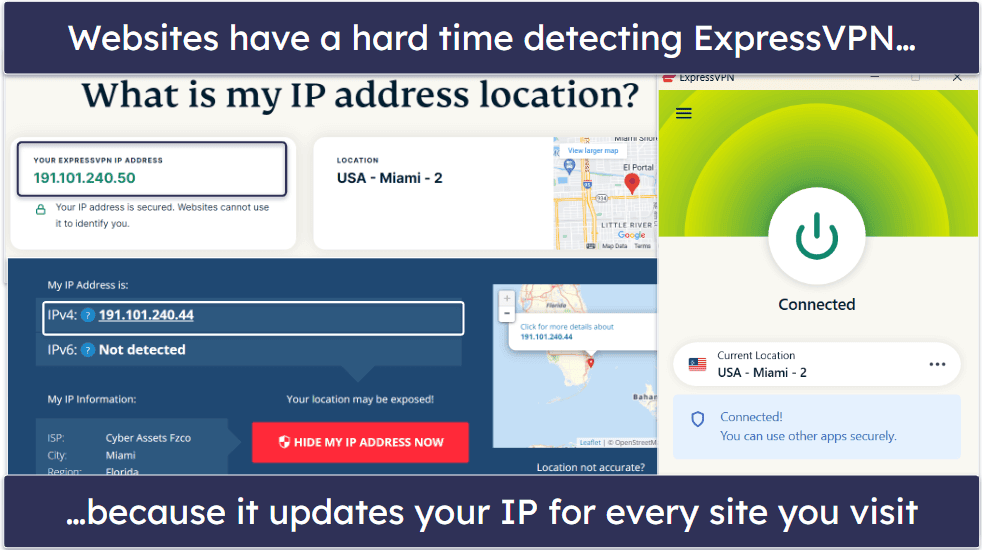
- It constantly refreshes its server IP addresses. I ran 10+ leak tests while connected to its New York server, and received a new IP each time, which noticeably reduced repeat blocks (including with major streaming platforms).
- It supports obfuscation on all servers. Obfuscation is a feature that makes your VPN traffic resemble normal internet traffic. This makes it very hard for your ISP, and by extension, governments in restrictive countries like China, to see that you’re using a VPN and block access to the open internet. On picky networks, it also supports OpenVPN over TCP 443, which helps it blend with normal HTTPS.

- It has ShuffleIP. This is a security feature that makes sure you use a different IP address every time you connect to a new website. It’s harder for sites to block your VPN connection, making simple IP blacklists and CAPTCHA storms less likely.
- It supports Tor over VPN connections. This makes your VPN’s IP address even harder to detect.
- It provides full leak protection. ExpressVPN has built-in protections against WebRTC, DNS, and IPv6 leaks, so your VPN traffic won’t be accidentally exposed to websites and apps you visit.
Quick summary of the best VPNs for avoiding VPN blockers in 2026:



2. Use Obfuscation Features
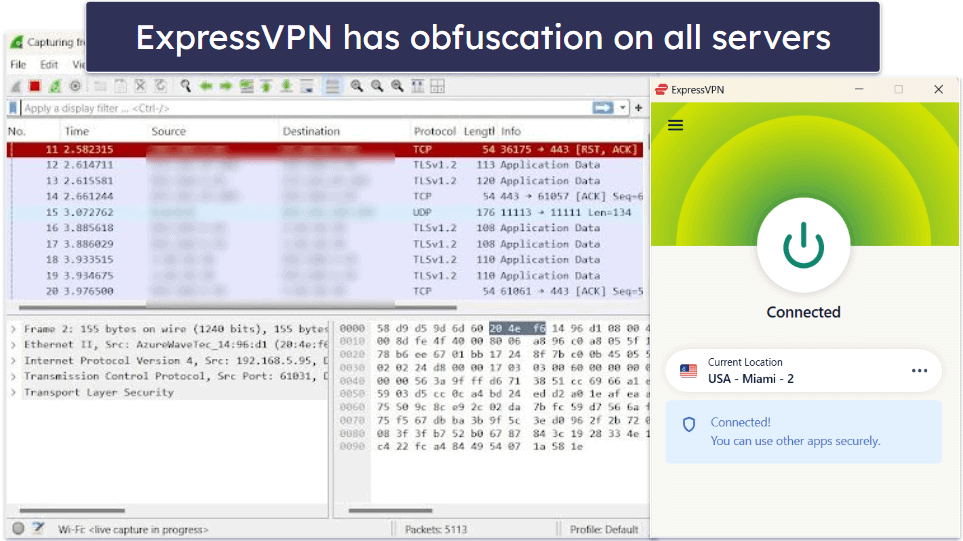
The goal of obfuscation is simple: make your VPN traffic look like ordinary HTTPS so it doesn’t stand out. When obfuscation is active, the tell-tale patterns of VPN protocols are hidden, and to anyone inspecting your traffic, be it a network admin, ISP, or government filter, it just appears as normal encrypted web data. This is why obfuscation is one of the most effective ways to bypass DPI detection and VPN blocks.
VPNs usually support obfuscation via the OpenVPN protocol, while some have proprietary protocols that come with obfuscation. Most providers have a built-in obfuscation feature — once you enable it, it will obfuscate VPN traffic via dedicated servers (or even all servers).
ExpressVPN’s obfuscation is among the strongest I tested. It works on every server and is available on all of its protocols, including OpenVPN and its proprietary (and super fast) Lightway protocol. And you don’t need to turn the obfuscation on since it’s always enabled, which is really convenient. Also, ExpressVPN is one of the few top VPNs that can work in restrictive countries like China, and China’s application of DPI is arguably among the most extensive and sophisticated in the world.
The trade-off is that obfuscation can sometimes reduce speeds or cause buffering on video platforms, since disguising traffic adds overhead. It’s best to keep it on when reliability matters most, and switch to faster protocols like WireGuard or Lightway when speed is the priority.
3. Change the VPN Protocol
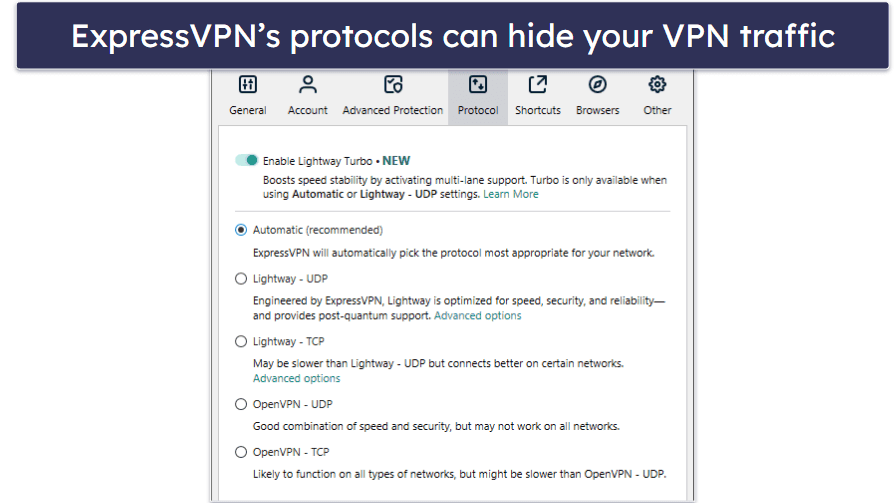
Restrictive countries and network admins can prevent you from using certain VPN protocols by using Deep Packet Inspection (DPI), a method that analyzes your internet traffic to detect and block VPN connections.
Switching your VPN protocol can help you bypass these restrictions and avoid detection. Keep in mind that getting around these restrictions is illegal in some places, so make sure you do your research before doing so in your current location.
If you’re facing DPI blocking, the easiest fix is to use a VPN protocol that hides your VPN traffic. For example, ExpressVPN offers Lightway (its proprietary protocol) and OpenVPN, giving you flexibility between speed and stealth. VyprVPN also has its Chameleon protocol designed for restrictive networks.
4. Change the VPN Port
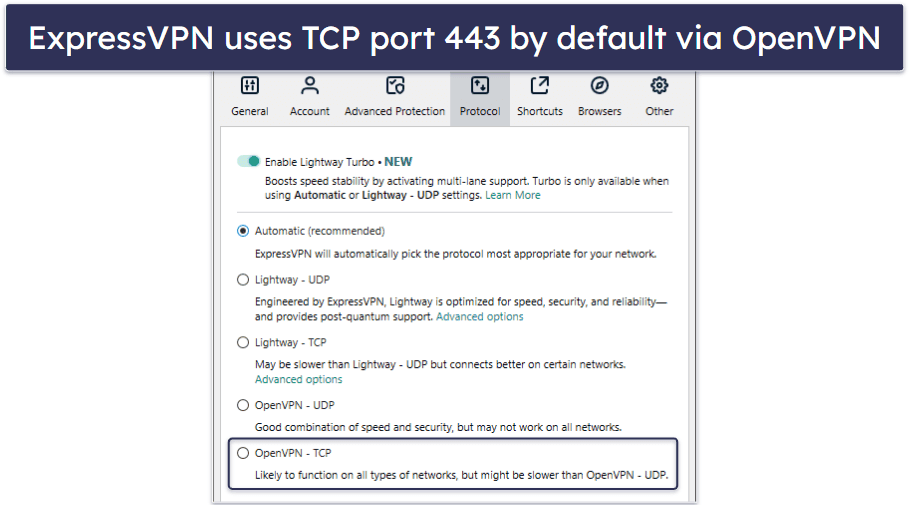
If you’re dealing with port blocking, I suggest switching to TCP port 443, the same port used by HTTPS traffic. Because nearly all web traffic depends on it (Google, Facebook, YouTube, etc.), it’s extremely unlikely that ISPs or admins will block it.
Only some VPN protocols are able to use TCP port 443:
- OpenVPN. This is a very popular and secure protocol. Some VPN providers, like Private Internet Access, allow you to pick TCP port 443 when you select OpenVPN. Others, like ExpressVPN, configure OpenVPN to automatically use TCP port 443, which is very convenient.
- SSTP. This protocol uses TCP port 443 by default, but only a few VPN providers offer access to it.
- SoftEther. Very few VPN services use this protocol because it’s difficult to integrate it into the VPN client.
Additional ports to consider:
- UDP 53. The default DNS port, often overlooked by VPN blockers. Using this port can bypass filters, as blocking it would interfere with DNS resolution across the entire network. Treat this as a fallback option, since DNS tunneling via UDP 53 is often watched closely and can itself raise flags. Treat it as a last-ditch option only if other ports fail, since relying on it may actually make detection more likely on strict networks.
- TCP 80. This port is used for regular HTTP traffic. While less secure than port 443, it’s still a viable option when other ports are being blocked.
5. Change the VPN’s IP Address

If your main goal is to avoid VPN detection and blocks by a site or app, the easiest fix is to refresh the VPN server’s IP address. This also helps if your network admin is blocking a VPN’s IP address (they do this by blacklisting known IPs associated with VPN servers).
The simplest way to refresh your VPN IP is to reconnect to the same VPN server location. This usually gives you a new IP while keeping the same virtual region. You can also just connect to a different server. Before retrying, it helps to clear app or browser data so a new IP isn’t tied to an older session.
ExpressVPN automatically refreshes your IP addresses very often — when I ran tests while connected to the same server, I always got a different IP address. It also has ShuffleIP, which gives you a different IP for each new site you visit. This reduces the chance of simple IP-based blocks and makes it harder for ad trackers to follow your activity. It’s one of the most important features for making a VPN undetectable for Netflix and streaming platforms, for example.
Some VPNs have built-in features that regularly refresh the IP address in the background — for example, Surfshark has IP Rotator, a tool that changes your VPN IP address without disconnecting you from the VPN server. It’s great for general browsing, but I don’t recommend it for streaming.
6. Use a GPS-Spoofing Feature or App
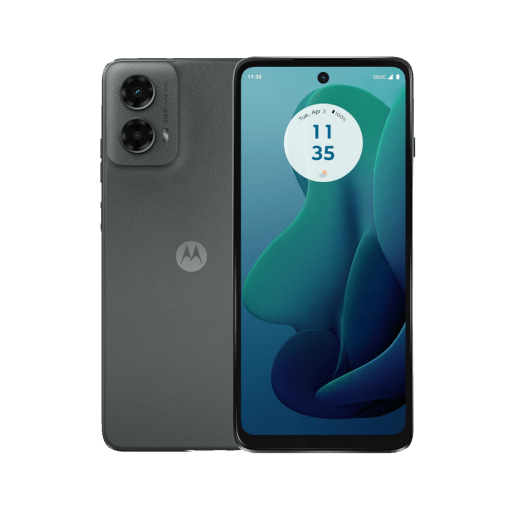
This tip is useful for mobile users, since many apps (especially streaming apps) check your device’s GPS data to confirm location. Even with a VPN active, the app may still see your real location and block your connection.
The solution is to spoof your device’s GPS data and make it match the location of the VPN server you’re connected to. This can be done via GPS-spoofing apps, though it’s much easier to do on Android since such apps are available on the Google Play Store.
If you’re an Android user and would like to spoof your device’s GPS data, I recommend trying Surfshark or Windscribe.
On iOS, it’s much harder. You’d need to jailbreak your device and install apps from unofficial stores (with real malware risks), or use a clunky desktop setup where your iPhone/iPad is tethered to a GPS-spoofing app running on your computer. That’s why, for most iOS users, the better fallback is simply to use the VPN in a browser instead of relying on the app.
7. Use Shadowsocks

Shadowsocks is an open-source encrypted proxy that can help your VPN traffic look less like VPN traffic. Think of it as a transport/obfuscation tool, not a full VPN protocol. It’s most useful when stealth/obfuscation over TCP 443 and protocol switches still fail.
Shadowsocks requires a manual setup, but it’s pretty simple to use. However, you need to use it with a VPN that supports Shadowsocks connections to its servers. The VPN also has to support manual port selection, since you need to pick a server port while setting up Shadowsocks.
I personally recommend using a VPN that has built-in support for Shadowsocks (like Private Internet Access) instead because it’s much more convenient.
In practice, try Shadowsocks only if you’ve already enabled obfuscation and changed protocols but are still hitting detection. It adds another layer of disguise (which is helpful for strict restrictive networks, like government censorship) but is more complex than the other methods here.
8. Use Tor Over VPN
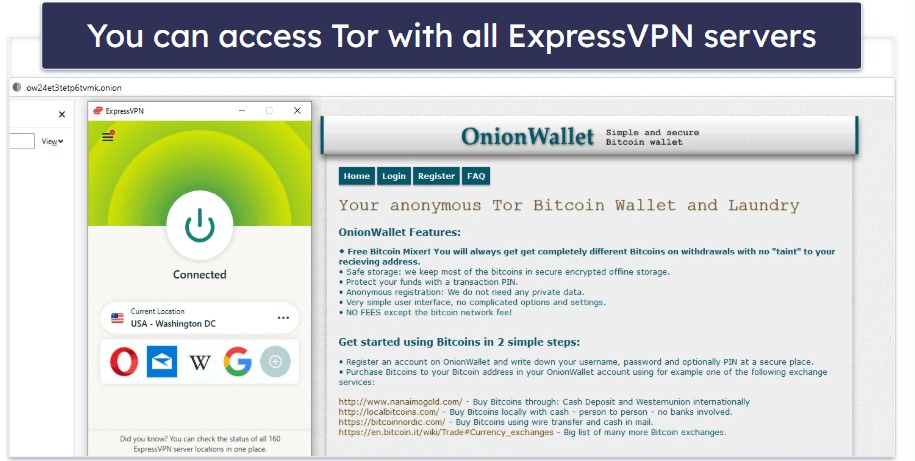
Tor is a privacy network that lets you access the dark web. It routes your traffic through multiple servers, changing your IP address and encrypting your traffic several times. Tor is free to use — you only need to download and install the Tor browser to access the Tor Network.
You can tunnel a Tor connection over a VPN connection to prevent internet and dark web sites from detecting your VPN IP address and hide your VPN connection behind several layers of Tor encryption. Basically, your connection will look like this:
You → VPN → Tor Server #1 → Tor Server #2 → Tor Server #3 → Internet or Dark Web
Pretty much all top VPNs support Tor over VPN connections, but I like ExpressVPN the most because it has really fast speeds (Tor over VPN connections are usually pretty slow). I also think NordVPN is a good pick because it has Onion Over VPN servers that automatically send your traffic through the Tor network, meaning you don’t need to download and use the Tor browser to use the Tor network.
9. Use Mobile Data
If your school, workplace, or hotel Wi-Fi blocks VPNs, the fastest workaround is to switch to mobile data. By connecting through your telecom provider’s network, you bypass restrictive firewalls entirely. It’s especially useful if a captive portal won’t let you log in while your VPN is active, or if a managed network is aggressively filtering VPN traffic.
For smoother mobile use, I found ExpressVPN’s app makes the switch seamless. It’s lightweight, works consistently on both iOS and Android, and includes built-in obfuscation so your connection looks like regular HTTPS even on 4G or 5G.
That way, you can connect securely on the go without losing speed, whether you’re just logging in quickly or streaming on a mobile network.
Editor’s Note: Intego, Private Internet Access, CyberGhost and ExpressVPN are owned by Kape Technologies, our parent company
Why Using Dedicated IPs and Residential IPs May Not Be the Best Option for Avoiding VPN Detection
I have seen a lot of online sources claim that using a dedicated IP address (an IP that’s only assigned to you) will make your VPN connection harder to detect. That’s not quite true, and I think many people believe this because they think that streaming sites don’t block dedicated VPN IP addresses.
Streaming services block dedicated VPN IPs just as easily as they block shared VPN IPs. In fact, most VPNs with dedicated IPs even warn against using them for streaming, since once a dedicated IP is flagged, you’d need to buy a new one.
The thing is, most dedicated VPN IPs come from data centers, and these IP ranges are usually added to databases by proxy detection services. Streaming sites use these databases to block VPNs.
You could make it harder for streaming sites to detect your dedicated IP by making sure it’s a residential IP, which means it comes from an ISP instead of a data center. Even a residential dedicated IP could still be detected and blocked. If you want to try one out, check out TorGuard.
But in 2026, detection also relies on ASN/provider reputation and traffic fingerprinting, so it’s not just about the IP itself.

I personally only recommend using a dedicated IP to access websites that mainly block shared IPs, like bank sites, and to avoid seeing too many reCAPTCHAs on search engines.
Can Decoy Traffic Make Your VPN Undetectable?
Not exactly. Decoy traffic is meant to make it harder for third parties to detect specific online activities when someone is connected to a VPN. Detection at that level usually comes from traffic correlation attacks, where upload/download volumes are analyzed to guess what apps or sites you’re using.
For example, let’s say you use a VPN to upload torrents or post on social media. Even though your ISP couldn’t see that you’re interacting with torrents and social media sites, it could still detect your upload volume. If it detects a lot of upload spikes, that could be a sign of torrenting or social media posting. While this is very hard to achieve for the ISP, it’s not impossible.
That’s where decoy traffic comes into play. By generating fake data transfers at random intervals, it blends your real activity with noise. This makes it harder for observers to match your traffic volume to a specific service. However, it’s important to remember that decoy traffic only disguises activity patterns — it doesn’t make the VPN connection itself harder to detect.
If you’d like to try it, Windscribe has a decoy traffic option in its Android app. Just keep in mind that using it will significantly increase your data usage and throttle your speeds a bit (this is done to make it even harder for third parties to single out specific web activities).
Can I Avoid Detection by Setting Up My Own VPN Server?
Not really. Setting up your own VPN usually means renting a virtual server that you configure to act as a VPN server. You then connect to the virtual server and use it to surf the web.
But you run into the same issue you do with dedicated IPs — streaming sites can still detect and block your virtual server IP address. It comes from a data center, after all. If that happens, you’ll need to request a new IP, and the hosting provider will likely charge you for that.
On top of that, the whole process is time-consuming and requires technical know-how. You’d have to configure the server, set up a VPN protocol, and maintain it. While Linux-based servers are cheaper (under $10/month), they’re harder to configure. Windows servers are easier but cost closer to $10–$12 per month.
In 2026, this approach may help you dodge basic blocklists, but it won’t beat fingerprinting or ASN reputation checks. Considering all of that, you’d be much better off just getting a premium VPN that’s affordable, easy to use, and can bypass pretty much any type of detection — like ExpressVPN, which ticks all of these boxes!
Editor’s Note: ExpressVPN and this site are in the same ownership group.
Why Should You Make Your VPN Undetectable?
- Bypass VPN blocks — Restrictive countries like China, Iran, and Indonesia often employ state-of-the-art methods to detect and block VPN connections. While most of these countries don’t specifically make it illegal to use a VPN to get around these restrictions, some legally ban them outright. It’s important to check all local rules and regulations before using a VPN. Also, learning institutions and workplaces might use firewalls to block VPNs, and some websites block known IP addresses, too.
- Get more privacy — When you connect to a VPN, your ISP is aware of the connection (but the VPN’s encryption prevents your ISP from seeing your internet behavior). Some people simply don’t want their ISPs or the sites they visit to know they’re using a VPN.

What Are VPN Blockers & Why Are They Used?
VPN blockers are services or tools that detect and block VPN connections. Governments, ISPs, network admins, and websites use VPN blockers — and here’s why:
Enforce Government Censorship
Restrictive countries often block access to popular sites, including social media sites, news sites, and platforms like Google and YouTube. These governments know that citizens use VPNs to get around firewalls, so they deploy advanced technology to detect and block VPN traffic. Note that in some of these countries, using a VPN to get around the firewall is illegal, so it’s important to do your research before doing so.
Enforce a School/Workplace Policy
Many schools, universities, and businesses use firewalls to stop students/employees from accessing certain sites. Since VPNs can be used to bypass these restrictions, administrators often block VPN traffic outright.
Honor Copyright and Licensing Agreements
Streaming platforms show different titles depending on which country you’re in — this is all due to the licensing agreements they signed with copyright holders. Basically, if a site doesn’t have the licensing rights to show a specific title in a certain country, it can’t legally broadcast it there.
Streaming sites detect and block VPNs because they allow people to bypass geo-restrictions (a type of content protection). If the sites were to ignore VPN connections, it could be a breach of the licensing agreements they signed.
Avoid Legal Issues
Some ISPs worry that their customers might use VPNs to illegally torrent copyrighted content. To avoid facing any potential legal repercussions, they throttle or block VPN connections on their networks.
Similarly, gambling sites often block VPNs to prevent access from countries where gambling is illegal, and payment processors may block them as a fraud prevention measure.
Modern VPN blockers don’t just rely on IP lists and ports. Many also use traffic fingerprinting, SNI filtering, and ASN/provider reputation checks to identify VPN usage — making blending techniques like obfuscation more important than ever.
Different Types of VPN Blockers
Here are the main VPN blocking methods:
IP Blocks
When using a VPN, websites only see the IP address of the VPN server you’re connected to. If a site blocks that IP address, you won’t be able to access the site through it.
Many streaming platforms use IP blocks to prevent VPN users from accessing geo-blocked content. To do this, they often source VPN and proxy IP databases from services like IP2Location. These websites also employ automated scripts to detect and block VPN IP addresses trying to connect.
Network administrators, internet service providers (ISPs), and governments with strict policies also use firewalls to block VPN IP ranges.
Port Blocking
Ports are numbers assigned to network protocols used for online communication. Each VPN protocol uses different ports to access the web — for example, OpenVPN uses UDP port 1194 by default. Network admins and ISPs can block certain ports to prevent you from using a specific VPN protocol.
Deep Packet Inspection (DPI)
Deep Packet Inspection (DPI) searches for indications and signatures in your internet traffic that suggest you’re using a VPN protocol. If a VPN is identified, DPI has the capability to either obstruct it or slow it down to the point of being ineffective, a strategy referred to as Quality of Service filtering. Countries that impose VPN restrictions, such as China, use DPI to identify and hinder OpenVPN connections.
Modern detection doesn’t stop at simple IP or port blocking. Today, systems also use more advanced techniques:
- TLS/JA3 fingerprints: Every VPN protocol leaves a “handshake pattern” when it connects, kind of like a digital fingerprint. Blockers can flag those patterns even if the IP looks fine.
- SNI filtering: When you visit a site, your device often tells the server the hostname up front (called the Server Name Indication). Filters can spot if that doesn’t match normal behavior.
- ASN reputation: If too many VPN servers come from the same provider’s network (its Autonomous System Number), entire ranges can be blocked at once.
- ECH (Encrypted Client Hello): A newer tech that hides SNI data to make detection harder, but it’s not widely supported yet.
Because of all this, obfuscation is still critical. It disguises your VPN traffic so it looks like regular encrypted web browsing, which is what allows you to avoid VPN detection on restrictive school or work networks.
Does VPN Over Tor Make Your VPN Undetectable?
Not really. VPN over Tor means you tunnel your VPN connection through the Tor network — a privacy system that hides your IP address and encrypts traffic several times by routing it through at least three servers.
Basically, your connection will look like this:
You → Tor Server #1 → Tor Server #2 → Tor Server #3 → VPN → Internet
This setup prevents ISPs or network admins from seeing the VPN server’s IP address, but they’ll still know you’re connecting to a Tor IP address and can easily block it (Tor doesn’t refresh its IP addresses very often). VPN over Tor also has security risks since Tor can sometimes leak your IP address, and malicious actors can operate their own Tor servers.
That’s why most experts recommend the opposite order of Tor over VPN connections instead. This hides your VPN IP address from normal internet sites and dark web sites, and if Tor ever leaks, it only exposes the VPN’s IP — not your real one.
Most top names like ExpressVPN support Tor over VPN connections directly. But remember, VPN over Tor is an advanced option. It adds privacy layers but increases latency and instability, so it’s not a reliable way to avoid detection.
Frequently Asked Questions
Can I use a free VPN to circumvent detection?
Unlikely. Free VPNs rarely refresh IP addresses, so it’s easy for sites and network admins to block their servers. What’s more, most free VPNs don’t provide access to obfuscation or protocols that can use multiple ports (like OpenVPN and WireGuard). Also, many free VPNs lack essential VPN security features like a kill switch or a no-logs policy.
I’d recommend a paid premium VPN like ExpressVPN instead, which refreshes IPs frequently, supports stealth protocols, and works in restrictive regions.
Does changing DNS settings make a VPN harder to detect?
No. Switching to third-party DNS (like Google DNS or Cloudflare DNS) only changes where your queries resolve — it doesn’t disguise VPN traffic itself. At most, it can fix connectivity issues, but it won’t make your VPN less detectable. If your VPN has built-in DNS leak protection and runs its own encrypted DNS servers (like ExpressVPN does), you don’t need to tweak DNS settings at all.
Will a double VPN connection make a VPN undetectable?
Not really. A double VPN connection sends your traffic through 2 VPN servers instead of 1 server — while that hides the IP address of the 1st VPN server, it’s still possible to detect the IP address of the 2nd VPN server. Plus, a double VPN connection won’t prevent network admins or ISPs from detecting VPN traffic.
I recommend using double VPN when you need an extra layer of encryption to secure your data. Surfshark has a very good double VPN feature that lets you pick the entry and exit servers (most VPNs with double VPN support don’t let you do that).
Can you use a proxy to make your VPN undetectable?
Probably not. Some online sources say you can use a proxy to hide your VPN IP. In reality, this often causes compatibility issues and doesn’t hide the underlying VPN patterns. It’s better to rely on built-in obfuscation or Shadowsocks if you need to disguise VPN traffic, since proxies aren’t designed for that purpose.
Proxies aren’t designed to defeat DPI or traffic fingerprinting—use obfuscation or Shadowsocks if you specifically need to disguise VPN patterns. It’s much better to just try the tips mentioned here instead.
Does obfuscation stop streaming sites from detecting VPNs?
No, obfuscation can only help you get around Deep Packet Inspection (DPI), which detects and blocks VPN traffic. However, streaming platforms rely mostly on IP reputation and ASN checks, so they can still detect a VPN connection even when it’s obfuscated. Obfuscation helps in restrictive countries (like China), but for streaming, the deciding factor is IP pool freshness.
Are peer-to-peer (P2P) VPNs harder to detect?
Not really. People probably get this impression because, with P2P VPNs, you access the web via other VPN users’ IP addresses (and they browse the web via your IP). Due to this, people assume that it will be harder for sites to detect and block your VPN IP.
But I already mentioned how even residential IPs can be blocked — not to mention that P2P VPNs are risky to use, as other users could use your IP to engage in illegal activities (like downloading copyrighted content).
Netflix blocked me, but my VPN is off. What should I do?
This happens when your ISP or streaming app flags your IP range, even without an active VPN. The best fix is to refresh your IP by rebooting your router, clearing app/browser data, and reconnecting. If you’re still blocked, switching servers (or ISPs, in rare cases) is the only way forward.
Why do I keep getting CAPTCHAs when my VPN is on?
Shared IPs are often abused by spammers, so services respond with CAPTCHAs. To avoid this, switch to a different VPN server or pool. Some providers, like ExpressVPN, reduce this problem by rotating IPs automatically with tools like ShuffleIP, so you don’t get stuck with a “bad neighbor” IP.
Hotel Wi-Fi won’t let me use my VPN. How can I log in?
Most hotels use captive portals, and you usually have to log in before setting up your undetectable VPN. First, connect to the Wi-Fi and accept the portal’s terms. Only after that should you connect your VPN — otherwise, the login page won’t load. If the network still blocks VPN traffic, temporarily switching to mobile data is a quick workaround to get online securely. VPNs that support OpenVPN over TCP 443 and robust obfuscation tend to connect more reliably after you accept the captive portal.