

The dedicated music player faded into insignificance because of the ubiquity of smartphones.
Therefore, it’s reasonable to expect the experience of listening to and purchasing music on one today to be excellent.
It is if you own an Apple iPhone, but on Android? It’s an embarrassment.
I found out the hard way
Starting from scratch

I’ve been revisiting the Samsung Galaxy Buds 3 Pro and, while doing so, thought I’d test them on a variety of phones, including the Motorola Edge 70 I’ve been reviewing.
While I usually use YouTube Music for review purposes on Android, I wanted to go a bit deeper and live with an Android phone and Samsung earbuds for all my usual musical needs.
What I found was a confused world of substandard apps, in-app payments, a huge push towards subscription-based streaming apps, and oh-so-many ads.
I am essentially a beginner with music on Android, as I usually use my iPhone for all this. If this is what awaits newcomers, and if someone said to me that music and audio were their most-wanted feature on a new phone, I’d tell them to avoid Android entirely.
It’s that bad.
Music done right
Only on the iPhone

Credit: Apple Podcasts
Now, I understand the way everyone listens to and purchases music is different, so here’s what I want from my phone.
I mostly discover new music outside of apps, and if I like a song, I buy it through iTunes and store it in my own curated playlist.
No ads, no skipping tracks I don’t like, no subscription. Just the music I want.
I have a small list of podcasts I listen to regularly. I stream them and download them to store in an offline playlist I can use anywhere at any time.
I also subscribe to YouTube Premium (for no ads on YouTube), and YouTube Music takes care of any further requirements, whether that’s listening to entire albums before purchasing individual tracks, or sometimes discovering new songs.

Credit: Apple Podcasts
These are, I think, fairly simple requirements, and it’s all done through Apple’s excellent Music and Podcast apps, plus iTunes for purchases.
From the really attractive designs to the simplicity of locating playlists and songs, I’m never more than a few taps away from either playing my music or podcasts, finding something new, or buying a track ready to put into a playlist.
It’s all seamless, fast, and logical, with a cohesive design throughout.
The apps are baked into the operating system, and unless you subscribe to Apple Music, are completely free.
Even if I started again from scratch, I’d know exactly where to look to get started with my podcasts, and where I’d find music I purchased through iTunes or synced from my computer.
Not the same on Android
An awful experience

When I fire up an Android phone, where exactly do I go to find my podcasts? Where do I buy some music? Where will I store my playlists? Is there a standard app?
Since Google Play Music and Google Podcasts’ demise, there’s nowhere obvious at all. Sure, as a YouTube Premium subscriber, YouTube Music is an option, but if I weren’t, I’d be forced into the Play Store.
Search for “music player,” and the top, most downloaded results are both called Music Player, and they appear to be essentially the same.
The first screen I get when I open Hitchhike’s DD Music Player app is a massive, timed ad. It’s there every single time, often with a deliberately obfuscated option to close it, and it’d cost $2 per month to remove the ads.
This app has more than 100 million downloads and a 4.6-star rating, yet it’s a horrible initial experience.
Inshot’s Music Player app is no different; it’s just a bit cheaper to remove the ads. The functionality is fine, but if these are the most popular music players out there, it’s a terrible start.
I understand developers must make money, and I could pay to remove ads, but as we’ll come to next, the monthly bill is going to start racking up, and the convenience will continue to go down.
Costs rack up
Nothing gets any better

Credit: Podcast Addict
How about podcasts? Outside yet more standalone apps, such as BBC Sounds, YouTube Music will play podcasts, but none of my most listened to podcasts are listed.
You can add them via the RSS feed, though, like it’s 2010.
Instead, I downloaded the podcast app most recommended on Reddit. It’s Podcast Addict, which turns out to have a bland design and more ads, which I can remove for another $1 per month or $10 per year.

The thing is, it’s slow and poorly designed, with an ugly interface that often makes no sense. Why are there different play buttons on podcasts? I have no idea.
Like YouTube Music, it also forced me to find the RSS feed so I could listen to the podcasts I wanted. After fiddling around with links that didn’t work, where did it find one that did? Yep, Apple Podcasts.
If I want to buy digital music, like I have been for years, it’s also a pain.
I can find the most recent song I purchased through iTunes on Amazon Music and Qobuz, but to actually buy the song, I have to do so through the website, not the app. It’s laughable.

Credit: Qobuz
Seeing as a MicroSD card slot is mostly a thing of the past, I’d have to rely on internal storage for offline music organization, should I buy tracks from different companies.
Not terrible, just yet another step in the long, laborious process of listening to something on Android.
If I’m happy to just stream music and podcasts, which I understand many are, I have to pay for an app like Spotify.
That’s potentially four, five, or even six apps, all with different designs, none of which talk to each other, and all either have ads or monthly payments attached just to listen to something.
It doesn’t have to be this way
You just need a different phone to find out

It’s not that I couldn’t survive using these apps and processes, but it not only feels messy and incoherent, but also like I’d be making do.
I’d end up dissatisfied, thinking there had to be a better system.
I can see myself asking other Android owners what music or podcast app they use, just in case musical nirvana exists and I’d missed it.
It shouldn’t be this complicated.
Google has failed to compete with Apple on music and podcast delivery, and the transition to YouTube Music doesn’t seem to effectively replicate services available in the past.
This, in turn, drives people to the Play Store, where an overwhelming choice of mostly substandard apps, many with an associated cost, awaits. Or, you can fill the pockets of apps like Spotify.
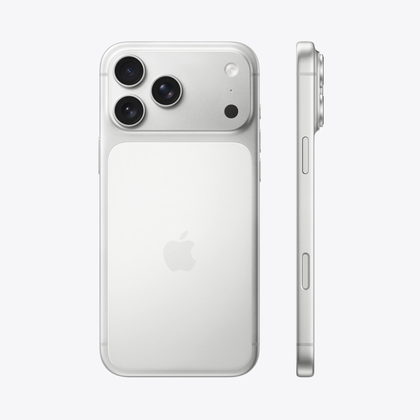
Apple iPhone 17 Pro Max

- SoC
-
A19 Pro chip
- Display type
-
Super Retina XDR display with 120Hz ProMotion
- Display dimensions
-
6.9-inches
- Display resolution
-
2868 x 1320
- Storage
-
256GB, 512GB, 1TB, or 2TB
- Battery
-
Up to 39 hours of video playback
A year-old Reddit post made me chuckle. An iPhone user asked how people bought music on Android.
Almost everyone recommended a different app, talked about servers, more apps to download Spotify playlists, and one aggressively said buying music was stupid, and that streaming was all anyone needed.
Not one person could point to a simple way to do so, and clearly nothing has changed.
It doesn’t have to be this way. Buy an iPhone, and you’ll find out. Unless things dramatically change in the future, I can’t imagine ever swapping iOS for Android when it comes to listening to, streaming, or buying music or podcasts.
What a sad state of affairs.







