


We recently built and open-sourced memsearch, a standalone, plug-and-play long-term memory library that gives any agent persistent, transparent, and human-editable memory. It uses the same underlying memory architecture as OpenClaw—just without the rest of the OpenClaw stack. That means you can drop it into any agent framework (Claude, GPT, Llama, custom agents, workflow engines) and instantly add durable, queryable memory. (If you want the deep dive into how memsearch works, we wrote a separate post here.)
In most agent workflows, memsearch performs exactly as intended. But agentic coding is a different story. Coding sessions run long, context switches are constant, and the information worth keeping accumulates over days or weeks. That sheer volume and volatility expose weaknesses in typical agent memory systems—memsearch included. In coding scenarios, retrieval patterns differ enough that we couldn’t simply reuse the existing tool as-is.
To address this, we built a persistent memory plugin designed specifically for Claude Code. It sits on top of the memsearch CLI, and we’re calling it the memsearch ccplugin.
- GitHub Repo: https://zilliztech.github.io/memsearch/claude-plugin/ (open-source, MIT license)
With the lightweight memsearch ccplugin managing memory behind the scenes, Claude Code gains the ability to remember every conversation, every decision, every style preference, and every multi-day thread—automatically indexed, fully searchable, and persistent across sessions.
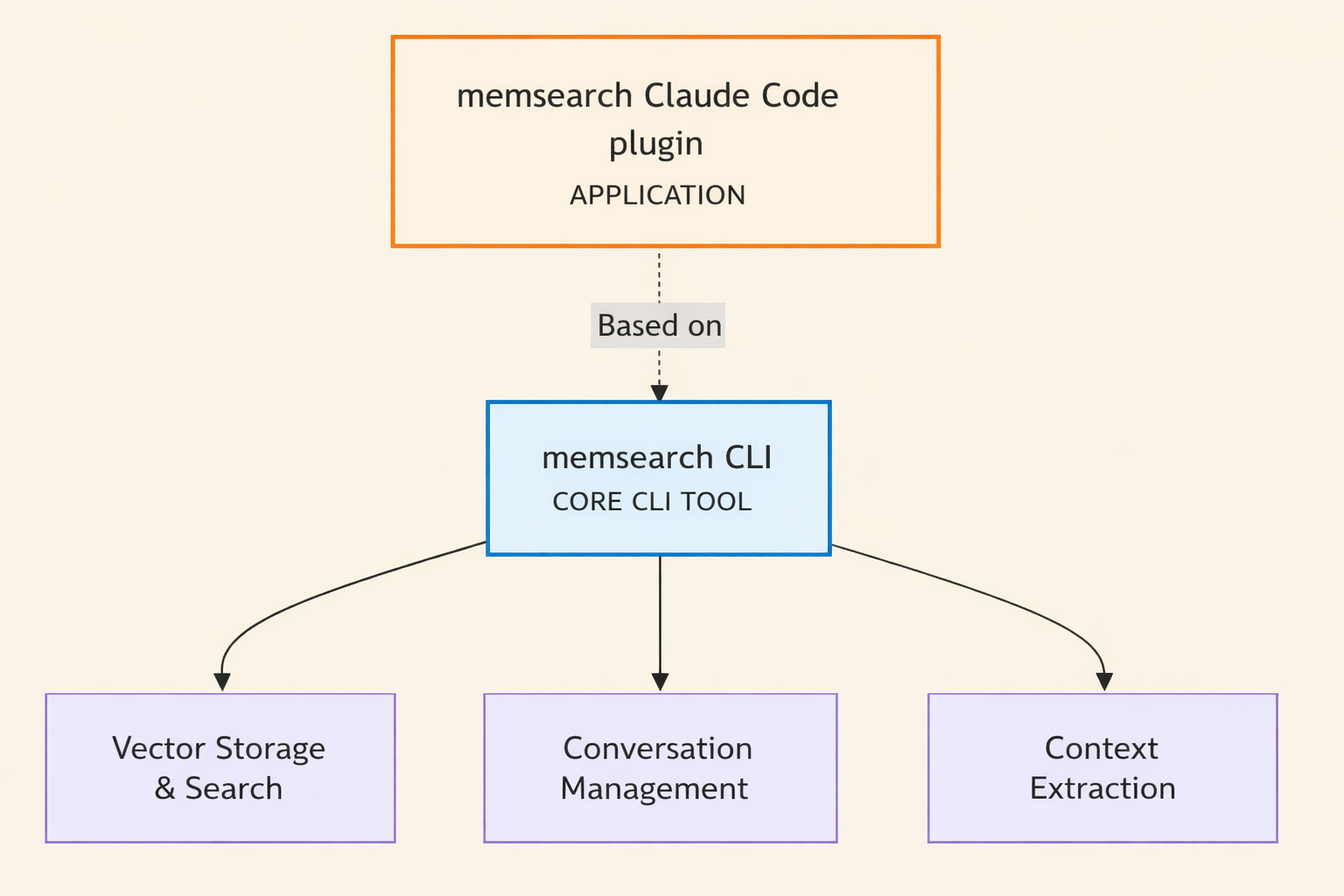
For clarity throughout this post: “ccplugin” refers to the upper layer, or the Claude Code plugin itself. “memsearch” refers to the lower layer, the standalone CLI tool underneath it.
So why does coding need its own plugin, and why did we build something so lightweight? It comes down to two problems you’ve almost certainly hit: Claude Code’s lack of persistent memory, and the clunkiness and complexity of existing solutions like claude-mem.
So why build a dedicated plugin at all? Because coding agents run into two pain points you’ve almost certainly experienced yourself:
-
Claude Code has no persistent memory.
-
Many existing community solutions—like claude-mem—are powerful but heavy, clunky, or overly complex for day-to-day coding work.
The ccplugin aims to solve both problems with a minimal, transparent, developer-friendly layer on top of memsearch.
Claude Code’s Memory Problem: It Forgets Everything When a Session Ends
Let’s start with a scenario that Claude Code Users most definitely have run into.
You open Claude Code in the morning. “Continue yesterday’s auth refactor,” you type. Claude replies: “I’m not sure what you were working on yesterday.” So you spend the next ten minutes copy-pasting yesterday’s logs. It’s not a huge problem, but it gets annoying quickly because it appears so frequently.
Even though Claude Code has its own memory mechanisms, they’re far from satisfactory. The CLAUDE.md file can store project directives and preferences, but it works better for static rules and short commands, not for accumulating long-term knowledge.
Claude Code does offer resume and fork commands, but they’re far from user-friendly. For fork commands, you need to remember session IDs, type commands manually, and manage a tree of branching conversation histories. When you run /resume, you get a wall of session titles. If you only remember a few details about what you did and it was more than a few days ago, good luck finding the right one.
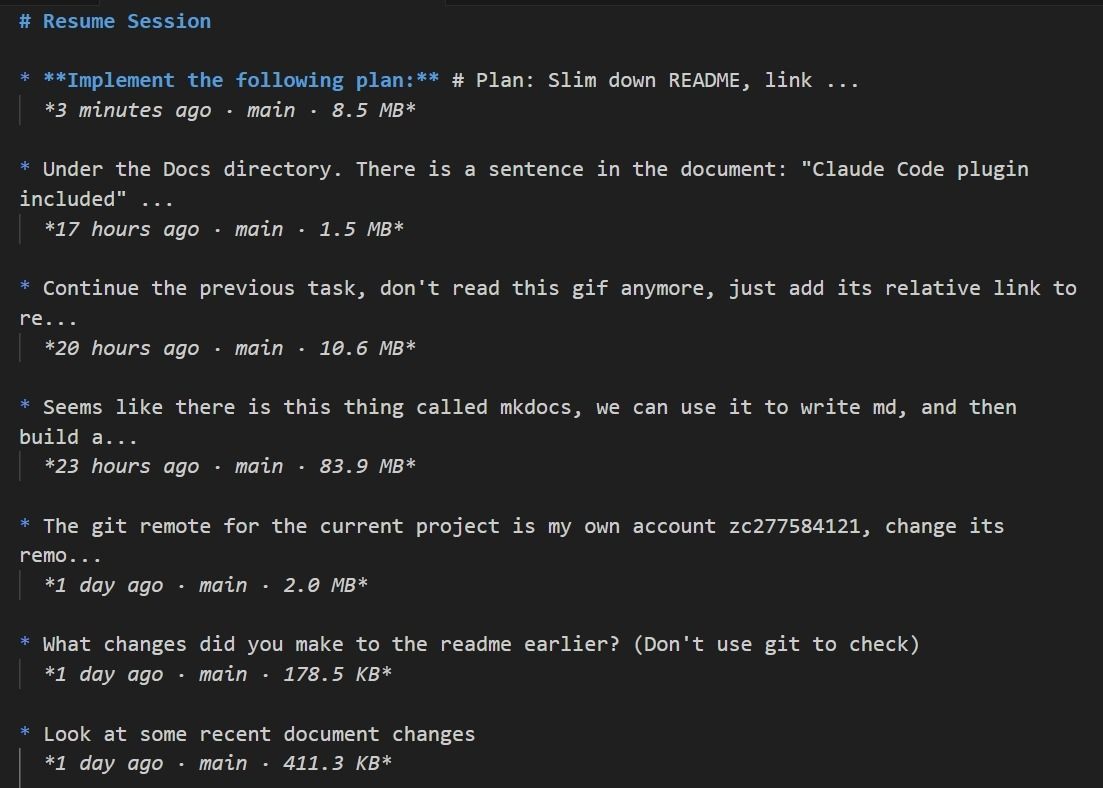
For long-term, cross-project knowledge accumulation, this whole approach is impossible.
To deliver on that idea, claude-mem uses a three-tier memory system. The first tier searches high-level summaries. The second tier digs into a timeline for more detail. The third tier pulls full observations for raw conversation. On top of that, there are privacy labels, cost tracking, and a web visualization interface.
Here’s how it works under the hood:
-
Runtime layer. A Node.js Worker service runs on port 37777. Session metadata lives in a lightweight SQLite database. A vector database handles precise semantic retrieval over memory content.
-
Interaction layer. A React-based web UI lets you view captured memories in real time: summaries, timelines, and raw records.
-
Interface layer. An MCP (Model Context Protocol) server exposes standardized tool interfaces. Claude can call
search(query high-level summaries),timeline(view detailed timelines), andget_observations(retrieve raw interaction records) to retrieve and use memories directly.
To be fair, this is a solid product that solves Claude Code’s memory problem. But it’s clunky and complex in ways that matter day-to-day.
| Layer | Technology |
|---|---|
| Language | TypeScript (ES2022, ESNext modules) |
| Runtime | Node.js 18+ |
| Database | SQLite 3 with bun:sqlite driver |
| Vector Store | ChromaDB (optional, for semantic search) |
| HTTP Server | Express.js 4.18 |
| Real-time | Server-Sent Events (SSE) |
| UI Framework | React + TypeScript |
| AI SDK | @anthropic-ai/claude-agent-sdk |
| Build Tool | esbuild (bundles TypeScript) |
| Process Manager | Bun |
| Testing | Node.js built-in test runner |
For starters, setup is heavy. Getting claude-mem running means installing Node.js, Bun, and the MCP runtime, then standing up a Worker service, Express server, React UI, SQLite, and a vector store on top of that. That’s a lot of moving parts to deploy, maintain, and debug when something breaks.
All those components also burn tokens you didn’t ask to spend. MCP tool definitions load permanently into Claude’s context window, and every tool call eats tokens on the request and response. Over long sessions, that overhead adds up fast and can push token costs out of control.
Memory recall is unreliable because it depends entirely on Claude choosing to search. Claude has to decide on its own to call tools like search to trigger retrieval. If it doesn’t realize it needs a memory, the relevant content just never shows up. And each of the three memory tiers requires its own explicit tool invocation, so there’s no fallback if Claude doesn’t think to look.
Finally, data storage is opaque, which makes debugging and migration unpleasant. Memories are split across SQLite for session metadata and Chroma for binary vector data, with no open format tying them together. Migrating means writing export scripts. Seeing what the AI actually remembers means going through the Web UI or a dedicated query interface. There’s no way to just look at the raw data.
Why the memsearch Plugin for Claude Code is Better?
We wanted a memory layer that was truly lightweight—no extra services, no tangled architecture, no operational overhead. That’s what motivated us to build the memsearch ccplugin. At its core, this was an experiment: could a coding-focused memory system be radically simpler?
Yes, and we proved it.

The entire ccplugin is four shell hooks plus a background watch process. No Node.js, no MCP server, no Web UI. It’s just shell scripts calling the memsearch CLI, which drops the setup and maintenance bar dramatically.
The ccplugin can be this thin because of strict responsibility boundaries. It doesn’t handle memory storage, vector retrieval, or text embedding. All of that is delegated to the memsearch CLI underneath. The ccplugin has one job: bridge Claude Code’s lifecycle events (session start, prompt submission, response stop, session end) to the corresponding memsearch CLI functions.
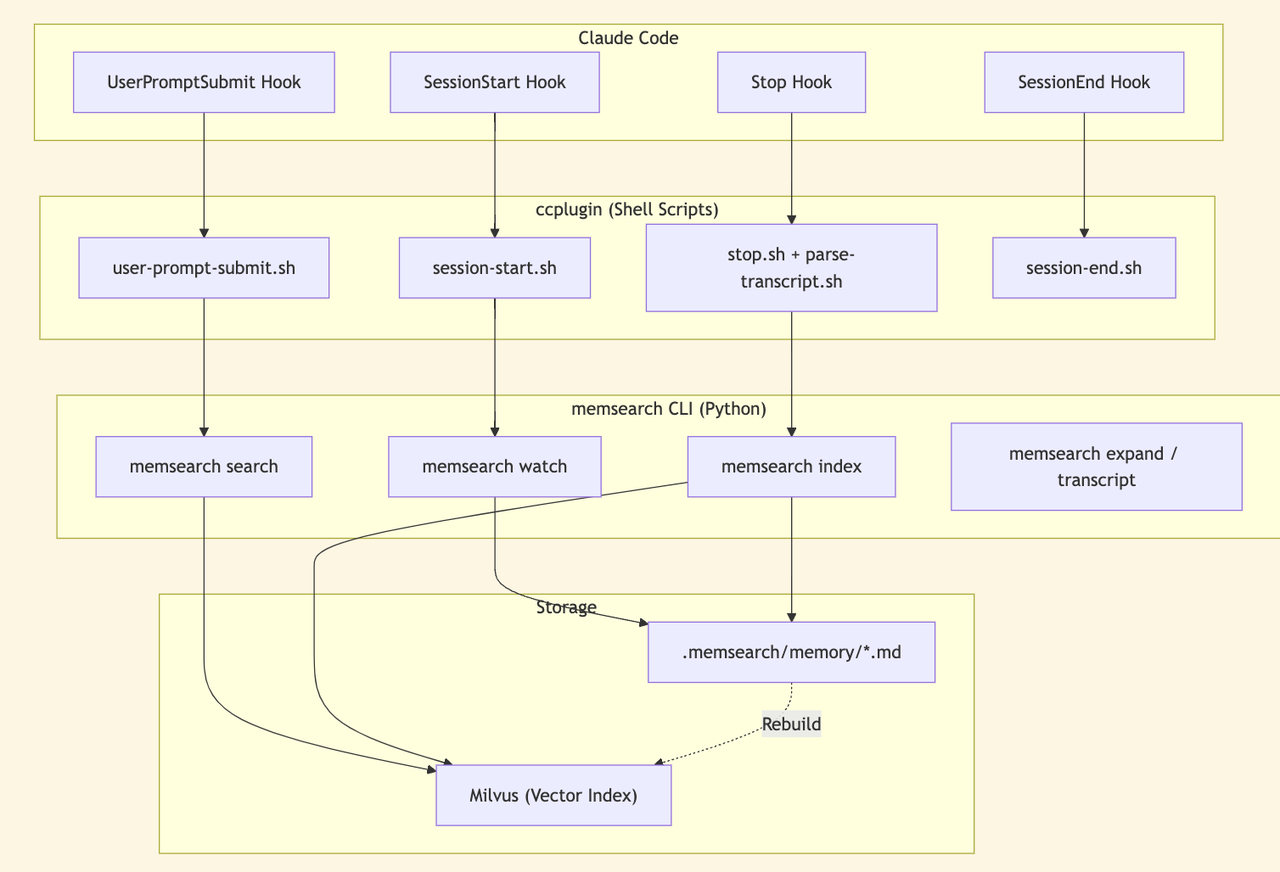
This decoupled design makes the system flexible beyond Claude Code. The memsearch CLI works independently with other IDEs, other agent frameworks, or even plain manual invocation. It’s not locked to a single use case.
In practice, this design delivers three key advantages.
1. All Memories Live in Plain Markdown Files
Every memory the ccplugin creates lives in .memsearch/memory/ as a Markdown file.
.memsearch/memory/
├── 2026-02-09.md
├── 2026-02-10.md
└── 2026-02-11.md
It’s one file per day. Each file contains that day’s session summaries in plain text, fully human-readable. Here’s a screenshot of the daily memory files from the memsearch project itself:
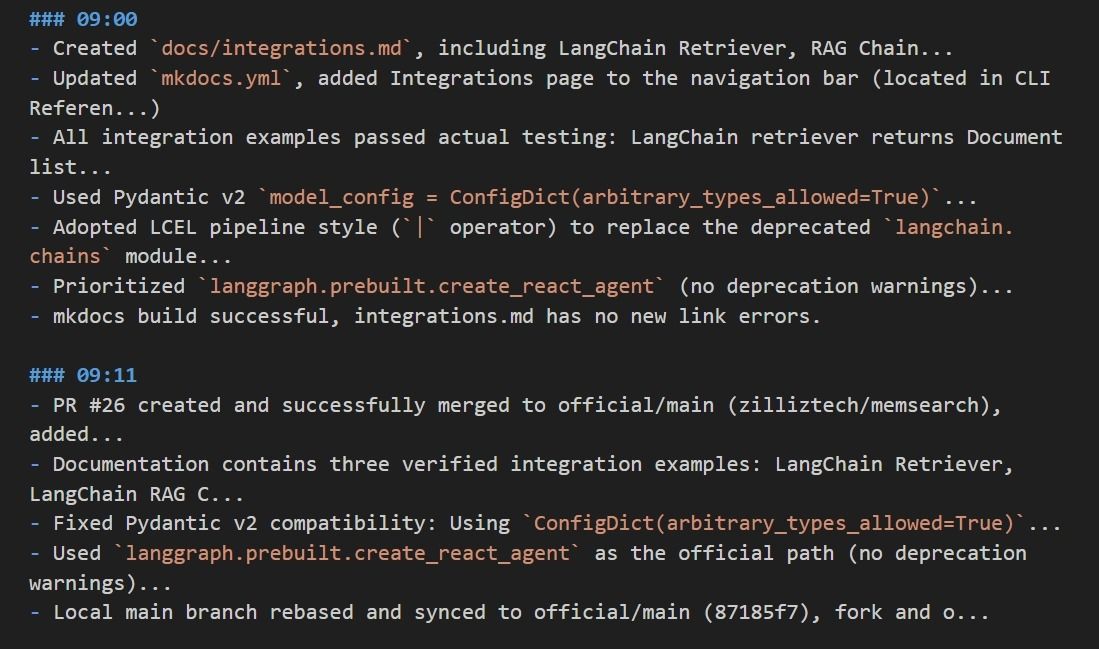
You can see the format right away: timestamp, session ID, turn ID, and a summary of the session. Nothing is hidden.
Want to know what the AI remembers? Open the Markdown file. Want to edit a memory? Use your text editor. Want to migrate your data? Copy the .memsearch/memory/ folder.
The Milvus vector index is a cache to speed up semantic search. It rebuilds from Markdown at any time. No opaque databases, no binary black boxes. All data is traceable and fully reconstructable.
2. Automatic Context Injection Costs Zero Extra Tokens
Transparent storage is the foundation of this system. The real payoff comes from how these memories get used, and in ccplugin, memory recall is fully automatic.
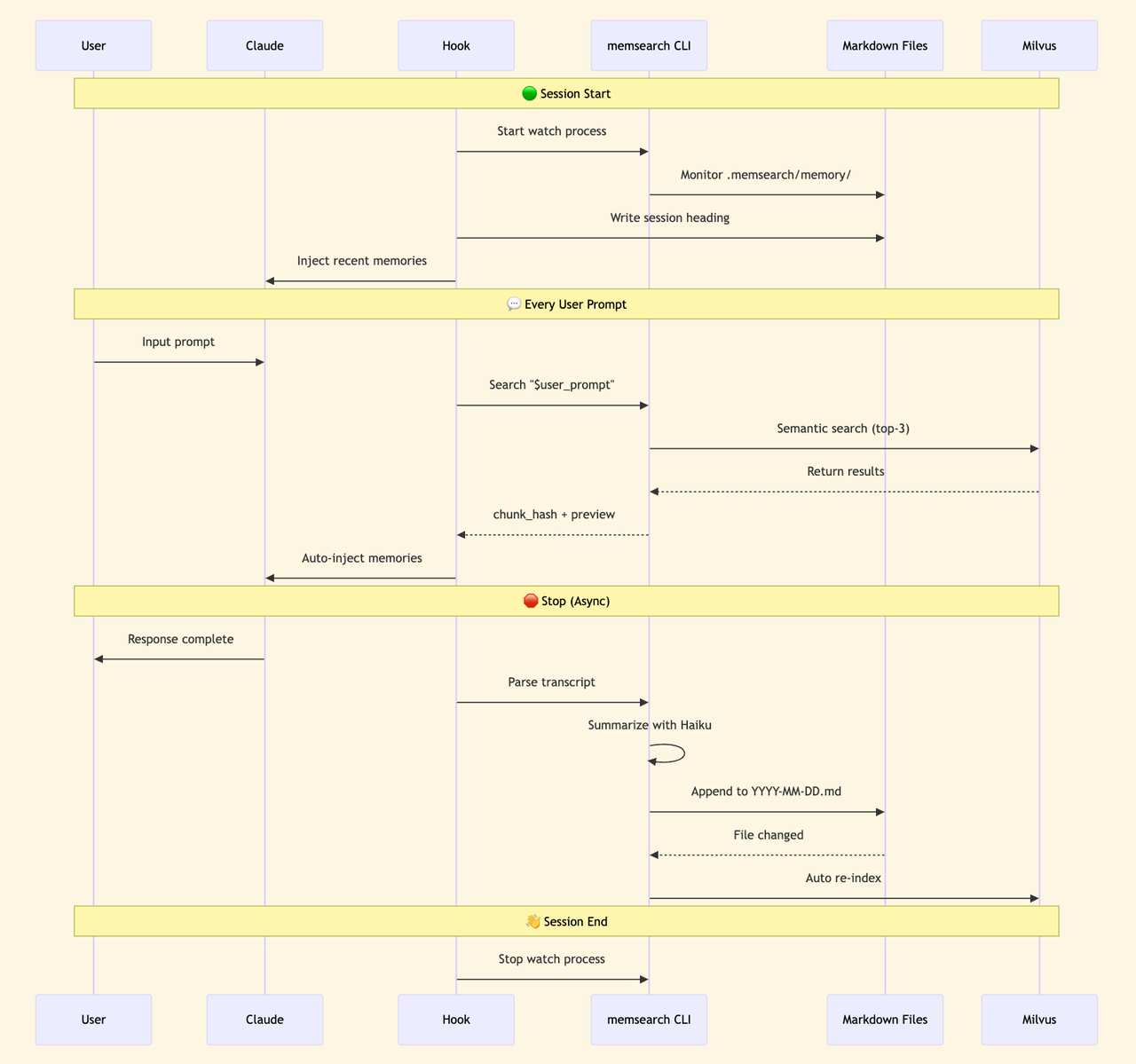
Every time a prompt is submitted, the UserPromptSubmit hook fires a semantic search and injects the top-3 relevant memories into context. Claude doesn’t decide whether to search. It just gets the context.
During this process, Claude never sees MCP tool definitions, so nothing extra occupies the context window. The hook runs at the CLI layer and injects plain text search results. No IPC overhead, no tool-call token costs. The context-window bloat that comes with MCP tool definitions is gone entirely.
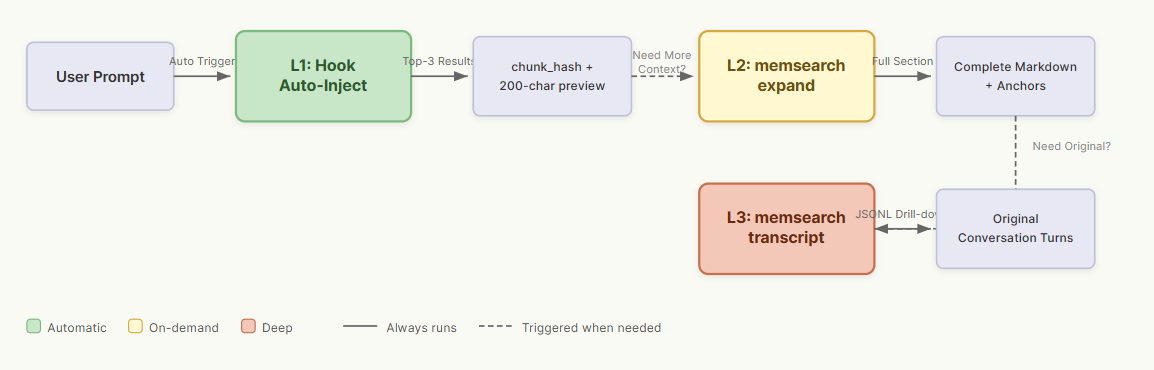
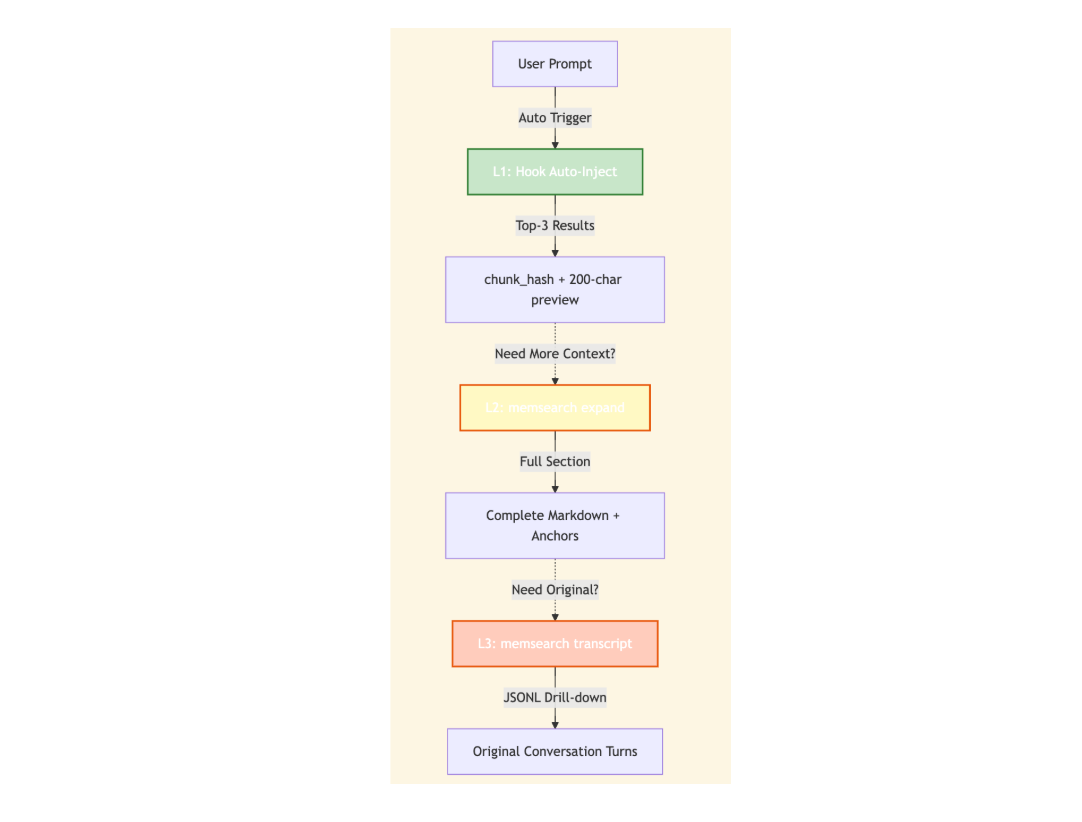
For cases where the automatic top-3 isn’t enough, we also built three tiers of progressive retrieval. All three are CLI commands, not MCP tools.
-
L1 (automatic): Every prompt returns the top-3 semantic search results with a
chunk_hashand 200-character preview. This covers most everyday use. -
L2 (on-demand): When full context is needed,
memsearch expand <chunk_hash>returns the complete Markdown section plus metadata. -
L3 (deep): When the original conversation is needed,
memsearch transcript <jsonl_path> --turn <uuid>pulls the raw JSONL record from Claude Code.
3. Session Summaries Are Generated in the Background at Near-Zero Cost
Retrieval covers how memories get used. But the memories have to be written first. How do all those Markdown files get created?
The ccplugin generates them through a background pipeline that runs asynchronously and costs almost nothing. Every time you stop a Claude response, the Stop hook fires: it parses the conversation transcript, calls Claude Haiku (claude -p --model haiku) to generate a summary, and appends it to the current day’s Markdown file. Haiku API calls are extremely cheap, nearly negligible per invocation.
From there, the watch process detects the file change and automatically indexes the new content into Milvus so it’s available for retrieval right away. The whole flow runs in the background without interrupting your work, and costs stay controlled.
Quickstart memsearch plugin with Claude Code
First, install from the Claude Code plugin marketplace:
bash
# Run in Claude Code terminal
/plugin marketplace add zilliztech/memsearch
/plugin install memsearch
Second, restart Claude Code.
The plugin initializes its configuration automatically.
Third, after a conversation, check the day’s memory file:
bash
cat .memsearch/memory/$(date +%Y-%m-%d).md
Fourth, enjoy.
The next time Claude Code starts, the system automatically retrieves and injects relevant memories. No extra steps needed.
Conclusion
Let’s go back to the original question: how do you give AI persistent memory? claude-mem and memsearch ccplugin take different approaches, each with different strengths. We summed up a quick guide to choosing between them:
| Category | memsearch | claude-mem |
|---|---|---|
| Architecture | 4 shell hooks + 1 watch process | Node.js Worker + Express + React UI |
| Integration Method | Native hooks + CLI | MCP server (stdio) |
| Recall | Automatic (hook injection) | Agent-driven (requires tool invocation) |
| Context Consumption | Zero (inject result text only) | MCP tool definitions persist |
| Session Summary | One asynchronous Haiku CLI call | Multiple API calls + observation compression |
| Storage Format | Plain Markdown files | SQLite + Chroma embeddings |
| Data Migration | Plain Markdown files | SQLite + Chroma embeddings |
| Migration Method | Copying .md files | Exporting from database |
| Runtime | Python + Claude CLI | Node.js + Bun + MCP runtime |
claude-mem offers richer features, a polished UI, and finer-grained control. For teams that need collaboration, web visualization, or detailed memory management, it’s a strong pick.
memsearch ccplugin offers minimal design, zero context-window overhead, and fully transparent storage. For engineers who want a lightweight memory layer without additional complexity, it’s the better fit. Which one is better depends on what you need.
Want to dive deeper or get help building with memsearch or Milvus?
-
Join the Milvus Slack community t to connect with other developers and share what you’re building.
-
Book our Milvus Office Hoursfor live Q&A and direct support from the team.
Resources
-
memsearch ccplugin documentation: https://zilliztech.github.io/memsearch/claude-plugin/
-
GitHub: https://github.com/zilliztech/memsearch/tree/main/ccplugin
-
memsearch project: https://github.com/zilliztech/memsearch
-
Blog: We Extracted OpenClaw’s Memory System and Open-Sourced It (memsearch)
-
Blog: What Is OpenClaw? Complete Guide to the Open-Source AI Agent –
-
Blog: OpenClaw Tutorial: Connect to Slack for Local AI Assistant









