


Google Keep has been my default scratchpad for years. It’s good enough for grocery lists, reminders, and quick notes.
Logseq is the opposite. It’s open source, local-first, and built around daily journals. It’s a thinking tool for people who enjoy structure.
I downloaded it expecting to experiment with it for writing. I didn’t expect it to touch my Keep workflow.
But over time, I noticed that I wasn’t reaching for Keep as often. Without planning to, I ended up shifting a significant part of my note-taking into an app I originally installed to try.
Here’s how that shift happened, and how I actually use Logseq in practice.

I stuck with Google Keep for years, but it started feeling limiting

Credit: Lucas Gouveia / Android Police
I used Google Keep as a quick capture tool. It loaded instantly, synced everywhere, and was easy to use.
But as my notes grew, I noticed Keep’s limitations. I had outlines in one note, research links in another, and follow-up ideas under a different label.
Sometimes, I would open an old note and realize I had related thoughts across numerous entries, and none were linked.
Longer notes were another problem. After a note stretches beyond a few paragraphs, it becomes a vertical scroll of text with minimal structure.
That’s when I began searching for an app that could manage both quick captures and long-term notes.
Logseq is available on Windows, macOS, and Linux, with a companion app for Android via GitHub and F-Droid.
How Logseq fills the gaps
Logseq won me over by fixing the exact issues that started to frustrate me in Google Keep.
Instead of isolated notes, it offered structure and connections.
Here’s what made a difference.
Linked notes changed everything
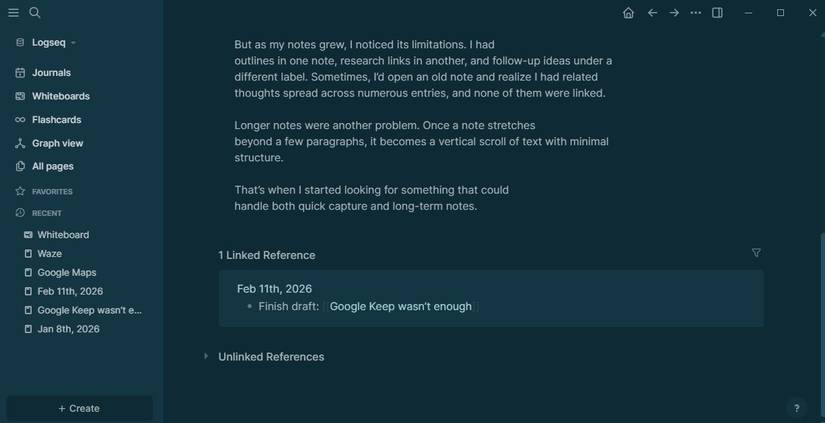
In Google Keep, notes mostly exist on their own. You can label them, but they don’t really relate to each other.
In Logseq, I can link one note to another just by typing [[Note Name]]. That creates a two-way connection automatically.
Now I can easily reorganize my messy brain dump in seconds. I can break ideas into components, rearrange arguments, group related points, and zoom in or out, depending on what I need to see.
It also makes revisiting older notes easier.
In Keep, I search for a keyword and scroll through results.
In Logseq, I open a page and immediately see every note that references it. Related thoughts appear without me having to remember exactly what I called them.
Daily notes made note-taking a breeze
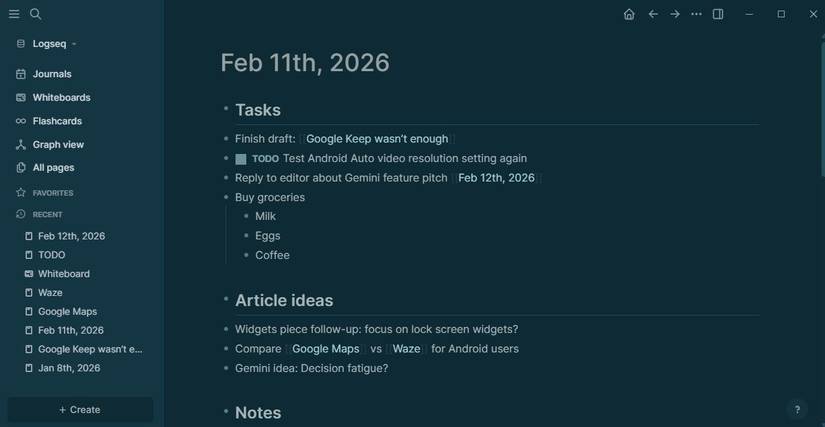
One reason I stuck with Keep for so long was speed. I didn’t want a system that slowed down quick capture.
Logseq’s daily notes solved that.
Every day gets its own page. When I open the app on my computer, I can start typing. I don’t have to bother with the folder, labels, or titles.
It replaced my habit of creating a new Keep note for every stray thought. Instead of spreading ideas across many sticky notes, they go on the daily page.
If something warrants its own space, I create a linked page for it later.
My notes weren’t locked into one ecosystem

Credit: Lucas Gouveia/Android Police | Surasak Klinmontha/Stanislav Photographer/Shutterstock
Google Keep is convenient, but it’s locked inside Google’s ecosystem. They are linked to my Google account, sync automatically, and are accessible everywhere.
That convenience is hard to beat.
Logseq operates differently by storing notes as plain Markdown text files on my device, rather than in a closed system. They aren’t wrapped in a proprietary format or dependent on a single company’s infrastructure.
That also means sync is up to you. Because your notes are just files, you can sync them using any file-based solution.
Some people use cloud folders like Google Drive or Dropbox. I use Syncthing, which keeps the same folder mirrored between my computer and phone.
If Logseq were to disappear tomorrow, I would still be able to access my notes in any Markdown editor.
There’s no special export process and no risk of being stuck in one ecosystem.
Outlining beats free-form typing
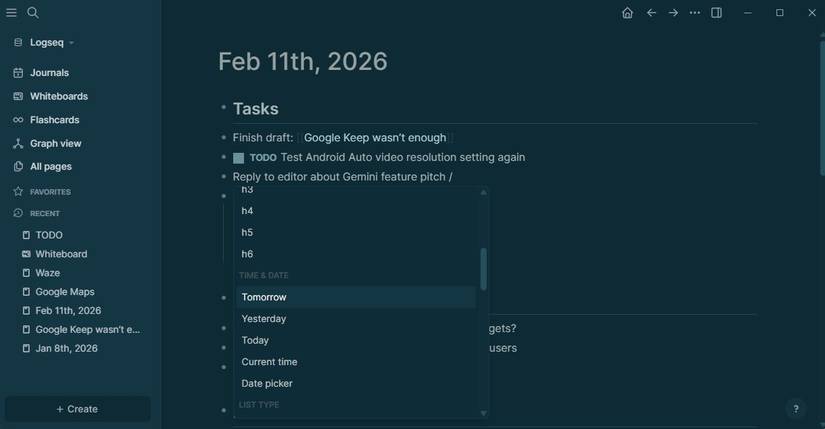
Google Keep provides a blank space where you can type your notes. That works for short notes, but when something grows beyond a few paragraphs, it turns into a long block of text.
You can add checkboxes or line breaks, but there’s no structure beyond that.
Logseq is structured around the use of bullets. You can indent to create hierarchy, collapse sections you’re not working on, and move blocks around without cutting and pasting entire chunks of text.
That makes drafting easier. When I’m outlining an article, I start with rough points. As the structure becomes clearer, I shift sections around and group related ideas together.
It also makes long notes easier to manage. Instead of scrolling through everything, I collapse what I don’t need and focus on one section at a time.

Logseq changed my note-taking habits
I didn’t stop using Google Keep. It’s still the fastest way for me to jot down a grocery list, set a reminder, or share a checklist. For lightweight notes, it’s hard to beat.
However, when a note turns into research, an outline, or an idea I’ll revisit weeks later, Logseq handles it better.
Linked pages keep related thoughts together, while plain text files mean I’m not tied to one ecosystem.
Logseq is what worked for me, but it’s not the only option.
For someone else, it might be Obsidian or Joplin. Even tools like Notion or Evernote might make more sense if you prefer something cloud-driven and collaborative.










