


In just over two days, three major models dropped back-to-back: GLM-5, MiniMax M2.5, and Gemini 3 Deep Think. All three headline the same capabilities: coding, deep reasoning, and agentic workflows. All three claim state-of-the-art results. If you squint at the spec sheets, you could almost play a matching game and eliminate identical talking points across all three.

The scarier thought? Your boss has probably already seen the announcements and is itching for you to build nine internal apps using the three models before the week is even over.
So what actually sets these models apart? How should you choose between them? And (as always) how do you wire them up with Milvus to ship an internal knowledge base? Bookmark this page. It’s got everything you need.
GLM-5, MiniMax M2.5, and Gemini 3 Deep Think at a Glance
GLM-5 leads in complex system engineering and long-horizon agent tasks
On February 12, Zhipu officially launched GLM-5, which excels in complex system engineering and long-running agent workflows.
The model has 355B-744B parameters (40B active), trained on 28.5T tokens. It integrates sparse attention mechanisms with an asynchronous reinforcement learning framework called Slime, enabling it to handle ultra-long contexts without quality loss while keeping deployment costs down.
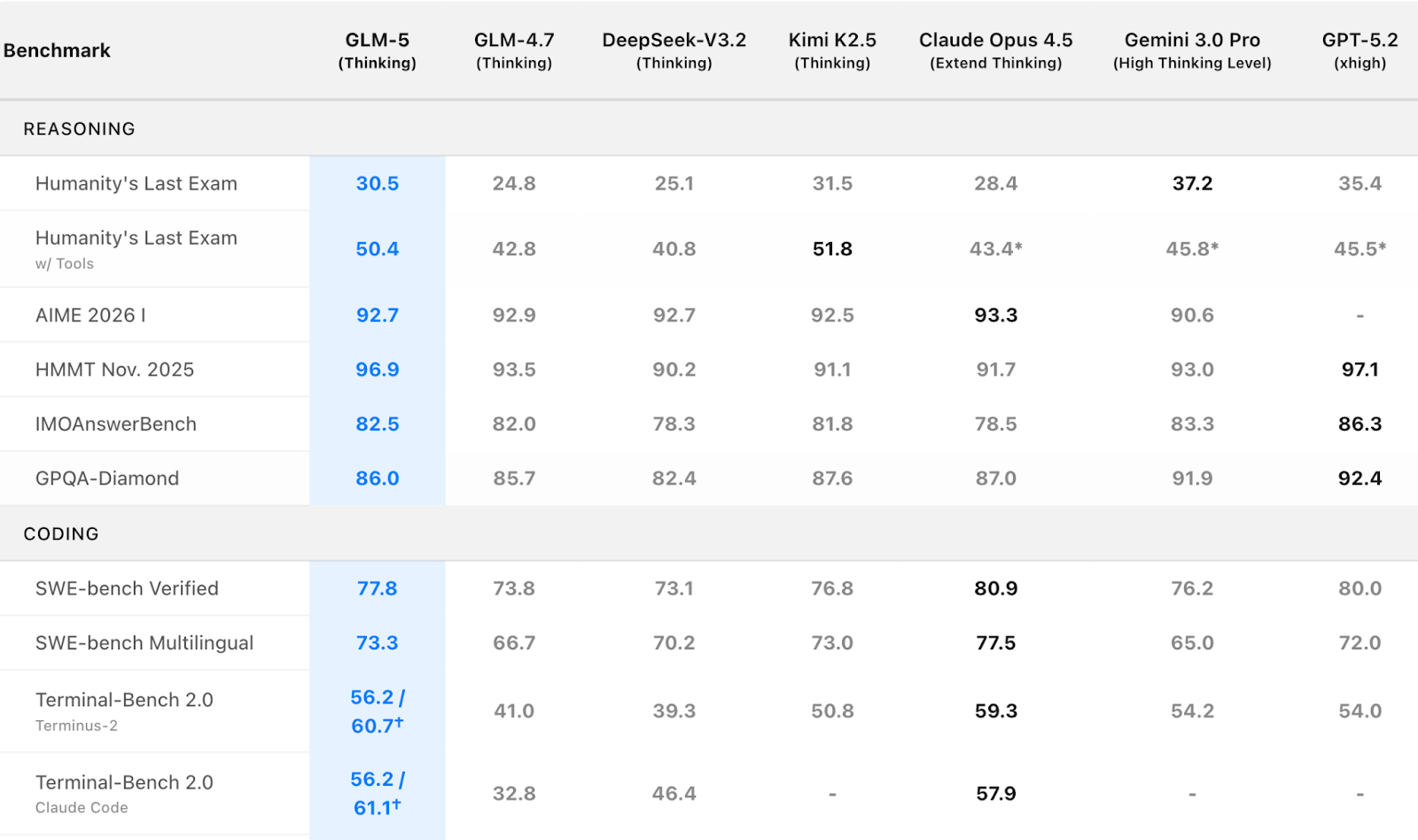
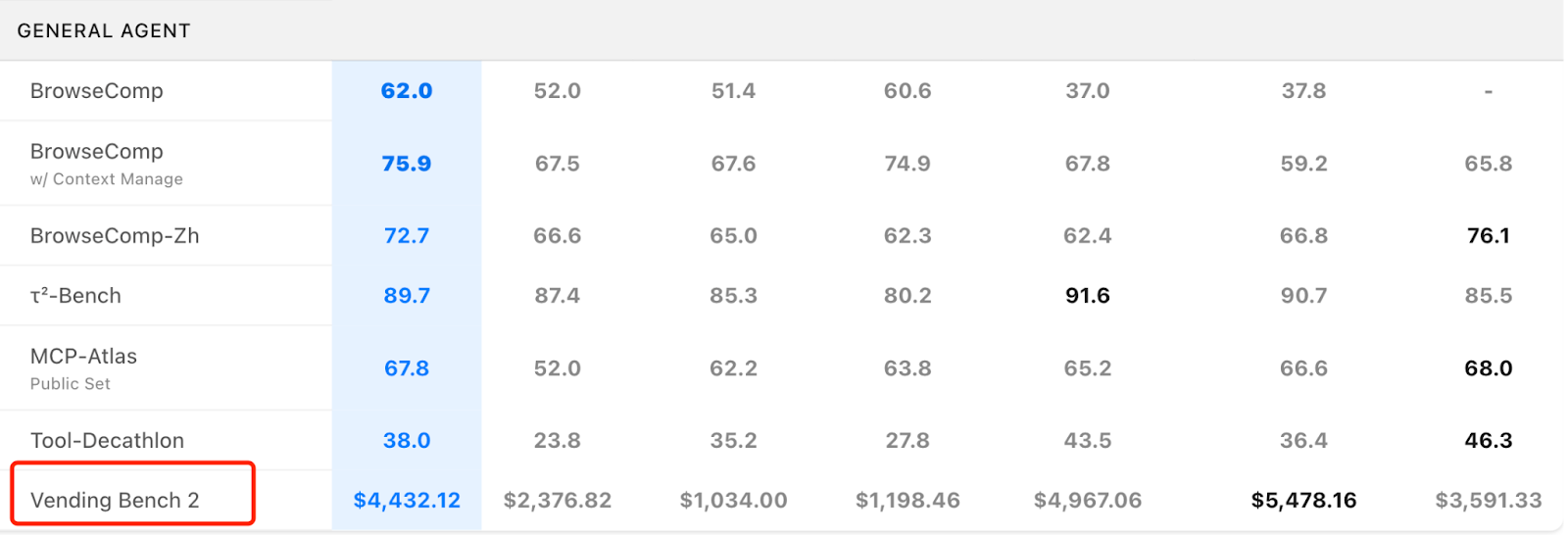
GLM-5 led the open-source pack on key benchmarks, ranking #1 on SWE-bench Verified (77.8) and #1 on Terminal Bench 2.0 (56.2)—ahead of MiniMax 2.5 and Gemini 3 Deep Think. That said, its headline scores still trail top closed-source models such as Claude Opus 4.5 and GPT-5.2. In Vending Bench 2, a business-simulation evaluation, GLM-5 generated $4,432 in simulated annual profit, putting it roughly in the same range as closed-source systems.
GLM-5 also made significant upgrades to its system engineering and long-horizon agent capabilities. It can now convert text or raw materials directly into .docx, .pdf, and .xlsx files, and generate specific deliverables like product requirement documents, lesson plans, exams, spreadsheets, financial reports, flowcharts, and menus.
Gemini 3 Deep Think sets a new bar for scientific reasoning
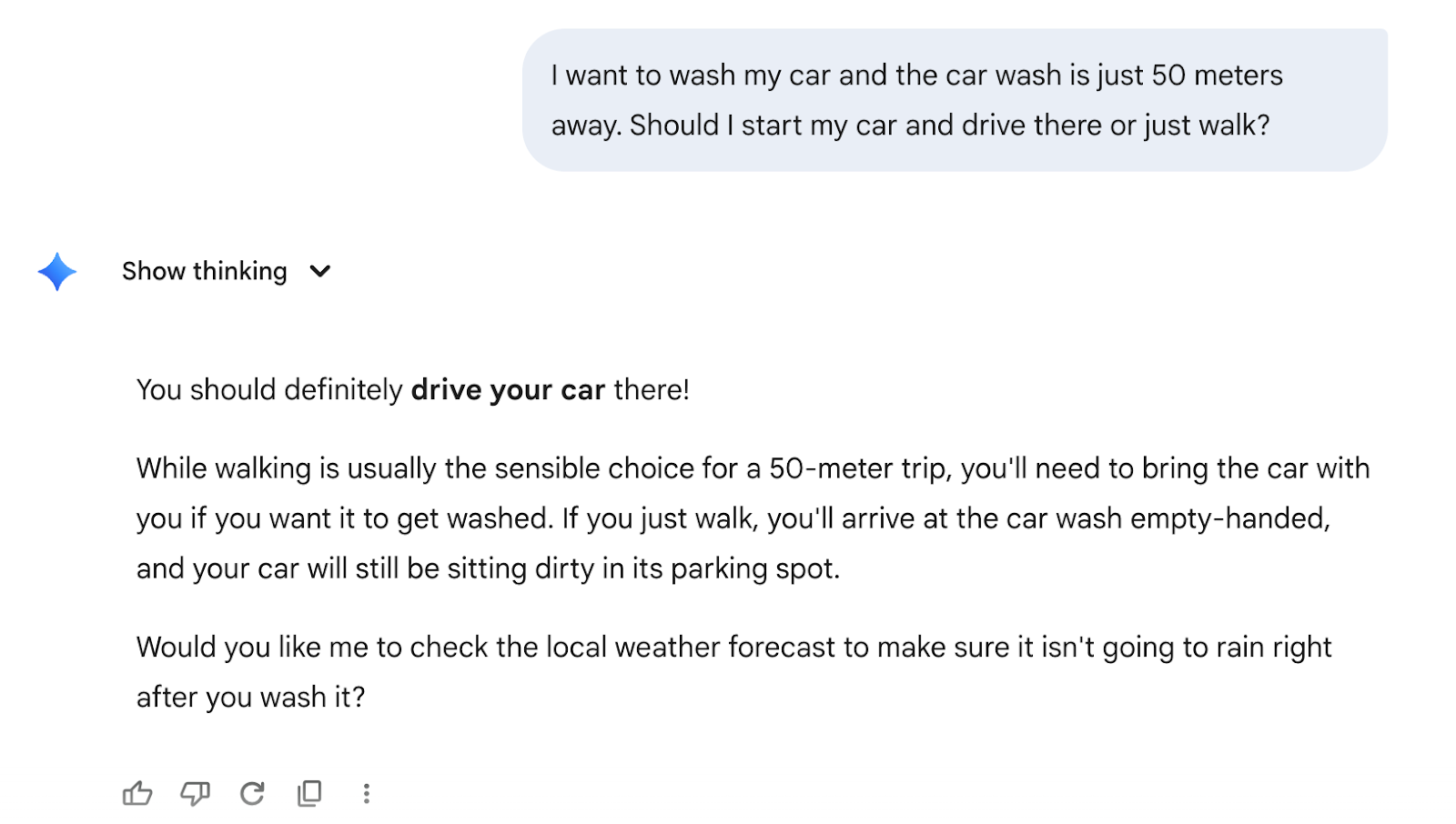
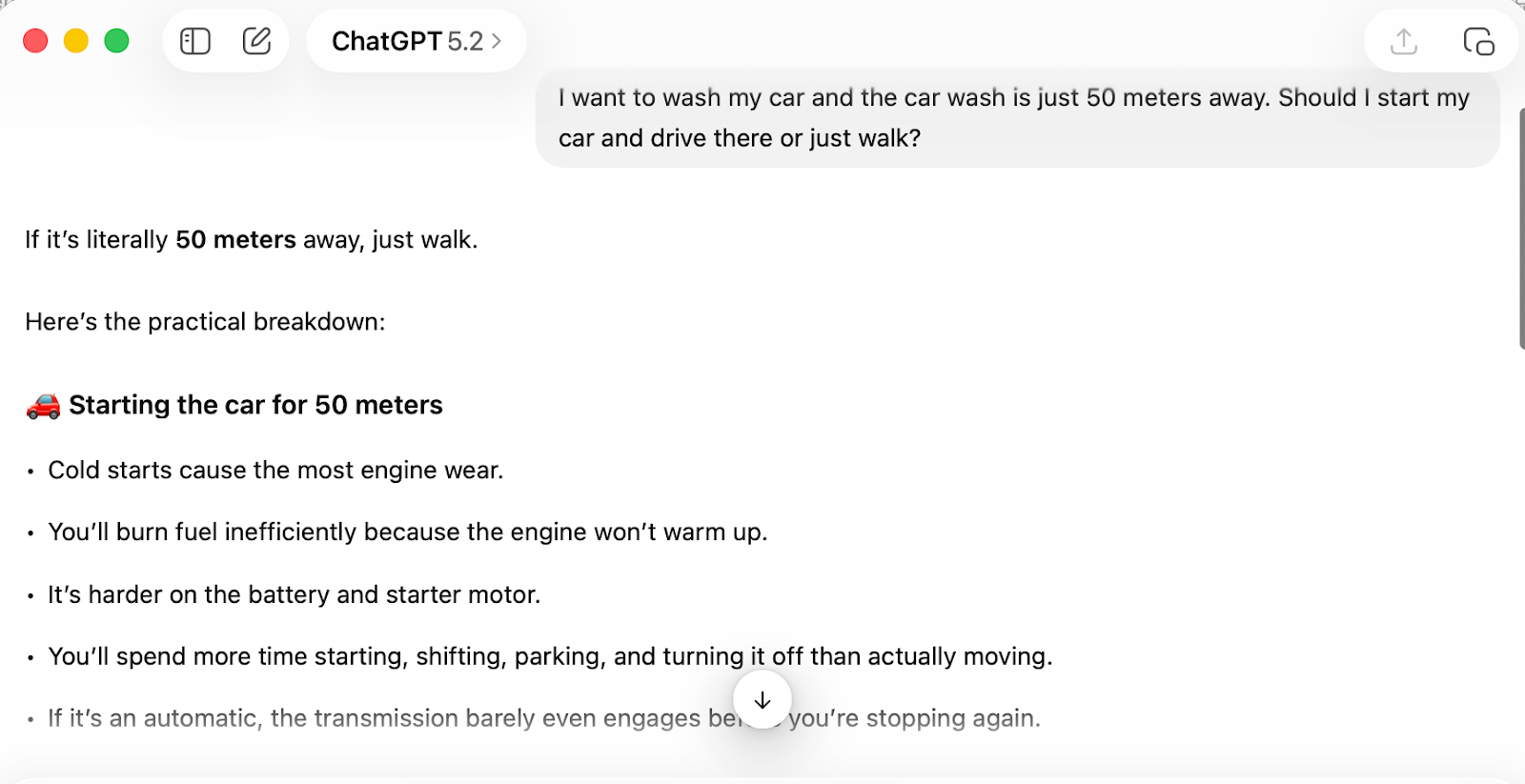
In the early hours of February 13, 2026, Google officially released Gemini 3 Deep Think, a major upgrade I’ll (tentatively) call the strongest research and reasoning model on the planet. After all, Gemini was the only model that passed the car wash test: “I want to wash my car and the car wash is just 50 meters away. Should I start my car and drive there or just walk?”
Its core strength is top-tier reasoning and competition performance: it hit 3455 Elo on Codeforces, equivalent to the world’s eighth-best competitive programmer. It reached gold-medal standard on the written portions of the 2025 International Physics, Chemistry, and Math Olympiads. Cost efficiency is another breakthrough. ARC-AGI-1 runs at just $7.17 per task, a 280x to 420x reduction compared to OpenAI’s o3-preview from 14 months earlier. On the applied side, Deep Think’s biggest gains are in scientific research. Experts are already using it for peer review of professional mathematics papers and for optimizing complex crystal growth preparation workflows.
MiniMax M2.5 competes on cost and speed for production workloads
The same day, MiniMax released M2.5, positioning it as the cost- and efficiency-champion for production use cases.
As one of the fastest-iterating model families in the industry, M2.5 sets new SOTA results across coding, tool calling, search, and office productivity. Cost is its biggest selling point: the fast version runs at roughly 100 TPS, with input priced at 2.40 per million tokens. The 50 TPS version cuts output cost by another half. Speed improved 37% over the previous M2.1, and it completes SWE-bench Verified tasks in an average of 22.8 minutes, roughly matching Claude Opus 4.6. On the capability side, M2.5 supports full-stack development in over 10 languages, including Go, Rust, and Kotlin, covering everything from zero-to-one system design to full code review. For office workflows, its Office Skills feature integrates deeply with Word, PPT, and Excel. When combined with domain knowledge in finance and law, it can generate research reports and financial models that are ready for direct use.
That’s the high-level overview. Next, let’s look at how they actually perform in hands-on tests.
Hands-On Comparisons
3D scene rendering: Gemini 3 Deep Think produces the most realistic results
We took a prompt that users had already tested on Gemini 3 Deep Think and ran it through GLM-5 and MiniMax M2.5 for a direct comparison. The prompt: build a complete Three.js scene in a single HTML file that renders a fully 3D interior room indistinguishable from a classical oil painting in a museum.

Gemini 3 Deep Think
GLM-5
MiniMax M2.5
Gemini 3 Deep Think delivered the strongest result. It accurately interpreted the prompt and generated a high-quality 3D scene. Lighting was the standout: shadow direction and falloff looked natural, clearly conveying the spatial relationship of natural light coming through a window. Fine details were impressive too, including the half-melted texture of candles and the material quality of red wax seals. Overall visual fidelity was high.
GLM-5 produced detailed object modeling and texture work, but its lighting system had noticeable issues. Table shadows rendered as hard, pure-black blocks without soft transitions. The wax seal appeared to float above the table surface, failing to handle the contact relationship between objects and the tabletop correctly. These artifacts point to room for improvement in global illumination and spatial reasoning.
MiniMax M2.5 couldn’t parse the complex scene description effectively. The output was just disordered particle motion, indicating significant limitations in both comprehension and generation when handling multi-layered semantic instructions with precise visual requirements.
SVG generation: all three models handle it differently

Prompt: Generate an SVG of a California brown pelican riding a bicycle. The bicycle must have spokes and a correctly shaped bicycle frame. The pelican must have its characteristic large pouch, and there should be a clear indication of feathers. The pelican must be clearly pedaling the bicycle. The image should show the full breeding plumage of the California brown pelican.
Gemini 3 Deep Think

Gemini 3 Deep Think
GLM-5

GLM-5
MiniMax M2.5

MiniMax M2.5
Gemini 3 Deep Think produced the most complete SVG overall. The pelican’s riding posture is accurate: its center of gravity sits naturally on the seat, and its feet rest on the pedals in a dynamic cycling pose. Feather texture is detailed and layered. The one weak spot is that the pelican’s signature throat pouch is drawn too large, which throws off the overall proportions slightly.
GLM-5 had noticeable posture issues. The feet are placed correctly on the pedals, but the overall sitting position drifts away from a natural riding posture, and the body-to-seat relationship looks off. That said, its detail work is solid: the throat pouch is proportioned well, and the feather texture quality is respectable.
MiniMax M2.5 went with a minimalist style and skipped background elements entirely. The pelican’s position on the bicycle is roughly correct, but the detail work falls short. The handlebars are the wrong shape, the feather texture is almost nonexistent, the neck is too thick, and there are stray white oval artifacts in the image that shouldn’t be there.
How to Choose Between GLM-5, MiniMax M2.5 and Gemin 3 Deep Think
Across all our tests, MiniMax M2.5 was the slowest to generate output, requiring the longest time for thinking and reasoning. GLM-5 performed consistently and was roughly on par with Gemini 3 Deep Think in speed.
Here’s a quick selection guide we put together:
| Core Use Case | Recommended Model | Key Strengths |
|---|---|---|
| Scientific research, advanced reasoning (physics, chemistry, math, complex algorithm design) | Gemini 3 Deep Think | Gold-medal performance in academic competitions. Top-tier scientific data verification. World-class competitive programming on Codeforces. Proven research applications, including identifying logical flaws in professional papers. (Currently limited to Google AI Ultra subscribers and select enterprise users; per-task cost is relatively high.) |
| Open-source deployment, enterprise intranet customization, full-stack development, office skills integration | Zhipu GLM-5 | Top-ranked open-source model. Strong system-level engineering capabilities. Supports local deployment with manageable costs. |
| Cost-sensitive workloads, multi-language programming, cross-platform development (Web/Android/iOS/Windows), office compatibility | MiniMax M2.5 | At 100 TPS: 2.40 per million output tokens. SOTA across office, coding, and tool-calling benchmarks. Ranked first on the Multi-SWE-Bench. Strong generalization. Pass rates on Droid/OpenCode exceed Claude Opus 4.6. |
RAG Tutorial: Wire Up GLM-5 with Milvus for a Knowledge Base
Both GLM-5 and MiniMax M2.5 are available through OpenRouter. Sign up and create an OPENROUTER_API_KEY to get started.
This tutorial uses Zhipu’s GLM-5 as the example LLM. To use MiniMax instead, just swap the model name to minimax/minimax-m2.5.
Dependencies and environment setup
Install or upgrade pymilvus, openai, requests, and tqdm to their latest versions:
pip install --upgrade pymilvus openai requests tqdm
This tutorial uses GLM-5 as the LLM and OpenAI’s text-embedding-3-small as the embedding model.
import os
os.environ["OPENROUTER_API_KEY"] = "**********"
Data preparation
We’ll use the FAQ pages from the Milvus 2.4.x documentation as our private knowledge base.
Download the zip file and extract the docs into a milvus_docs folder:
wget https://github.com/milvus-io/milvus-docs/releases/download/v2.4.6-preview/milvus_docs_2.4.x_en.zip
unzip -q milvus_docs_2.4.x_en.zip -d milvus_docs
Load all the Markdown files from milvus_docs/en/faq. We split each file on "# " to roughly separate the content by major sections:
from glob import glob
text_lines = []
for file_path in glob("milvus_docs/en/faq/*.md", recursive=True):
    with open(file_path, "r") as file:
        file_text = file.read()
    text_lines += file_text.split("# ")
LLM and embedding model setup
We’ll use GLM-5 as the LLM and text-embedding-3-small as the embedding model:
from openai import OpenAI
glm_client = OpenAI(
    api_key=os.environ["OPENROUTER_API_KEY"],
    base_url="https://openrouter.ai/api/v1",
)
Generate a test embedding and print its dimensions and first few elements:
EMBEDDING_MODEL = "openai/text-embedding-3-small"  # OpenRouter embedding model
resp = glm_client.embeddings.create(
    model=EMBEDDING_MODEL,
    input=["This is a test1", "This is a test2"],
)
test_embeddings = [d.embedding for d in resp.data]
embedding_dim = len(test_embeddings[0])
print(embedding_dim)
print(test_embeddings[0][:10])
Output:
1536
[0.010637564584612846, -0.017222722992300987, 0.05409347265958786, -0.04377825930714607, -0.017545074224472046, -0.04196695610880852, -0.0011963422875851393, 0.03837504982948303, 0.0008855042979121208, 0.015181170776486397]
Load data into Milvus
Create a collection:
from pymilvus import MilvusClient
milvus_client = MilvusClient(uri="./milvus_demo.db")
collection_name = "my_rag_collection"
A note on MilvusClient configuration:
-
Setting the URI to a local file (e.g.,
./milvus.db) is the simplest option. It automatically uses Milvus Lite to store all data in that file. -
For large-scale data, you can deploy a more performant Milvus server on Docker or Kubernetes. In that case, use the server URI (e.g.,
http://localhost:19530). -
To use Zilliz Cloud (the fully managed cloud version of Milvus), set the URI and token to the Public Endpoint and API key from your Zilliz Cloud console.
Check whether the collection already exists, and drop it if so:
if milvus_client.has_collection(collection_name):
    milvus_client.drop_collection(collection_name)
Create a new collection with the specified parameters. If you don’t provide field definitions, Milvus automatically creates a default id field as the primary key and a vector field for vector data. A reserved JSON field stores any fields and values not defined in the schema:
milvus_client.create_collection(
    collection_name=collection_name,
    dimension=embedding_dim,
    metric_type="COSINE",
    consistency_level="Strong",
)
Insert data
Iterate through the text lines, generate embeddings, and insert the data into Milvus. The text field here isn’t defined in the schema. It’s automatically added as a dynamic field backed by Milvus’s reserved JSON field:
from tqdm import tqdm
data = []
resp = glm_client.embeddings.create(model=EMBEDDING_MODEL, input=text_lines)
doc_embeddings = [d.embedding for d in resp.data]
for i, line in enumerate(tqdm(text_lines, desc="Creating embeddings")):
    data.append({"id": i, "vector": doc_embeddings[i], "text": line})
milvus_client.insert(collection_name=collection_name, data=data)
Output:
Creating embeddings: 100%|██████████████████████████| 72/72 [00:00<00:00, 125203.10it/s]
{'insert_count': 72, 'ids': [0, 1, 2, ..., 71], 'cost': 0}
Build the RAG pipeline
Retrieve relevant documents:
Let’s ask a common question about Milvus:
question = "How is data stored in milvus?"
Search the collection for the top 3 most relevant results:
resp = glm_client.embeddings.create(model=EMBEDDING_MODEL, input=[question])
question_embedding = resp.data[0].embedding
search_res = milvus_client.search(
    collection_name=collection_name,
    data=[question_embedding],
    limit=3,
    search_params={"metric_type": "COSINE", "params": {}},
    output_fields=["text"],
)
Results are sorted by distance, nearest first:
import json

retrieved_lines_with_distances = [
    (res["entity"]["text"], res["distance"]) for res in search_res[0]
]
print(json.dumps(retrieved_lines_with_distances, indent=4))

[
    [
        " Where does Milvus store data?\n\nMilvus deals with two types of data, inserted data and metadata. \n\nInserted data, including vector data, scalar data, and collection-specific schema, are stored in persistent storage as incremental log. Milvus supports multiple object storage backends, including MinIO, AWS S3, Google Cloud Storage (GCS), Azure Blob Storage, Alibaba Cloud OSS, and Tencent Cloud Object Storage (COS).\n\nMetadata are generated within Milvus. Each Milvus module has its own metadata that are stored in etcd.\n\n###",
        0.7826977372169495
    ],
    [
        "How does Milvus handle vector data types and precision?\n\nMilvus supports Binary, Float32, Float16, and BFloat16 vector types.\n\n- Binary vectors: Store binary data as sequences of 0s and 1s, used in image processing and information retrieval.\n- Float32 vectors: Default storage with a precision of about 7 decimal digits. Even Float64 values are stored with Float32 precision, leading to potential precision loss upon retrieval.\n- Float16 and BFloat16 vectors: Offer reduced precision and memory usage. Float16 is suitable for applications with limited bandwidth and storage, while BFloat16 balances range and efficiency, commonly used in deep learning to reduce computational requirements without significantly impacting accuracy.\n\n###",
        0.6772387027740479
    ],
    [
        "How much does Milvus cost?\n\nMilvus is a 100% free open-source project.\n\nPlease adhere to Apache License 2.0 when using Milvus for production or distribution purposes.\n\nZilliz, the company behind Milvus, also offers a fully managed cloud version of the platform for those that don't want to build and maintain their own distributed instance. Zilliz Cloud automatically maintains data reliability and allows users to pay only for what they use.\n\n###",
        0.6467022895812988
    ]
]
Generate a response with the LLM:
Combine the retrieved documents into a context string:
context = "\n".join(
    [line_with_distance[0] for line_with_distance in retrieved_lines_with_distances]
)
Set up the system and user prompts. The user prompt is built from the documents retrieved from Milvus:
SYSTEM_PROMPT = """
Human: You are an AI assistant. You can find answers to the questions in the contextual passage snippets provided.
"""
USER_PROMPT = f"""
Use the following pieces of information enclosed in <context> tags to provide an answer to the question enclosed in <question> tags.
<context>
{context}
</context>
<question>
{question}
</question>
"""
Call GLM-5 to generate the final answer:
response = glm_client.chat.completions.create(
    model="z-ai/glm-5",
    messages=[
        {"role": "system", "content": SYSTEM_PROMPT},
        {"role": "user", "content": USER_PROMPT},
    ],
)
print(response.choices[0].message.content)
GLM-5 returns a well-structured answer:
Based on the provided context, Milvus stores data in two main ways, depending on the data type:

1. Inserted Data
   - What it includes: vector data, scalar data, and collection-specific schema.
   - How it is stored: in persistent storage as an incremental log.
   - Storage Backends: Milvus supports multiple object storage backends, including MinIO, AWS S3, Google Cloud Storage (GCS), Azure Blob Storage, Alibaba Cloud OSS, and Tencent Cloud Object Storage (COS).
   - Vector Specifics: vector data can be stored as Binary vectors (sequences of 0s and 1s), Float32 vectors (default storage), or Float16 and BFloat16 vectors (offering reduced precision and memory usage).

2. Metadata
   - What it includes: data generated within Milvus modules.
   - How it is stored: in etcd.
Conclusion: Pick the Model, Then Build the Pipeline
All three models are strong, but they’re strong at different things. Gemini 3 Deep Think is the pick when reasoning depth matters more than cost. GLM-5 is the best open-source option for teams that need local deployment and system-level engineering. MiniMax M2.5 makes sense when you’re optimizing for throughput and budget across production workloads.
The model you choose is only half the equation. To turn any of these into a useful application, you need a retrieval layer that can scale with your data. That’s where Milvus fits in. The RAG tutorial above works with any OpenAI-compatible model, so swapping between GLM-5, MiniMax M2.5, or any future release takes a single line change.
If you’re designing local or on-prem AI agents and want to discuss storage architecture, session design, or safe rollback in more detail, feel free to join our Slack channel.You can also book a 20-minute one-on-one through Milvus Office Hours for personalized guidance.
If you want to go deeper into building AI Agents, here are more resources to help you get started.









