

When you boot up Android Auto, or nestle your phone into a car cradle, you probably use Google Maps for your navigation. But that dedication is about to be put to the test with the introduction of some great new features from Waze.
Famous for its community-led approach to traffic and other obstructions, Waze is the other Google-owned navigation app. And starting soon, you’ll be able to see a lot more on your Waze app.
Better directions and more alerts
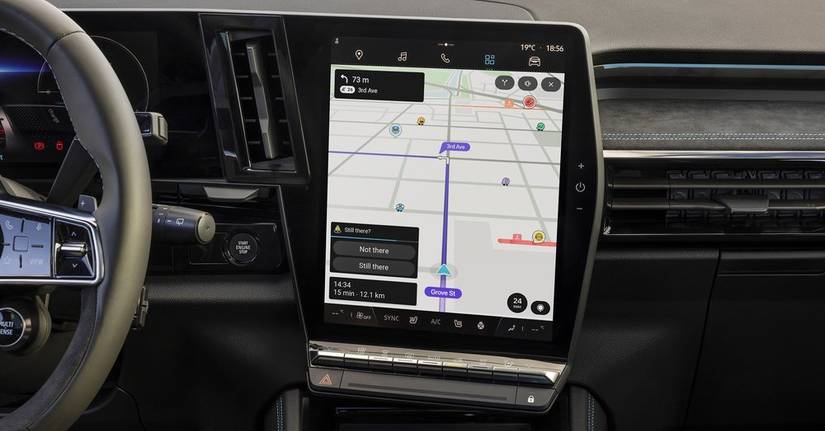
A lot of these additions have been announced before, and have been dribbling out into other territories around the world, but you shoudl soon be seeing the following features landing on your Waze app.
- More alerts about the roads ahead, including sharp bends, tolls, and speed bumps.
- Speed limit decreases ahead.
- Roundabout instructions.
- Emergency vehicles on your route.
The last feature is supposed to come to the US, Canada, Mexico and France first, but a Redditor from the Netherlands claims it’s been available there already for some time, so it’s possible you might have already seen some of these.
Waze will also be adding support for “favorite routes”. This will mean it’ll suggest routes you like to drive, while also offering other routes that may be slightly faster. Ever had your directions bring you off a freeway at an exit only to go back on again because it’s a minute faster? The favorite routes feature will hopefully fix that annoying tendency.
It’s easy for this approach to alerts to become a bad thing, though. Waze’s entire model rests on drivers adding new obstructions and problems to its maps, which often means they’ll need to be added mid-drive. While it’s far safer to let a passenger do it, many drivers will likely use Waze’s hands-free voice reporting.
This is obviously safer than pawing at a screen, but it’s still a distraction, and too many distractions could be disastrous. As such, adding more alerts means more distractions, which, well, aren’t good.
However, it’s worth thinking of Waze as a collection of customizable alerts, rather than an all-or-nothing. Check out the new additions, take out whatever doesn’t work for you, and roll with whatever does.
Waze is often thought to have the best directions and time estimates when compared to other apps, but it can be a little overzealous with the alerts. If it’s your first time with Waze, then make sure to check out your alert settings before you begin.










