
Sam Boyd
Updated on: January 10, 2026
Fact-checked by Katarina Glamoslija
-
🥇 Norton
— Excellent antivirus with more advanced parental controls than many standalone parental control apps, including content filtering, time supervision, location tracking, and more. Norton’s 360 Deluxe plan offers antivirus protection for up to 5 devices, parental controls for 10 devices, and a risk-free 60-day money-back guarantee.
Kids are spending more time online than ever before. As a parent, keeping them safe from hackers, predators, and harmful content is harder than it’s ever been. Not only do you need to limit their screen time, but you also need to protect them from phishing scams and malware. You might think a standalone parental control app is enough — but it’s not.
Standalone parental control apps can’t fully protect your child online. They’re great for setting screen time limits or blocking certain apps, but they lack essential cybersecurity tools to defend against malware, phishing, and unsafe websites. A top-tier antivirus with built-in parental controls gives you both safety and supervision in one package.
After testing dozens of apps, I found 5 antivirus programs with excellent parental controls — including web and app filtering, location tracking, screen time management, and real-time malware protection. These antiviruses give you the right balance between digital safety and healthy device use.
My top choice, Norton 360 Deluxe, offers perfect malware detection rates, and it has the most comprehensive bundled parental controls of any antivirus I tested. That said, any of the options on my list are a good choice for ensuring your kids are protected from the dangers of the digital world.
Quick Summary of the Best Antiviruses With Parental Controls



300+ people found the right antivirus today
Editor’s Note: Intego and this site are in the same ownership group.
🥇 1. Norton 360 Deluxe — Best Antivirus Software With Parental Controls in 2026
Approved by our experts


Norton 360 Deluxe is my top choice for protecting kids from online threats in 2026. It combines powerful antivirus protection with excellent parental controls that consistently rank high on our list of the top parental control apps in 2026. Norton scored a perfect 100% malware detection rate in my tests, and its Safe Family parental control suite makes it easy to manage your kids’ online activities across Windows, Android, and iOS.
- Age-based restriction levels
- Reliable school-time scheduling
- Detailed app supervision
- AI-powered Scam Protection
- Doesn’t support macOS
Norton’s parental controls are straightforward to use. I had no problem checking notifications and adjusting settings for my test devices. You’ll also appreciate the 4 built-in restriction levels based on your kid’s age. Each is associated with an extensive set of rules that vary in their strictness. It’s also easy to create a custom rule set based on your best judgment.
Norton’s parental controls include:
- Screen time management.
- School Time scheduling.
- YouTube/video monitoring.
- Content filtering.
- Website & app supervision.
- Location tracking.
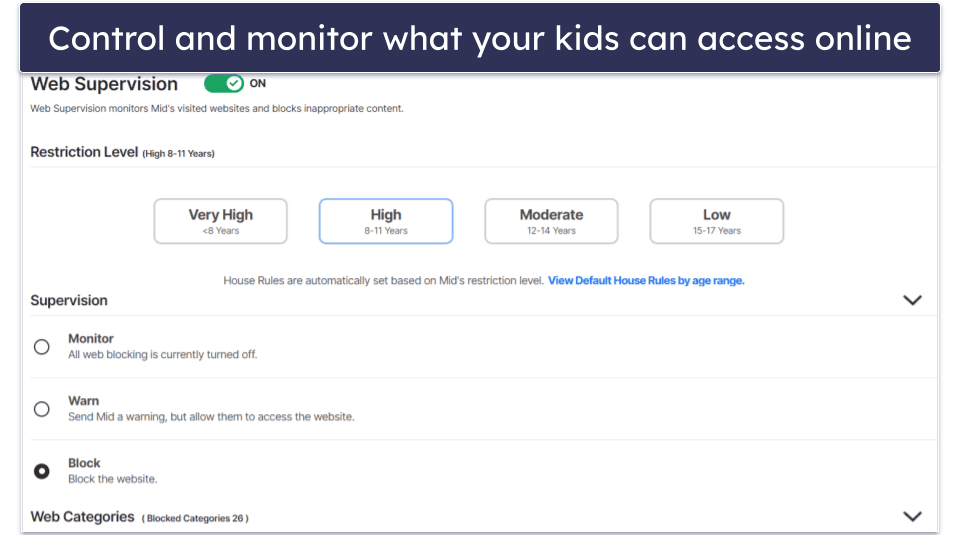
The School Time scheduling feature is great. It allows you to restrict certain websites during scheduled “school hours” without impacting access to educational content. For example, you can prevent your kid from accessing things like YouTube, Snapchat, and Roblox during school hours, but still give them access to school-based websites. That said, I noted that while School Time also works on iOS, functionality is a bit more limited — kids can bypass it more easily compared to Apple’s built-in Screen Time controls.
Norton also lets you restrict, filter, and manage what your kids can access online. This includes monitoring what they search for, the apps they download, and the sites they visit. Plus, kids can request access to sites you’ve blocked — leaving some negotiating room with older kids where appropriate.
I also appreciate that Norton lets you monitor your child’s YouTube activity, including what they search for and the videos they watch. Unfortunately, this only works for YouTube when it’s accessed through a web browser. Norton can’t track any videos viewed inside the YouTube app, which is what most kids use.
Norton also prevents tampering — your child can’t uninstall or disable it without your approval. However, its web filtering relies on browser extensions, meaning tech-savvy teens could disable it if they wanted. Thankfully, Norton notifies you instantly if that happens.
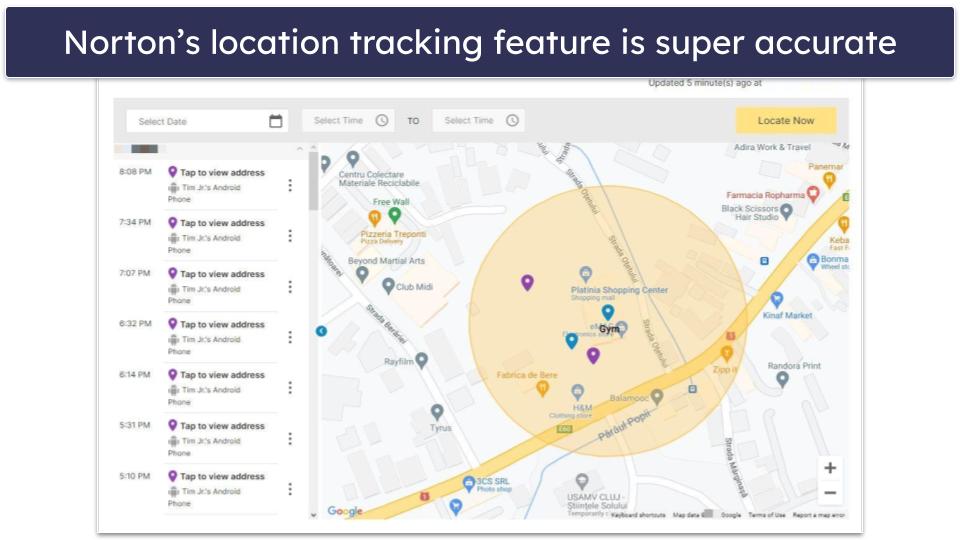
The location tracker is another helpful feature — it lets you see your kids’ locations in real-time and includes geo-fencing, which alerts you if your kid leaves a defined radius. A handy check-in feature lets your kid easily send you their location on their phone with just a few taps. And it’s great that you can check your child’s location timeline as far back as 30 days. That said, you must make sure GPS permissions are enabled on your child’s device — Norton can’t track their location without it.
The only downside is that Norton’s parental controls don’t work on macOS — so if your kids regularly use Mac computers, you should look at Intego, or consider using Norton alongside a standalone parental control app like Qustodio.
The parental controls are included free with the Norton 360 Deluxe plan (£29.99 / year), and you can monitor 10 kids’ devices using them. This plan also includes a powerful malware scanner, a VPN with unlimited browsing data (one of the best VPN-antivirus bundles), web browsing protections, system cleanup tools, and more. Norton 360 Deluxe offers its antivirus tools for up to 5 devices and has a 60-day money-back guarantee. Note that while Norton’s parental controls are included with plans like Norton 360 Deluxe, you must download Norton Family as a completely separate app — you won’t find parental controls inside the main Norton 360 antivirus interface.
Bottom Line:
Norton 360 Deluxe has the best antivirus-bundled parental controls on the market, and the antivirus scanner scored a perfect 100% detection rate in my tests. Norton’s parental controls include different restriction levels based on age, time supervision, content filtering, and even location tracking. Its intuitive parental control apps make it simple to manage settings and notifications, and you can monitor up to 10 kids’ devices (its antivirus tools are available for up to 5 family devices). All Norton plans come with a risk-free 60-day money-back guarantee.
Read the full Norton review here >
🥈 2. Bitdefender — Cloud-Based Antivirus With Excellent Parental Controls


Bitdefender includes one of the most lightweight antivirus scanners on the market and some excellent parental controls. It scored 100% in my malware-detection tests and didn’t slow any of my devices down during scanning.
- Lightweight cloud-based scanner
- Offers internet time rewards
- Includes device optimization tools
- Kids can’t request site access
When it comes to parental controls, Bitdefender offers:
- Website & content filtering.
- App monitoring.
- Screen time limits.
- Location tracking.
- Internet time reward system.
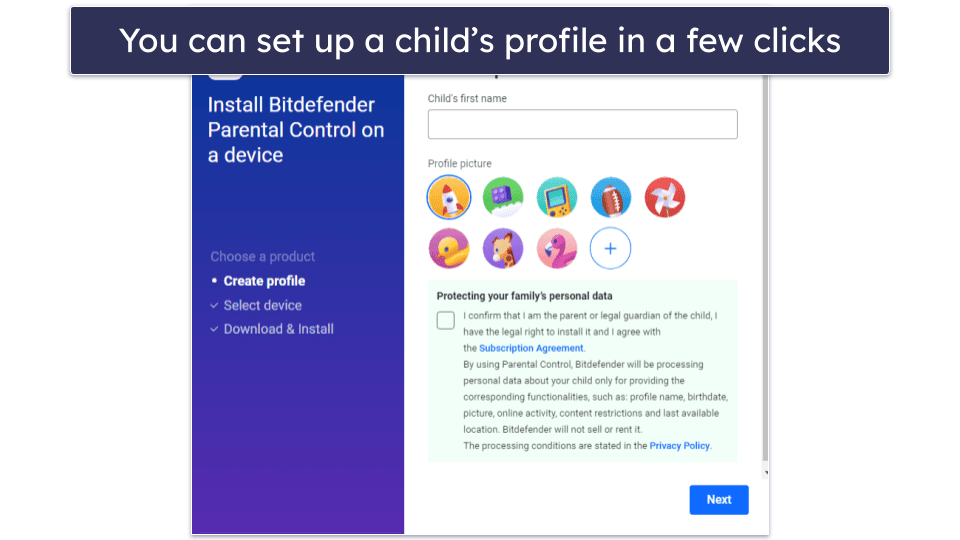
It didn’t take me long to get Bitdefender’s parental controls running smoothly, and all the features worked well. Setting up a child’s profile was also straightforward and streamlined — it only took a few clicks. Parents can assign different restrictions per child and choose from pre-set rules or create custom ones. Since Bitdefender uses a local VPN on your child’s device to filter web content and block inappropriate sites, you’ll need to grant VPN permissions during setup.
I was particularly impressed with the location tracking, which pinpointed my test device’s location to a few meters. Like Norton, Bitdefender makes it easy for kids to send notifications with their location throughout the day.

Bitdefender’s content filtering is excellent — you can allow or block specific sites or choose to filter them by category, and it successfully blocked all inappropriate sites during my tests. However, I wish your kid could request access to a blocked site via the app (Norton has this feature, and it’s super helpful when something gets unintentionally blocked).
I found Bitdefender’s internet time reward system very convenient. It allows you to give your child extra online time as a reward when they complete tasks or meet goals, such as finishing their homework or chores. It’s a simple way to encourage good habits while keeping screen time under control.
Bitdefender’s parental controls are only included in its Family plans (Total Security Family, Premium Security Family, and Ultimate Security Family), not the standard individual subscriptions. The family plans include content filtering, screen-time limits, app controls, location tracking, and activity reports. In contrast, individual Total Security (£40.00 / year) and Premium Security (£49.99 / year) plans do not include parental controls — they focus on device protection features like advanced web protection, system optimization, password manager access, and VPN (200 MB/day on Total Security, unlimited on Premium). All Bitdefender plans are covered by a 30-day money-back guarantee.
Bottom Line:
Bitdefender is a lightweight antivirus with great malware protection and a well-designed parental control suite. It includes everything most parents need — from app blocking and screen time limits to reliable content controls and accurate location tracking. While I wish it offered access requests for blocked content, it’s still an excellent all-in-one choice for families who want strong protection and easy setup. Bitdefender’s plans come with a 30-day money-back guarantee.
Read the full Bitdefender review here >
🥉 3. McAfee+ Premium Family — Intuitive Parental Controls + ID Theft Monitoring


McAfee+ Premium Family is a comprehensive internet security suite with good parental controls, including top-quality location tracking features. During my tests, McAfee’s malware scanner detected every single malware file on my PC and Android tablet, and its web protections are top-notch, blocking more fraudulent sites than Chrome’s built-in ones. However, unlike Bitdefender and Norton, McAfee’s scanner did slow down my devices slightly when running in the background.
- Easy parental control setup
- Quick location update button
- Includes ID theft protection
- Slight device slowdowns
- No Mac parental controls
McAfee’s parental controls (Safe Family) include:
- Location tracking and geo-fencing.
- Device and app usage monitoring.
- Website, app, and content filtering.
- Flexible screen-time scheduling.
- Multi-parent control.
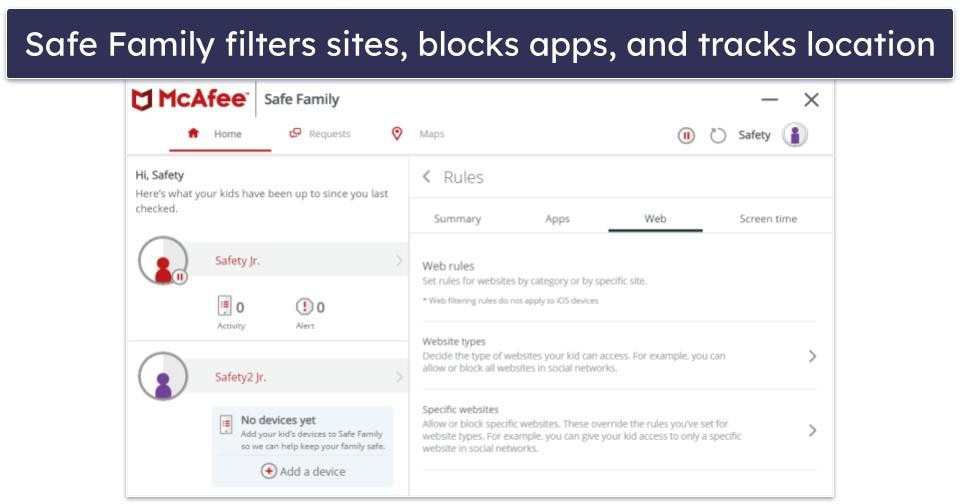
McAfee’s website, app, and content filtering work well and are easy to set up and use. In my tests, they blocked the majority of inappropriate websites I tried to access — this included violent websites, social media websites, and websites promoting hate speech. I could also block violent video games that I didn’t want kids playing (like Call of Duty) — which is super cool! However, McAfee does this using the game’s built-in content rating tags rather than AI or keyword detection, so it’s only reliable for games that are correctly rated. Newly released or improperly tagged games might go unnoticed.
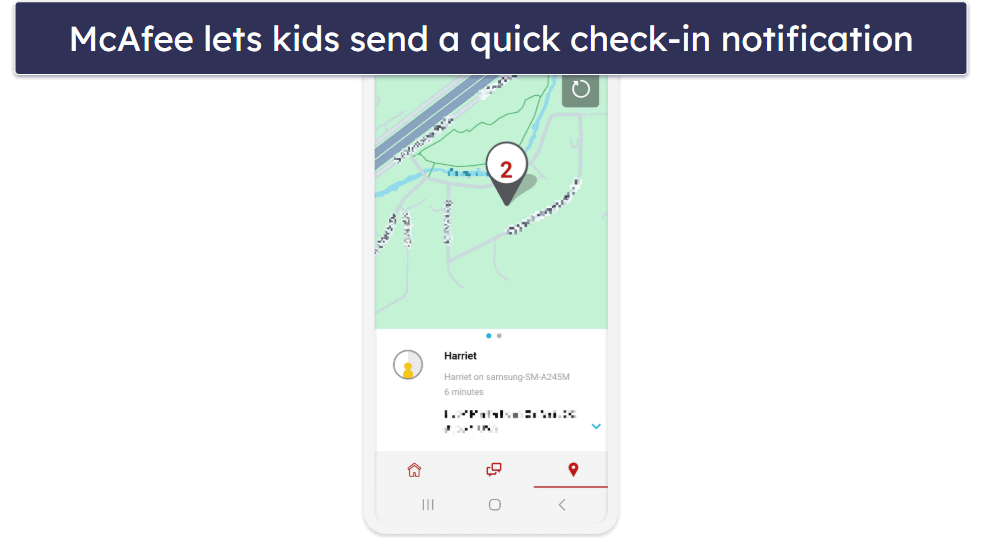
I could accurately see where my test device was on an interactive map. Geo-fencing alerts notify you when your child arrives at and leaves specific locations, such as school or a friend’s house. And like Norton and Bitdefender, there is a quick-update button that allows your kids to notify you of their location easily.
However, McAfee’s parental controls are only compatible with Windows, Android, and iOS devices — not Mac computers. If you need to protect a MacBook, I suggest using Intego’s dedicated Mac antivirus or a standalone parental control app that works with Mac, like Qustodio.
McAfee+ Premium Family (£39.99 / year) includes parental controls, but you also get additional features like a VPN with unlimited data, a password manager, and a range of ID theft protection tools. The plan is covered by a 30-day money-back guarantee.

Bottom Line:
McAfee+ Premium Family is an excellent internet security suite. Its malware scanner detected all of the malware on my devices. I was particularly impressed with McAfee’s location tracking feature, which allows you to monitor your kid’s location at all times. McAfee Premium Family covers unlimited devices and has a 30-day money-back guarantee.
Read the full McAfee review here >
4. Intego Mac Premium Bundle X9 — Best for Mac Users


Intego Mac Premium Bundle X9 is my favorite antivirus with parental controls for Mac computers — it’s excellent at detecting Mac-specific malware, and its parental controls are a vast improvement on Apple’s built-in parental controls. Although Norton, Bitdefender, and most other antiviruses have Mac compatibility, they’re primarily built for Windows, leaving their Mac apps lacking key features. Intego, on the other hand, has built an antivirus dedicated to macOS — and it’s the best Mac-specific antivirus on the market in 2026.
- Built specifically for macOS
- Anti-predator chat monitoring
- Advanced system cleaner included
- No location tracking
- Doesn’t filter WhatsApp chats
Intego’s parental controls, called ContentBarrier, include:
- Content filtering.
- Device usage scheduling.
- Anti-predator chat monitoring.
- App internet-access blocking.
- And more…
Intego blocks sites based on dozens of filter categories — from sexual content to online shopping — so you can tailor your child’s access to online content with much more control. In comparison, Apple’s built-in content filters only offer the ability to “block adult websites”. Just note that ContentBarrier doesn’t sync settings across devices, so if you have multiple Macs, you’ll need to set up and customize the rules on each one separately.
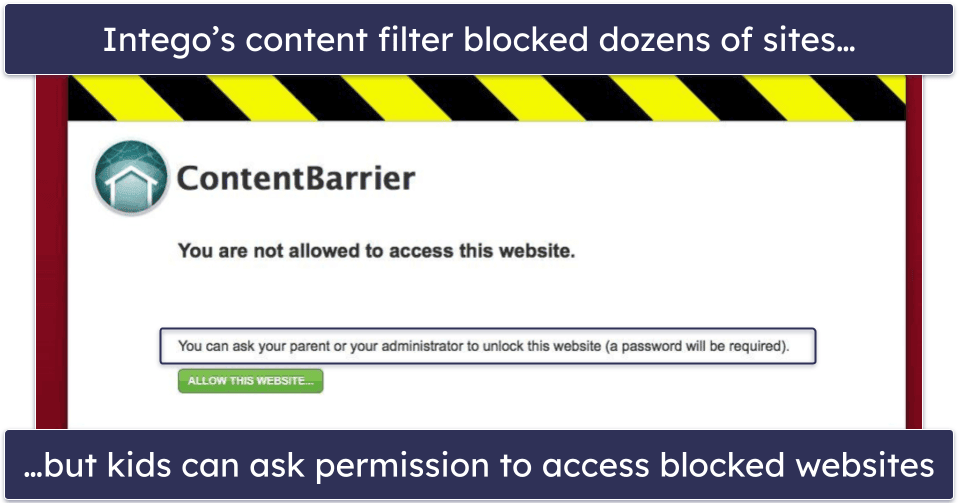
I was impressed with Intego’s anti-predator feature. Intego monitors all incoming and outgoing messages for unsafe language — which you can pre-define and add as many words to as you wish — and then Intego automatically blocks any incoming or outgoing messages with these keywords and sends you an alert. However, the monitoring only checks text — it doesn’t analyze images, emojis, or modern slang, so parents may need to update keyword lists regularly. Additionally, you won’t be able to set it up to filter WhatsApp chats. If this feature is important to you, I suggest you look at these hand-picked parental control apps for WhatsApp.
Intego also includes screen recording and keystroke monitoring tools, which are handy if you’re worried about serious issues like cyberbullying or potentially harmful conversations. I recommend using these features carefully — especially with older kids and teenagers — and having an open conversation with them instead of monitoring secretly.
While it has some great and rare features, Intego doesn’t offer location tracking or geo-fencing. This is a huge letdown, especially as these features are standard on McAfee, Norton, and every other parental control app on this list. That said, if you’ve previously set up Family Sharing on your Apple account, you can find your child’s device with Find My, so Intego’s shortcoming in this area isn’t a dealbreaker.
I also noticed that the setup process is a bit more involved than other parental control apps I’ve tested, but once everything is configured, Intego works smoothly.
Intego’s Mac Premium Bundle X9 (£27.99 / year) includes parental controls, malware scanning, web protections, and advanced system cleanup. It covers up to 5 Macs on 1- or 2-year plans and has a 30-day money-back guarantee.
Bottom Line:
Intego Mac Premium Bundle is the best antivirus for Mac users who want strong malware protection and reliable parental controls. Its ContentBarrier module provides parents with detailed oversight of web, app, and chat activity, offering a significant improvement over macOS’s built-in controls. It’s a great all-Mac solution backed by a 30-day money-back guarantee.
Read the full Intego review here >
Editor’s Note: Intego and this site are in the same ownership group.
5. Panda Dome Advanced — Intuitive Antivirus With Parental Controls


Panda Dome Advanced is a user-friendly antivirus that offers solid malware protection with basic Windows parental controls, but to get access to mobile parental controls, you have to buy the Family license. In my tests, its malware engine caught over 95% of my test malware, and its real-time protection scored 100%. Although its malware engine isn’t quite as good as Norton or Bitdefender, which both achieved 100% malware detection rates, Panda still offers good protection against most malware threats.
- Includes panic button
- Unlimited device coverage
- Included parental controls very limited
- Separate Windows & mobile options
Panda’s bundled parental control feature is limited to content filtering for Windows, but with the Family add-on, you also get access to:
- Location tracking & geo-fencing.
- Screen-time scheduling.
- Website, app, and content management.
- Panic button for emergency situations.
- And more…
I really like Panda’s location features. It has a real-time GPS location tracking feature that lets you see exactly where your children are. It also offers geo-fencing, so you can configure a “safe area” and be alerted whenever your child leaves it. Panda also includes a helpful “panic button” that lets kids instantly send an alert with their real-time location if they feel unsafe, giving you a fast way to respond in an emergency.

The screen-time scheduling is only basic, especially when compared to top standalone parental control products like Qustodio. However, the content filtering is very thorough — you can define a large number of categories that you want to block access to, and also add specific websites to block. Panda also lets you see exactly what your kids have been looking at, what they’ve been trying to access, and how long they’ve been spending online.
Panda’s parental controls don’t include more advanced features, like Intego’s anti-predator tools, or advanced functionality like Norton’s School Time or YouTube monitoring, but they’re decent and easy to use.
Panda Dome Advanced (£19.99 / year) includes parental controls, malware scanning, web protections, and a limited-data VPN for 1 to unlimited devices. Alternatively, the slightly more expensive Panda Dome Complete (£24.99 / year) adds system clean-up tools and a password manager, while Panda Dome Premium (£34.99 / year) adds to that dark web monitoring, an update manager, and round-the-clock tech support. Unfortunately, you have to buy the Family license to get access to the full complement of services. Every Panda plan is covered by a 30-day money-back guarantee.
Bottom Line:
Panda Dome Advanced provides good malware protection and practical Windows content filtering at an affordable price. The Family add-on’s location tracking and content filtering work well, though its time management tools are basic. It’s a good choice for parents who want simple online protection across unlimited devices, backed by a 30-day money-back guarantee.
Read the full Panda review here
Quick Comparison Table
Editor’s Note: Intego and this site are in the same ownership group.
Testing Methodology: Comparison & Ranking Criteria
To identify the best antivirus software with free parental controls, I adhered to our comprehensive testing methodology (both for antiviruses and parental controls). This approach involved hands-on testing to evaluate each antivirus program based on several key criteria:
- I paid special attention to malware protection. I looked for an antivirus and parental control combo that can protect against all types of malware while allowing me to monitor my kids’ online activity.
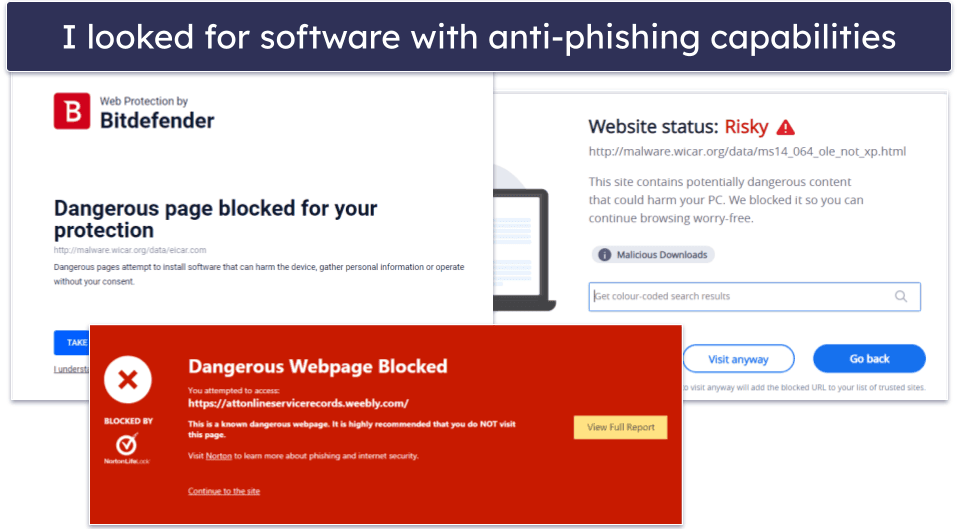
- I only included antiviruses with great web protections. Kids can be exposed to phishing, account hacking, and similar threats. The antiviruses on my list will keep your kid safe from fraudulent and phishing sites as they browse the web.

- I opted for user-friendly apps. The antivirus apps I recommend are very easy to set up and navigate for you and your kids. Plus, they all come with a money-back guarantee.
- I ensured that these apps offer features across various devices. I checked that the parental controls covered devices from personal smartphones and tablets to school-issued devices — so you can maintain consistent protection wherever your kids go.
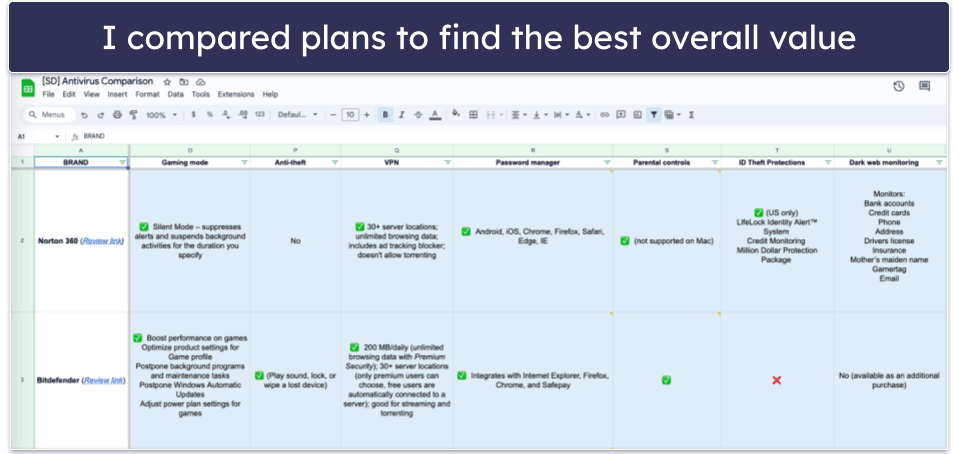
- I selected programs that offer a good value. There are some excellent standalone parental control apps, but most lack the cybersecurity protections offered by antivirus packages. The top antiviruses on this list all bundle top-quality malware protection with excellent parental controls at a competitive price.

- I considered privacy & data handling. Since parental controls often involve sensitive information, I sought solutions that adhere to strong privacy policies and ensure secure data handling practices.
- I looked at control and detail. I prioritized apps that offer detailed settings, allowing you to tailor restrictions and permissions to different age groups and usage scenarios for a more personalized protection plan.
Top Brands That Didn’t Make the Cut
- Trend Micro Internet Security. Trend Micro has an effective real-time antivirus scanner, a variety of other features, and affordable pricing. However, Trend Micro’s parental controls are pretty basic — you can block access to certain websites and apps, set usage time limits, but the content filtering is inconsistent, there’s no location tracking, and there’s minimal reporting so parents can review their kids’ activities.
- Avira Prime. Avira has an excellent malware scanner with web protections, a game booster, and system clean-up tools. However, Avira’s antivirus package doesn’t offer any parental controls.
- ESET Premium. ESET has near-perfect malware detection rates, but its parental controls are only available as a separate app, and are lacking. It lets you set screen time limits and has geofencing and location-tracking capabilities, but its content filtering didn’t block inappropriate content on Google Image searches during my tests.
Frequently Asked Questions
Do I really need to use parental controls?
No, but it’s probably a good idea, especially with younger children. There are all kinds of dangers hiding on the internet, and even if you completely trust your child, it doesn’t mean they can’t be deceived by malicious actors online:
- Online predators can deceive children and get personal details and images.
- Scammers can trick kids into giving away sensitive social security and financial data.
- Malicious websites can embed malware in files intended for children.
- Predators can use AR games like Pokémon Go to target kids.
There are also reports of children experiencing trauma after using the internet unattended — especially after being exposed to violent, hateful, and graphic content. The antiviruses on this list will help you protect your kids against all of these threats. They’re also highly customizable, making it easier for you to balance the levels of control and trust when helping your kids manage their online presence.
Can I manage and monitor my child’s activities on school-issued devices using antivirus parental controls?
School-issued devices are often managed by educational institutions and come with their own set of restrictions. While some antivirus solutions (like Norton) offer cross-platform management features and school-time scheduling, their effectiveness can vary on devices with institutional management settings. Coordinating with your child’s school is a good idea, so you can understand what controls are in place and how they can work together with your antivirus software. I also recommend checking the vendor’s compatibility to make sure it will work across all your child’s devices
What is the most effective parental control for my family?
You are the most effective tool for protecting your family online. The fact is, no parental control app can completely protect your kids. Even if you block every potentially inappropriate app, read every text message your child sends, block every streaming site, and ban every sensitive word from your child’s search engine, kids will find a way to break the rules.
Many studies have suggested that honest, age-appropriate conversations are the best way to keep your kids safe online. That’s why Norton’s parental controls include a Smart Talk template to help parents and kids come together to set smart device usage limits.
The best parental controls can help you keep track of and manage your child’s activity, but ultimately, it’s up to us as parents to help our kids safely navigate the digital world.
Can my kids deactivate their parental controls?
Sometimes, yes — every parental control app offers a different level of control to your children. Some can’t be changed without a password, while others send you a notification if any changes are made. Norton’s parental controls include uninstall protection, which prevents your kids from deleting the app without your parental login credentials, while Kaspersky’s mobile apps require a PIN code to uninstall them.
What’s the benefit of using an antivirus with parental controls?
Standalone parental control apps are great, but they don’t protect against malware. Malware and phishing sites are also targeting our kids, and parental controls alone aren’t enough to keep them safe. Children are at a very high risk of accidentally compromising their devices with malware, and if that happens, your whole family network could eventually become infected.
There are some excellent parental control apps on the market, but if you want to keep your kids and their devices safe from every threat, you’ll need an antivirus, too. The top antivirus packages include better parental controls than many standalone parental control apps.