


Soon after giving users the option to turn PDFs into easy-to-grasp NotebookLM-like audio summaries, alongside a nifty Gemini-powered feature that lets you know what’s inside a folder without you having to open it, Google is now giving Drive a major visual upgrade.
As part of its latest update, Drive will now begin showing third-party file formats, including PDFs, videos, images, and audio files, in a more modern interface.
Currently barebones at best, with what Google is now rolling out, Drive’s file viewer will be upgraded with not just a polished look, but also functional tools to make navigating documents much easier.
Here’s everything new arriving over the coming two weeks:
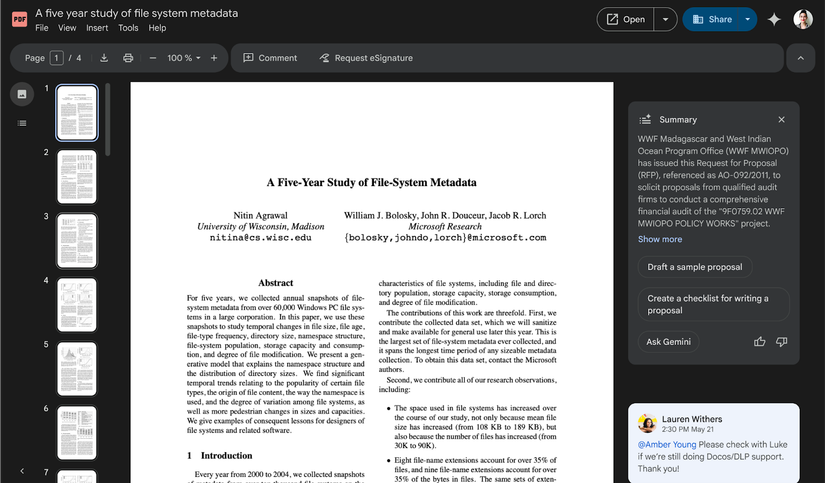
- A new left rail for PDFs which will include a table of contents (where applicable) and thumbnails for easier navigation of documents.
- A new file menu.
- A new toolbar and app bar.
- An option to search by transcript when looking at a video.
No, the new UI is not paywalled
Credit: Google
As seen in the screenshot above, the new PDF viewer sports a sidebar with a table of contents, complete with thumbnails for each page, making navigation much easier than before. Similarly, tools like download, print, zoom in/out, and more are readily available and visible with the new UI.
The updated UI is the new default and doesn’t need you as the user to opt in or toggle any settings. It’s also worth noting that you don’t have the option to revert to the old viewer UI.
Google Drive’s new file-viewer UI is rolling out now and should be widely visible to all Google Workspace customers, Workspace Individual Subscribers, and users with personal Google accounts around the middle of December.










