


Google has gone to great lengths to integrate Gemini into every Workspace product, including Drive. As part of this push, Google introduced “nudges” at the top of the Drive home page and individual folders back in March. These nudges offered one-click access to key Gemini actions, such as the ability to summarize entire folders or files.
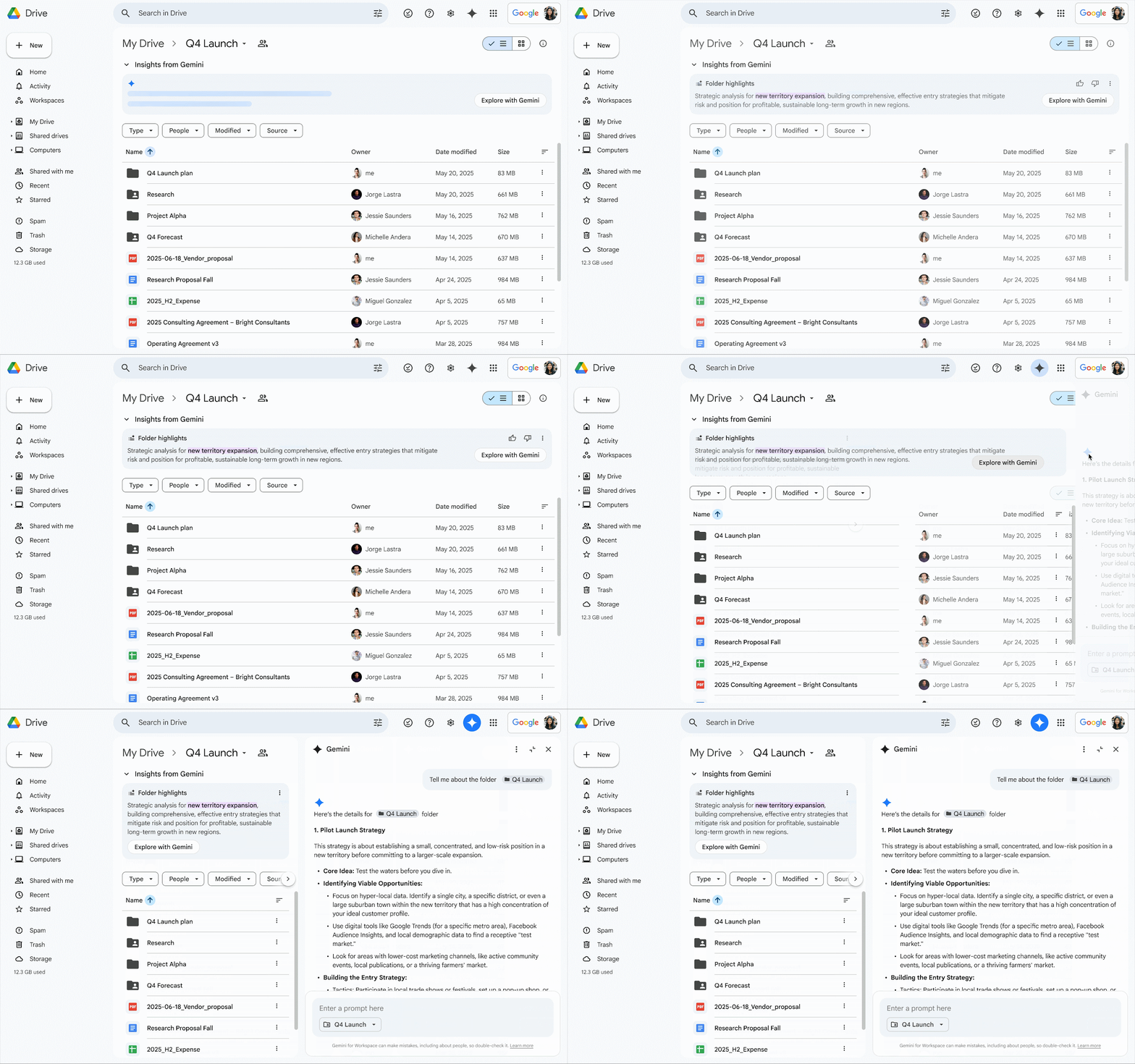
Now, Google is announcing an “evolution” of these AI nudges in the form of “insights.” Instead of the horizontally placed chips at the top, users will now see “Insights from Gemini,” offering a summary of all the files in the folder. Google says this will make it easier to quickly gauge what’s in the folder without having to dive into each file.
For more info on the folder’s contents, users can tap the “Explore with Gemini” chip within the insights panel at the top. This opens the Gemini side panel with a “full summary” of the folder. As you would expect, the side panel also lets you ask follow-up questions about the contents.
A logical evolution of nudges
Credit: Google
This new insights section effectively replaces the existing “Ask Gemini” panel, which includes the soon-to-be-replaced nudges. In Google’s own words, the updated panel replaces “simple suggestions” with “proactive, intelligent summaries.” The insights panel also comes with thumbs-up and thumbs-down icons to rate the quality of the summary.
Google says the feature will be enabled by default, but users can collapse the panel if they don’t want insights generated each time a folder is opened. If you find these insights to be too intrusive, you can hide them entirely by disabling smart features in Drive from the privacy settings page. However, this may come at the expense of losing out on some of the other Gemini-related features.

This updated insights panel is only available in English right now and will roll out over the next few weeks to the Google One AI Premium and Google AI Pro for Education tiers, as well as Workspace Business Standard/Plus, and Enterprise Standard/Plus customers.
The introduction of the Insights with Gemini panel follows the launch of “Catch me up” in June. This feature provides an overview of file edits in Docs since your last visit, as well as details on comments across Docs, Sheets, and Slides files.











