


Are you tired of the never-ending parade of monthly fees? It feels like every app, service, and digital tool now demands a recurring subscription.
But what if I told you that the best digital tools don’t have to come with a hefty price tag?
I dug through the Google Play Store to find six exceptional, high-quality Android apps that deliver premium-level functionality for the unbeatable price of zero.
Stop paying and start saving. These are the apps that will change how you view your phone budget.

OneNote
Microsoft OneNote is a game-changer on Android, and it’s one of the biggest reasons why I stopped paying for a dedicated note-taking app.
Looking at the competition, you have premium apps locking basic features like unlimited storage or cross-platform sync behind a monthly fee.
I’m over here with OneNote, which is completely free for all its core features, and it just works. It’s not just free; it’s feature-rich.
I can create massive notebooks, divided into sections and pages, just like a real binder. It’s perfect for students and power users.
I can type, record an audio note, insert images, draw diagrams with my stylus, and even extract text from a picture using the built-in scanner — all on the same page, and without paying a dime.
And for those moments when an idea hits me while I’m deep in another app? The ‘OneNote badge’ is pure genius. I just tap the little floating icon, and a quick note window pops up instantly.
I capture the thought and dismiss it in no time.
It’s already synced across my phone, tablet, and PC. It’s that effortless, on-the-go functionality — the kind that other apps charge a premium for — that makes OneNote a rock-solid productivity tool.
The list of features continues with home screen widgets, excellent organization, Sticky Notes integration, password-protected sections, and more.
Bitwarden
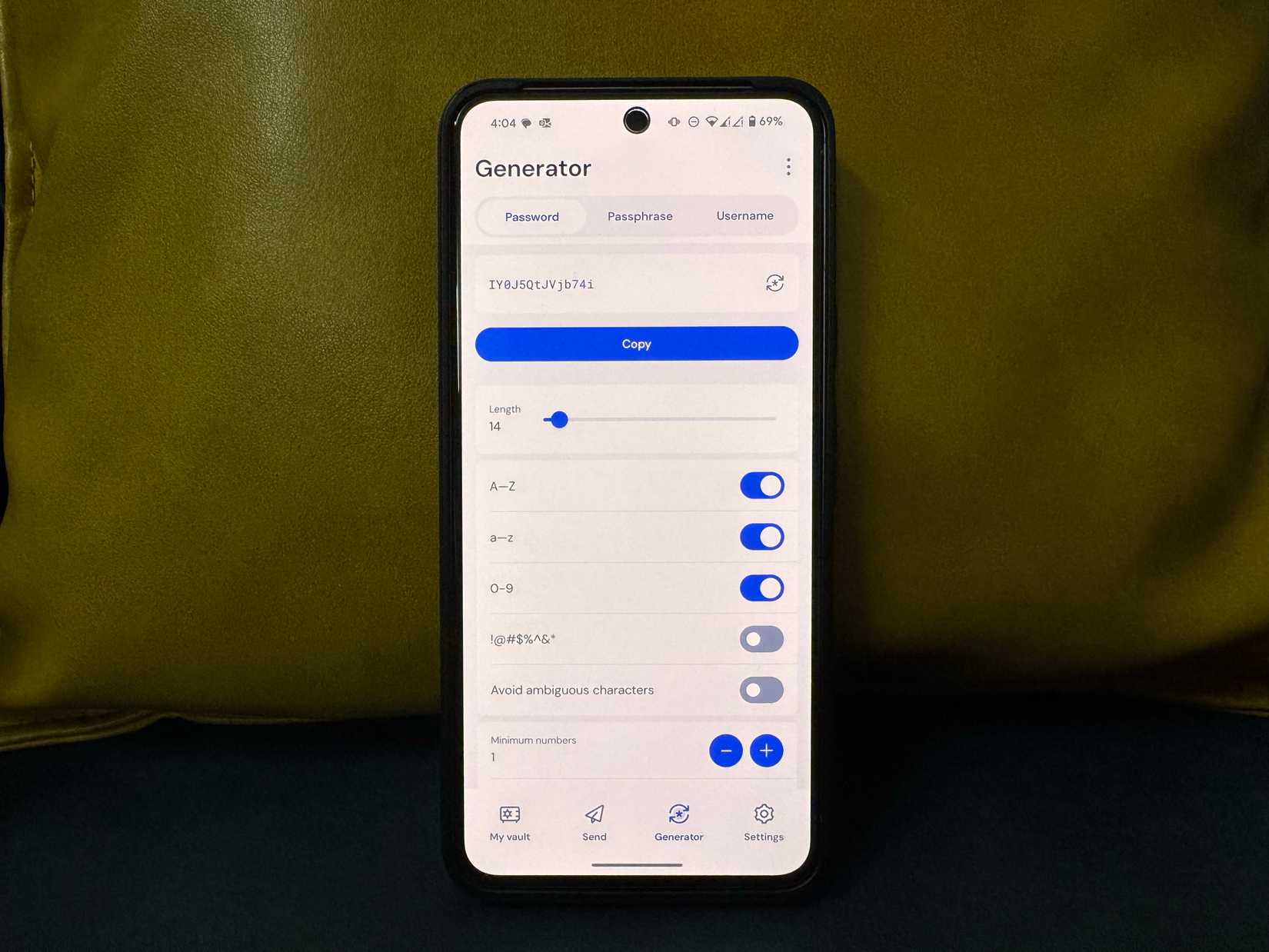
When I look at the pricing of other top password managers — the ones that charge me every month just to use it on my phone and computer — I immediately think of Bitwarden and wonder why anyone is still paying.
This app is the ultimate proof that subscriptions are completely overrated, especially when it comes to security.
I like how the Android version offers all the core features for free, with zero restrictions.
I can create unlimited entries, sync them across all my devices, use templates, TOTP, and more without paying a single dime.
Speaking of the Android app, it’s quite feature-rich and nice to look at. It supports autofill and all the necessary features you can ask for in a password manager.
There is a built-in password generator, and in terms of entries, I can create secure notes, add credit card details, and more with built-in templates.
Fossify File Manager
Most Android phones come with a file manager out of the box. But let’s be honest, they are basic at best.
While the Play Store is packed with robust file manager apps, most are paid options and require a subscription to unlock all the features.
Here is where Fossify File Manager stands out.
First, Fossify File Manager is an open source app, which means its source code is available for anyone to review. It also comes with a Material You UI, which looks fantastic.
I can glance over my phone storage breakdown, move files, play with different views, tweak the theme, hide files behind a passcode, and optimize device space like a pro.
I appreciate that it’s usually lean and fast. I can easily browse my internal storage, manage my SD card, perform batch operations like copy/move/delete, and even handle compressed files.
It does the essential file management tasks brilliantly without bloat.
Grocy
Grocy is my secret weapon against the chaos of managing a household — and it’s free, which is why I can confidently say that those expensive, paid meal-planning and inventory apps are totally overrated.
But I have to be upfront: Grocy isn’t a simple download; it’s a self-hosted system, which means I run the main brain (the Grocy server) on my home lab, and the Android app is an ideal companion for it.
After I got the server running, the Grocy Android app became the remote control for my entire home inventory.
Grocy offers meal planning, shopping lists, a barcode scanner, and gives a stock overview in a beautiful avatar.
I don’t have to pay for a separate service to avoid throwing out spoiled food; Grocy tells me what to cook tonight to use up those ingredients before they go bad.
Appflowy
When I first heard of all-in-one workspaces like Notion, I loved the idea of combining notes, tasks, databases, and Kanban boards, but I hated being trapped on their servers and scaling costs.
Then I found Appflowy, and it’s truly the open source, free solution that lets me unlock all the productivity tricks.
I now have a centralized workspace on my Android phone that rivals the most expensive tools.
The core proof is Appflowy’s free tier. I can create unlimited pages and blocks without signing up for a paid plan.
Appflowy is privacy-focused and lightning-fast. And since it’s a native app, it feels like a joy to use on a small screen. It’s something I can’t say the same about Notion and Obsidian.
And the self-hosting option means I can own my data, which is a freedom a subscription service can never give me.
OpenCloud
Instead of renting storage from Google, Microsoft, or Dropbox, you can use an open source self-hosting option like OpenCloud to store and sync media and files across devices.
With the company’s Android app, you can connect to your OpenCloud server and access every single file without breaking a sweat.
OpenCloud Android app is feature-packed with real-time file sync, automatic photo backup, web office integration, offline access, and biometrics support.
OpenCloud proves that I can get the performance and features of an enterprise-level cloud service without paying a monthly fee.
If OpenCloud feels too basic to you, check out Nextcloud. It’s another robust Google Drive alternative for self-host enthusiasts.
Forget recurring fees
The myth that ‘you get what you pay for’ simply doesn’t hold up in the modern Android ecosystem.
These free apps are more than just budget alternatives; they are powerful, fully-featured tools that expose the typical subscription model. I encourage you to try these apps.
After all, the true value of an app lies in its features, not its price tag.
Now, go forth, install these excellent alternatives, and enjoy a smarter, more capable, and cheaper mobile life. What’s the first subscription you are going to cancel now that you have these alternatives?
And if you are looking for more self-hosting Android apps, check out my dedicated post here.










