
Updated on: February 1, 2026
Fact-checked by Eric Goldstein
-
🥇 ExpressVPN
: ExpressVPN is one of the only VPNs with a dedicated router app, so it’s very easy to install on your router. It works with popular routers and router firmware, and you can even get its own affordable router, which comes pre-installed with the VPN. The VPN is fast, secure, and can access 100+ streaming services. It also comes with a 30-day money-back guarantee for first-time users.
I tested dozens of VPNs to find the best ones for routers — to pass my tests, they had to have fast & reliable speeds, support for speedy and secure protocols like WireGuard and OpenVPN, wide firmware compatibility (including DD-WRT and OpenWRT), and easy setup on the latest Wi-Fi 6 and Wi-Fi 7 models. I also made sure they offered excellent tutorials and live chat support reps who can help you with the manual configuration.
ExpressVPN is my top recommendation, as it’s one of the only VPNs with a dedicated router app, consistently delivers top speeds across all devices, and even offers an affordable router preloaded with its VPN that’s regularly updated and keeps up with future internet and security standards. Editor’s Note: ExpressVPN and this site are in the same ownership group.
Quick Summary of the Best VPNs for Routers


Editor’s Note: Intego, Private Internet Access, CyberGhost and ExpressVPN are owned by Kape Technologies, our parent company
🥇1. ExpressVPN — Best Overall VPN for Routers in 2026
Approved by our experts

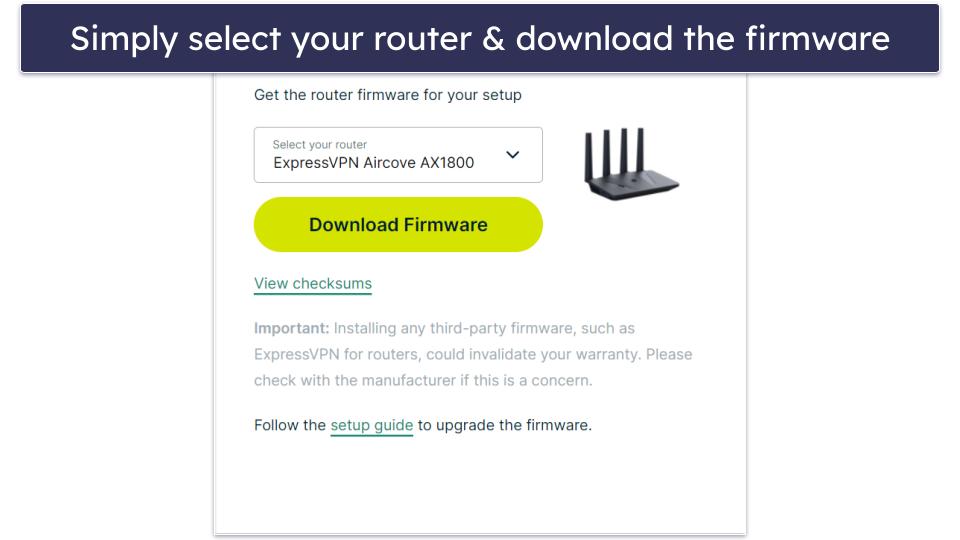
ExpressVPN is my go-to VPN for routers because it has a native router app that you can install in just a couple of steps on several types of routers directly, like Asus, Linksys, and Netgear — all you have to do is download the firmware to your PC and upload it to your router. It took me about 8 minutes to download and set up the app on my router.
- Native app for Asus & Netgear
- Top speeds due to Lightway protocol
- Can split-tunnel devices
- Ad, tracker, & malware blocker
- Limited OpenVPN advanced settings
The app is based on the OpenWrt firmware, which is regularly updated. Plus, I really like that once the VPN is up and running on your router, it automatically installs available updates, which is super important for keeping your router and all of your connections secure.
ExpressVPN also works with a wide range of third-party firmware that supports VPNs, like DD-WRT, Sabai, and Tomato, via an OpenVPN configuration. The provider has easy-to-follow step-by-step guides with screenshots to avoid any hassle, too. You can even manually configure ExpressVPN on some of the latest Wi-Fi 7 routers, like the TP-Link Archer and GL.iNet Slate 7, without needing to flash third-party firmware.
ExpressVPN has its own Wi-Fi 6 router, called Aircove — and it’s one of the best VPN routers on the market. If you buy it, you get access to a secure router that comes with ExpressVPN pre-installed on it. Aircove has passed an independent security audit, comes with a built-in kill switch, as well as WPA3 security that protects your Wi-Fi network against brute-force attacks, and port forwarding. And there’s Aircove Go, which is a portable version of the router that you can take with you on vacation.
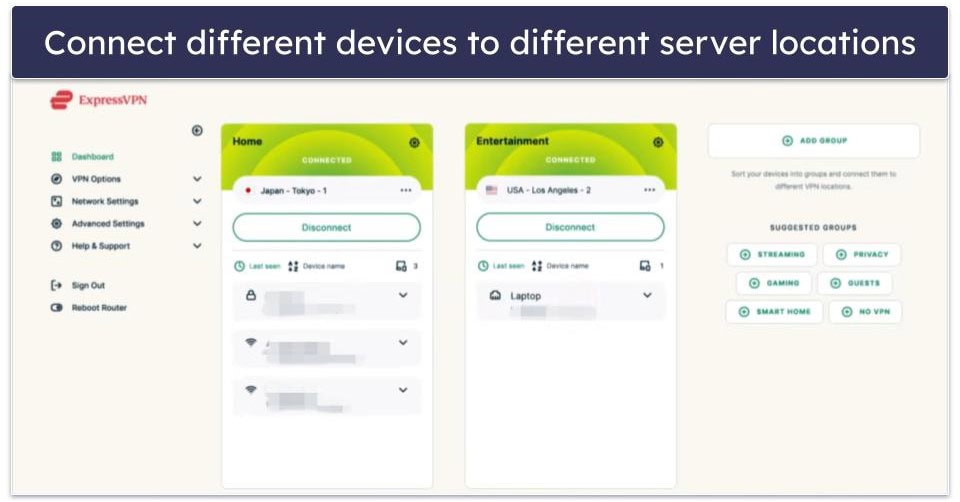
ExpressVPN’s router app makes it easy to control which devices use the VPN and which don’t, without needing two separate networks. With the Device Groups feature, you can assign devices to use the VPN, stay on the regular internet, or even connect through different server locations. You can also block internet access or enable ad, tracker, malware, and content filtering for each group individually.
ExpressVPN offers blazing-fast speeds, so even if your router doesn’t have a powerful processor, you’ll still get uninterrupted streaming, gaming, and browsing. This is because its router app comes with the Lightway protocol, which is the fastest VPN protocol I’ve tested. When I connected to a far-away server in the US, I experienced only minimal speed loss, and HD videos loaded instantly without any buffering or lag.
The VPN is also really good for streaming, it can access 100+ streaming platforms from anywhere in the world. This includes popular services like Netflix, BBC iPlayer, Amazon Prime, and Disney+.
Bottom Line:
ExpressVPN is the best VPN for routers thanks to its dedicated router app that’s extremely simple to install and use. Additionally, the router app lets you decide which devices use the VPN and which don’t from one location, and it comes with a good ad blocker. Finally, ExpressVPN uses its own proprietary protocol on the router app, so it’s super-fast for all activities.
Read the full ExpressVPN review
🥈2. Private Internet Access — Great Customizability Features for Routers


Private Internet Access (PIA) has good router support and strong security features. It works with DD-WRT, Asuswrt, Asuswrt-Merlin, pfSense, LEDE, and FreshTomato firmware, and it supports setups via OpenVPN, which is very secure.
- User-friendly router guides
- Preloaded on FlashRouters
- Includes port forwarding option
- Custom DNS for full control
- No WireGuard support for routers
- No built-in kill switch
I also like how user-friendly the provider’s router setup guides are. I managed to get it configured in less than 15 minutes, which is actually pretty fast. However, ExpressVPN is a better option, as it offers a dedicated router app that requires less manual configuration. Still, if you don’t want to manually configure your router, you can also buy a FlashRouter with PIA pre-installed.
PIA also includes advanced options like port forwarding and custom DNS, which can be configured through many supported router interfaces. These are useful for secure remote access, better torrenting performance, and custom network-wide DNS filtering. Port forwarding allows you to access your home PC, media server, or NAS while away. For example, you can use it to establish a remote connection to your desktop or manage smart home devices — all through your VPN without exposing your real IP address.

PIA also allows torrenting on all servers and works with 30+ popular streaming sites (like Netflix, Amazon Prime Video, and Disney+) via dedicated streaming servers. The provider makes it very easy to find and download the appropriate streaming server files so that you can set them up on your router.
The downside is you don’t get extra built-in features like split-tunneling or a kill switch as with ExpressVPN. However, you can manually enable these on your router and a lot of the router firmware that PIA works with includes these tools.
Note: At the time of writing, PIA’s router certificates are expired, which may prevent official installation on some routers. While it may still be possible to use PIA via OpenVPN on certain systems using unofficial config files, functionality is not guaranteed and may vary by router model.
Bottom Line:
Private Internet Access allows manual setups via OpenVPN on popular router firmware and supports advanced features like port forwarding for remote access and improved torrenting performance. Plus, it’s really fast and has great torrenting and streaming support.
Read the full Private Internet Access review
Editor’s Note: Private Internet Access and this site are in the same ownership group.
🥉3. NordVPN — Supports Tons of Router Models


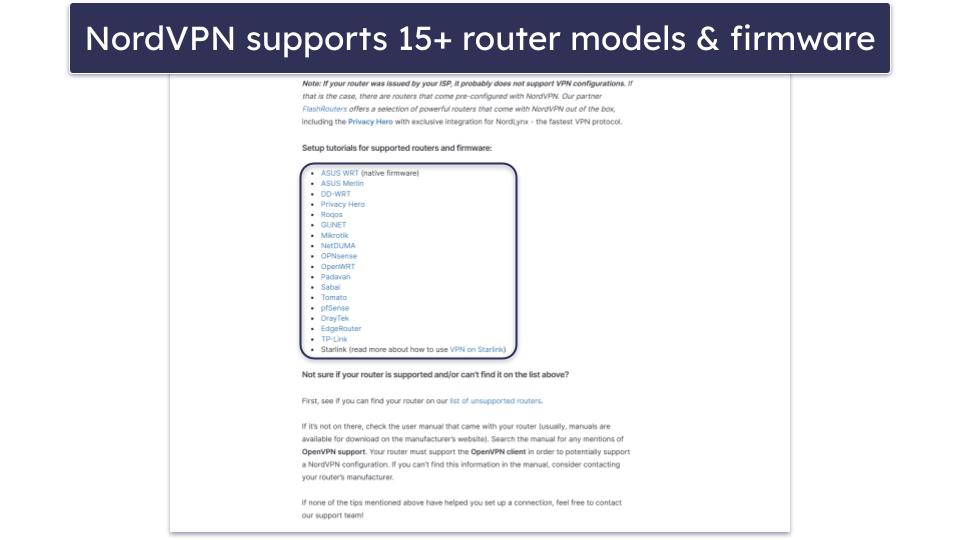
NordVPN supports OpenVPN setups on many popular router models and firmware. The provider works with 15+ options, including DD-WRT, GL.iNet, Tomato, Asuswrt, Asuswrt-Merlin, pfSense, TP-Link, EdgeRunner, and more.
- OpenVPN & IKEv2/IPSec support
- Preloaded router available
- Supports 15+ router options
- Works with Wi-Fi 7 routers
- No split-tunneling on routers
- Manual setup lacks NordLynx protocol
The VPN also allows IKEv2/IPSec setups on certain routers — this is very convenient since IKEv2/IPSec is faster than OpenVPN. It has really good router setup tutorials, too, most of which come with helpful screenshots.
If you’re interested in buying a VPN router, you can opt for the Privacy Hero router that’s sold by FlashRouters and comes pre-configured with the NordLynx protocol on it. This is NordVPN’s proprietary protocol, which is built around WireGuard — so it’s very fast.
NordVPN is also compatible with the latest Wi-Fi 7 routers and mesh Wi-Fi systems through manual OpenVPN configuration. FlashRouters partners with NordVPN to offer a selection of Wi-Fi 7 router models and mesh systems that are tested and optimized for OpenVPN.
On top of that, you also get other great perks — servers in 178 countries, compatibility with 10+ popular streaming services (including Netflix, Disney+, and BBC iPlayer), and P2P servers in 110+ countries.
Bottom line:
NordVPN is compatible with tons of router models and firmware, and it supports both OpenVPN and IKEv2/IPSec setups (you can also buy a VPN router from FlashRouters that comes with NordLynx). You can set up the VPN on high-performance routers, and it’s great for streaming and torrenting.
4. Surfshark — Good for WireGuard Router Setups


Surfshark is a good pick if you want to use WireGuard to set up the VPN on your router. WireGuard is much faster than OpenVPN, but it’s just as secure — so it’s an ideal option for bandwidth-heavy activities like online gaming, sharing files, and streaming.
- WireGuard setup on 10+ routers
- Supports OpenWrt & GL.iNet
- Video tutorials for setup
- Lacks router-level kill switch
- Fewer advanced router settings
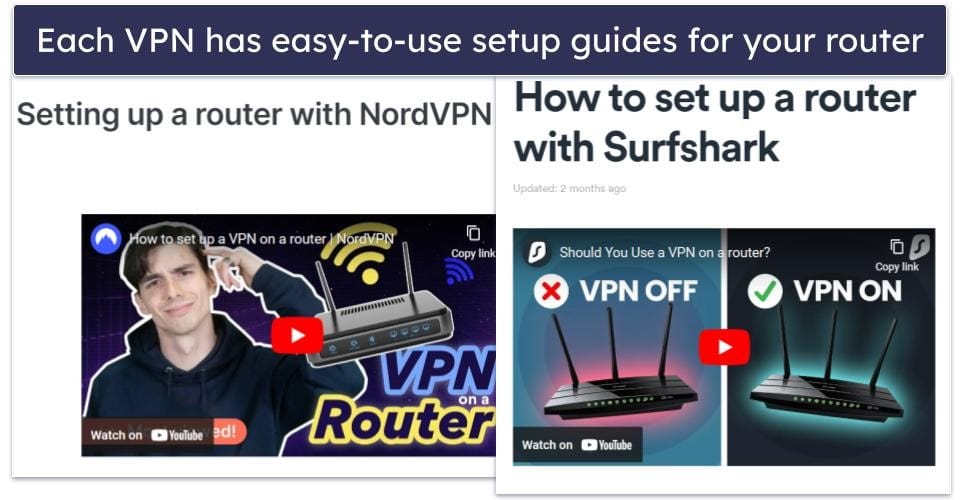
The provider supports WireGuard setup on 10+ router models and firmware, including DD-WRT, TP-Link, OpenWrt, Asus, and GL.iNet. Plus, the VPN’s router setup guides are extremely simple to follow, and most of them also include screenshots and video guides.

Surfshark can also be manually configured on many modern Wi-Fi 7 routers and mesh Wi-Fi systems (like TP-Link’s Deco series and Asus routers) using WireGuard, as long as the router firmware supports it. This makes it a great choice if you want to take advantage of faster, low-latency connections across high-speed or multi-device mesh networks.
The VPN also has servers in 100 countries and allows torrenting on all of them, works with 50+ streaming platforms. The only downside is that you won’t get easy access to split-tunneling or a kill switch, like you do with ExpressVPN’s router app.
Bottom line:
Surfshark supports WireGuard router setups on many popular models and firmware. Plus, its router setup tutorials are very easy to read and follow. In addition, the provider has a huge server network, and great P2P and streaming support.
Read the full Surfshark review
5. CyberGhost VPN — Great Router VPN for Gaming


CyberGhost is a good option for gaming since you can configure its gaming servers on your router. These servers are optimized to maintain stable average ping and provide lag-free gaming sessions. The provider has gaming servers in 4 countries: the US, the UK, Germany, and France.
- Gaming servers for low ping
- Supports DD-WRT & TomatoUSB
- Built-in ad-blocking features
- No access to streaming servers
- OpenVPN support only
CyberGhost VPN supports manual OpenVPN setups on many popular router models and firmware, including DD-WRT, TomatoUSB, Raspberry Pi, and Synology NAS. It also provides access to very straightforward manual setup tutorials (and most of them include screenshots). Plus, its router setups provide access to good ad-blocking.

My only complaint is that you can’t use the provider’s streaming servers on your router — these servers are compatible with 50+ top streaming sites. You can try using its regular servers to access streaming content, but the provider doesn’t guarantee they’ll work 100% of the time. If this is an issue, consider getting ExpressVPN instead.
Bottom line:
CyberGhost VPN is a great router VPN for gamers. It has dedicated gaming servers available for router configuration, and it has decent speeds, easy-to-follow guides, and even an ad blocker. Plus, it works with all top router firmware!
Read the full CyberGhost VPN review
Editor’s Note: CyberGhost and this site are in the same ownership group.
Quick Comparison Table
Editor’s Note: Intego, Private Internet Access, CyberGhost and ExpressVPN are owned by Kape Technologies, our parent company
Testing Methodology: Comparison & Ranking Criteria
To determine the best VPNs for routers, I followed our well-established testing methodology, conducting thorough evaluations of numerous VPNs on the market. This process included testing each VPN under a range of scenarios specifically tailored to router usage, to assess their capabilities and effectiveness. Below, you’ll find the criteria I used to test, compare, and ultimately rank the VPNs:
- I looked for VPNs with great router support. In addition to making sure the VPNs allow manual router setups, I prioritized providers that are compatible with many popular router models and firmware. ExpressVPN, my #1 pick, even has a dedicated router app that’s very easy to install and use.
- I considered the setup and configuration process. All the VPNs I recommend provide a quick and easy setup process with helpful tutorials and guides.

- I verified compatibility with modern Wi-Fi 6 and Wi-Fi 7 routers. Since many users are upgrading to next-gen routers for better speed and coverage, I made sure most VPNs I recommend can be manually configured, or come pre-configured, on popular Wi-Fi 6 and Wi-Fi 7 models, including mesh systems where applicable.
- I tested each VPN’s speeds. Most VPN/router combos can be slow due to limited processing power of routers, which struggle with the demands of VPN encryption. Additionally, the distance to VPN servers and server load can increase latency and reduce speeds. In my tests, all VPNs on my list minimized the speed loss. The fastest one was ExpressVPN.
- I checked for security features. All the providers on my list come with industry-standard security measures like military-grade 256-bit AES encryption, a no-logs policy, and protection against leaks.

- I picked VPNs that offer good value for money. All the VPNs on my list come with affordable plans, extra features, easy-to-use apps, and a reasonable money-back guarantee.

3 Ways to Use a VPN With a Router
Preconfigured VPN Routers
Preconfigured VPN routers come with a VPN already set up on the hardware, which eliminates the need for any additional setup. For example, ExpressVPN’s Aircrove router comes with the VPN software pre-installed and all the convenient features that the provider offers. There are also companies that sell preconfigured routers (like FlashRouters, for instance).
VPN-Ready Routers
VPN-ready routers are designed to support VPN configurations natively without the need for replacing firmware. Brands like Asus, Netgear, and Linksys offer models that can be configured with most major VPN services that support router configuration directly through their standard firmware options.
Installing Firmware on a Router
Installing custom firmware like DD-WRT or Tomato on compatible routers can add VPN functionality to routers that don’t support it out of the box. This is a great option, especially if you’re tech savvy and want to enhance an older router or customize your network management.
How to Get the Best Speeds With a VPN Router
Using a VPN router slows down your internet speed because of the encryption process. The processing power required for VPN encryption is intensive and can overwhelm the router’s CPU, especially in consumer-grade models. Here’s how you can optimize your VPN router’s speed:
Choose the Right Router
Your router’s processing power significantly affects your speeds when using a VPN. For optimal performance, it’s best to select a router with a powerful processor and sufficient RAM designed to handle VPN traffic, such as those with dual-core processors or higher. I also recommend picking a router that supports Wi-Fi 6 or Wi-Fi 7, which are the most modern and high-performance Wi-Fi standards.
Update the Router Firmware
Outdated router firmware could slow down your device, which in turn will also affect your internet speeds. So check if there are any updates for your firmware, as manufacturers often release updates and patches to improve performance.
Pick a Nearby VPN Server
The physical distance between you and the VPN server can impact your internet speed. To get the fastest speeds possible, you should configure your router to connect to the closest VPN server location.
Click here to read more ways to get the best speeds with a VPN router
Use a Fast VPN Protocol (If Possible)
Most manual router setups are done via OpenVPN — while it’s a very secure protocol, it’s not very fast. If your router and VPN provider support setups via WireGuard, use that protocol instead since it’s much faster than OpenVPN.
If WireGuard isn’t an option, I recommend configuring the router to use OpenVPN over UDP since it’s usually faster (though a little less stable) than OpenVPN over TCP.
Change the VPN Encryption
Most firmware allows you to change VPN encryption levels. If your firmware does, try downgrading the encryption, as it could improve your speeds. For example, instead of 256-bit AES, switch to 128-bit AES — don’t worry, the 128-bit cipher is just as safe as the 256-bit one.
Use Wired Connections
Whenever possible, connect devices directly to your VPN router via an ethernet cable. Wired connections are typically faster and more stable than Wi-Fi, which can suffer from interference and signal degradation.
Limit VPN Usage to Necessary Devices
Connecting only specific devices that require VPN services, such as those used for sensitive transactions or accessing restricted content, can improve the VPN speeds. This is because it limits the number of devices routing their traffic through the VPN, reducing the processing demand on the router’s CPU. This allows the router to manage encryption more efficiently and maintain higher speeds for connected devices.
Top Brands That Didn’t Make the Cut
- Mullvad VPN. The provider supports manual router setups via both OpenVPN and WireGuard, but unfortunately, it’s not compatible with most streaming services.
- Astrill VPN. You can buy a preconfigured Astrill VPN router and install the provider’s applet (a small program) on compatible router firmware. But I think this VPN is way too expensive.
- TunnelBear. The provider is very secure, has good speeds, and even has a decent free plan — but it doesn’t support router setups.
Frequently Asked Questions
Is it a good idea to use a VPN on routers?
Yes, using a VPN on a router offers good perks. If you set up a good VPN on your router, like ExpressVPN, you’ll secure all the devices connected to that router. This is really helpful if you want to use a VPN on devices that don’t support VPN apps, like certain smart TVs or gaming consoles. Moreover, having a VPN on your router allows you to bypass the device limit set by some VPN services, as the router counts as just one connection.
What is the best VPN for routers?
ExpressVPN is my top choice for a VPN for routers. It has a dedicated router app that’s very easy to install and use, it lets you buy a preconfigured router to make the whole process even simpler, and even has a portable version of that router. Also, its router app comes with split-tunneling and an ad blocker. Moreover, ExpressVPN has servers in 105 countries, maintains lightning-fast speeds, works with 100+ streaming sites, and has strong privacy and security features.
Do routers have a built-in VPN?
Yes, some routers do come pre-configured with a VPN, ready for use. These routers can be a good option for those who want to secure all devices on their home network without the need for a manual setup. For instance, FlashRouters offers devices pre-configured with VPN software. These routers are typically partnered with certain VPN providers, such as ExpressVPN or Private Internet Access.
Is using a VPN on a router safe?
Yes, using a VPN on a router increases the overall security of your internet connection. By setting up a VPN on your router, all traffic passing through it is encrypted, which enhances the privacy and security of your entire network.
How do I activate the kill switch feature on my VPN router?
The exact steps vary depending on your VPN configuration, but these are the general steps to follow: log into your router’s control panel, navigate to the VPN settings, and look for an option labeled as “Kill Switch,” “VPN Disconnect Protection,” or something similar, and enable it.
This setting ensures that if the VPN connection fails, all internet traffic will be blocked to prevent data leaks. Keep in mind that not all VPNs include a kill-switch option when configured on a router, but a lot of the router firmware that work with the VPNs I mention here include extra features like a kill switch.
How do I configure split-tunneling on my VPN router?
To set up split-tunneling on a VPN router, access the router’s admin panel, looking for a tab or section dedicated to network routing or VPN configurations — the feature is usually labeled as policy-based or selective routing.
Here you can specify which devices or IP addresses should bypass the VPN. This is often done by entering specific IP addresses or selecting which apps use the VPN and which do not.