
Updated on: February 5, 2026
Fact-checked by Sam Boyd
-
🥇 RoboForm
: Offers effective network protections, including SSO options, an intuitive admin console, advanced form-filling, and more. It’s also easy to integrate into existing infrastructure, so adopting it won’t be a hassle for most businesses.
I tested dozens of password managers to find the best options for networks. I evaluated security features, administrative controls, enforceable password policies, customer support, and more. After weeks of testing, I narrowed it down to 5 reliable and secure choices.
Many password managers offer strong security, but not all are designed for large-scale networks. If you’re managing multiple users, you need more than just strong encryption. Features like secure password sharing, SSO integration, and admin controls can make all the difference.
RoboForm is my top pick due to its ease of use and management and excellent form-filling that saves you a lot of time. That said, the other options I recommend also have their pros, so read on and find out which one is right for you.
Quick Summary of the Best Password Managers for Networks


🥇1. RoboForm — Best Overall Password Manager for Networks With Convenient Auto-Fill & Affordable Plans
Approved by our experts


RoboForm is a solid choice for businesses looking to enhance their network security. An easy setup process and simple interface make it a great password manager for non-technical employees. While it doesn’t have all the advanced features of other competitors, RoboForm contains a very strong set of core security features.
Among other things, you’ll get:
- 256-bit AES encryption.
- 2FA via SMS, email, or authenticator app.
- SSO integration.
- Secure password sharing.
- Customizable security policies.
- Dark web monitoring.
- Self-hosting option.
- Admin controls.
- Secure notes.
- Regular audits and reports.
The admin controls are simple but effective. RoboForm lets you assign specific roles to employees, enforce password policies, and restrict access when needed. It also provides real-time data logs that (among other things) evaluate the strength of your passwords. It lacks the customization options that 1Password has, but the admin controls are very straightforward.
I was pleased with RoboForm’s automatic form-filling. You start by creating an identity using one of RoboForm’s templates. After inputting your data, RoboForm will automatically fill in your details going forward. I tested it using passwords, legal documents, social media logins, and online forms. While many password managers struggle to fill out data correctly, RoboForm handled it flawlessly.
With RoboForm, you don’t need to rely on third-party servers to protect your network. RoboForm’s servers are secure, but I like that it lets companies self-host their own servers if they want. This lets you rely on your own network for network security.
RoboForm’s dark web monitoring is okay but not as good as some competitors. Rather than create its own tools, RoboForm relies on a third-party database of data breaches. It will still alert you if it finds company data online, which is good.
RoboForm is significantly more affordable than most top brands but remains highly secure. You can pick up RoboForm Business for £1.64 / month per user. It contains most of RoboForm’s features, but larger companies can pick up the Enterprise plan to get comprehensive onboarding support, self-hosting, and more (contact sales for pricing questions).
Bottom Line:
RoboForm is a highly affordable option that offers everything you need to protect your company’s passwords. Features like role-based permissions and automatic form-filling abilities make it convenient to use and integrate into any company. It lacks some specialized features my other picks offer, but it works well. You can try it out with a 14-day free trial.
🥈2. 1Password — Top-Notch Network Security & Comprehensive Extra Features


1Password has a wide range of highly secure features for admins and team members. For example, it uses military-grade encryption and offers several MFA options. 1Password is easy to use, has strong fundamental security, and comes with many extra features. You’ll get:
- Admin control panel.
- SSO integration.
- SIEM integration.
- MFA options.
- Multiple vaults.
- Hidden vaults (Travel Mode).
- Dark web monitoring.
- Passkey support.
- Customizable security settings.
- And a lot more…
In terms of network security, I really like 1Password’s SSO (Single Sign-On) integration. With SSO, employees can use their existing credentials from services like Google Workspace, Okta, or anything using the OIDC protocol to log into 1Password. You can also quickly provision or de-provision access. The result is a convenient centralized authentication process you have complete control over.
1Password is easy to use. Businesses with over 21 end users can access dedicated onboarding support and regular awareness training resources. On the admin side, managing permissions and setting rules is simple through the master dashboard. I also found the reports and audits easy to read.
1Password’s multiple vault system is great — it allows businesses to create multiple separate vaults for different teams, departments, or projects. Each vault can hold passwords, secure notes, and documents. You can easily customize permissions and access controls. You can also selectively hide vaults, making them invisible when a user leaves their country. Alternatively, you can create firewall rules so data can only be accessed from specific IP addresses.
I also really like the dark web monitoring, which checks to see if any of your data has been leaked online. If it finds something, 1Password immediately alerts you, sharing the relevant details and telling you what to do next.
Finally, 1Password’s administrative controls offer a lot of social policies. Admins can easily enforce password policies (password length, requirements, expiration dates, etc.). It also provides detailed auditing logs that display who accessed what and when. You can create customized roles with various permissions levels, too.
1Password offers multiple business plans. Teams Starter Pack covers 10 users and starts at £14.64 / month. You’ll need 1Password Business to get networking features like SSO integration and advanced admin controls. It costs £5.86 / month per user and includes 5 GB of cloud storage per user, 20 guest accounts, and a 1Password Families account for every employee. For the onboarding training and a dedicated account manager, you’ll need 1Password Enterprise (contact sales for pricing). You can try Teams Starter Pack and Business for free using a 14-day free trial.
Bottom Line:
1Password contains many effective network security features, including SSO integration, dark web monitoring, and passkey support. Its vaults are secure and highly customizable. 1Password is highly intuitive and provides easy onboarding (larger companies even get face-to-face onboarding). It has 3 plans with advanced network security features. The cheapest plans, Teams Starter Pack and Business, are available as a risk-free 14-day free trial.
Read the full 1Password review
🥉3. Dashlane — Strong Password Manager With VPN Integration for Improved Network Security


Dashlane is an excellent password manager that uses bank-grade encryption to protect your passwords. Regarding network security, it comes with an integrated VPN that automatically encrypts incoming and outgoing network data, SSO options, admin controls, and more. You can’t create hidden vaults, and there’s less organizational flexibility than 1Password, but it’s still a really good choice.
Dashlane includes a broad range of powerful features, including:
- SSO integration.
- MFA options.
- Dark web monitoring.
- Password sharing.
- Customizable security policies.
- Admin controls.
- Secure notes.
- Anti-phishing protection.
- VPN integration.
- And more…
Dashlane’s standout network security feature is its integrated VPN. Using a VPN will significantly mitigate the dangers of employees accessing business resources from untrusted networks, like public Wi-Fi. The VPN encrypts all internet traffic, even when employees are working remotely or traveling. You might want to consider making a company policy that off-site users should only access vaults through the VPN.
Dashlane’s admin controls are top-tier. You can manage user permissions, enforce strong password policies, and access detailed logs. Admins can set specific rules for password length, complexity, and expiration. Additionally, Dashlane’s SIEM integration helps businesses monitor user activity and receive real-time alerts.
It also has a good collection of threat-monitoring tools. The built-in anti-phishing protection will alert you if an employee accidentally visits a fraudulent website posing as Dashlane. The dark web monitoring is also excellent. Unlike most of its competitors, Dashlane doesn’t rely on public databases. It searches for breaches using its own in-house resources, which I found highly effective.
To get Dashlane’s network and credential-security features, you can choose between Password Management (£4.40 / month) and the Dashlane Omnix credential-security platform (£8.07 / month). The Password Management plan includes all core enterprise tools — an admin console, SSO and SCIM provisioning, customizable password policies, detailed activity logs, VPN access, and dark web monitoring. Dashlane Omnix builds on that foundation with proactive credential risk detection, AI-driven phishing alerts, and advanced analytics that identify and respond to suspicious activity in real time. Both plans include a free 14-day trial, and annual subscriptions come with a 30-day refund policy if you cancel within that period.
Bottom Line:
Dashlane offers powerful security features with a user-friendly setup that makes managing credentials across networks straightforward. The Omnix platform takes things further by using AI to spot and neutralize threats before they escalate, making Dashlane a smart choice for businesses that value both control and proactive protection. It’s one of the easiest enterprise password managers to roll out, and you can try it risk-free with a 14-day trial and 30-day refund guarantee.
4. Proton Pass — Excellent Choice for Networked Teams & Devices

Proton Pass is a great option for users who manage multiple connected devices or shared networks. It’s built on Proton’s trusted privacy framework — the same team behind Proton Mail and Proton VPN — and uses end-to-end encryption to make sure only you can access your data.
In my tests, Proton Pass performed exceptionally well in networked environments. Admins can easily create and manage shared vaults for departments or teams, enforce password strength policies, and control access based on role. Syncing across devices — from laptops to mobile endpoints — was instant and seamless, with no data leaks or login lag.
Among its standout tools are:
- Admin console for provisioning and monitoring
- Secure vault sharing and role-based access
- Built-in 2FA and passkey support
- SCIM and SSO integration (Professional plan)
- Dark web and breach monitoring via Pass Monitor
- AI-powered threat detection with Proton Sentinel
- Integration with Proton Mail, Drive, and VPN
An important feature for networked environments is email aliasing. With Proton Pass, team members can use disposable or department-specific aliases when registering for services. If one alias becomes compromised or starts receiving unwanted traffic, it can be disabled instantly without affecting the main account. This helps reduce phishing exposure and improves credential hygiene across shared networks.
I found Proton Sentinel especially valuable for networked businesses. It monitors for unusual activity — such as logins from new devices, unexpected geographic locations, or patterns suggesting credential theft — and blocks access in real-time. This proactive layer adds serious protection for distributed or remote teams.
Proton Pass Essentials starts at £1.46 / month and includes unlimited passwords, enforced 2FA, and Proton Sentinel protection for teams of 3 or more. The Professional plan (£3.29 / month) adds SSO/SCIM integration, policy customization, and Pass Monitor reporting. Businesses can also bundle Proton Pass within the Proton Business Suite, which includes Proton Mail Professional, Drive, and VPN for a unified privacy-first platform. Every plan comes with a 30-day money-back guarantee.
Proton Pass is an excellent choice for businesses that want to secure their network logins and shared credentials without sacrificing usability. It combines open-source transparency with enterprise-grade protection, making it a reliable solution for teams that prioritize data privacy and compliance. The AI-powered Sentinel system, strong admin controls, and seamless Proton ecosystem integration make it one of the most security-conscious password managers available in 2026.
Read the full Proton Pass review >
5. Keeper — Best for Secure Communications Between Team Members & Password Rotation

Keeper uses powerful encryption, zero-knowledge architecture, and network monitoring tools to secure your network and credentials. All plans offer secure storage and deployment of passwords, plus some nice extras. The most comprehensive plan even offers complete tools for privileged access management.
Alongside excellent encryption, Keeper’s features include:
- Multi-factor authentication (MFA).
- SSO integration.
- Password sharing and shared folders.
- Data breach monitoring (add-on).
- Password rotation.
- Admin controls.
- Secure file storage (add-on).
- Secure messenger app (add-on).
Admins get detailed audit logs that track user activity so you can immediately recognize suspicious behavior. You can customize your password policies using the admin console as well, but you don’t have as much control over your individual policies and permissions as you do with 1Password.
I really like Keeper’s admin console. It has a clean interface, and the fact that it shows whether a user is currently active is a nice touch. You can use it to make network-wide password rules, organize teams, view logs, and more. Keeper lets you create highly specific rules, requiring all passwords to have a minimum character length or instituting a particular form of 2FA.
Keeper also comes with excellent add-ons that bring additional protection to your entire network. BreachWatch, Keeper’s dark web monitoring tool, alerts you if any credentials have been involved in leaks. There’s also KeeperChat. Thanks to end-to-end encryption, it’s an excellent way for employees to communicate and share files. It’s a shame that you have to pay extra for these features (Dashlane provides dark web monitoring with all plans).
Keeper offers 4 business plans. The Starter plan covers up to 10 people and includes most of Keeper’s basic features for £5.14 / month per user, plus a free Family plan for each user. The Business plan adds delegated administration and advanced organizational tools and costs £2.75 / month for each member. Enterprise includes SSO, AD integration, advanced 2FA, and provisioning options, making it ideal for organizations with more complex needs. It isn’t the most comprehensive plan, but I think it’s the best deal for most networks. Finally, the Privileged Access Manager plan adds secrets management, remote access, and more. For both Enterprise and Privileged Access Manager, you need to contact Keeper’s sales team for curated pricing.
Bottom Line:
Keeper is great for business owners who want complete control over their password manager and want to customize its features. On top of data encryption, Keeper offers administrative controls, detailed activity logs, and more. You can also get dark web monitoring and a secure messaging app as paid add-ons. Its interface isn’t the most intuitive, but you can try it risk-free using a 14-day free trial.
Bonus. Bitwarden — Good Overall Network Protections, Plus Options for Self-Hosted Servers

Bitwarden is a secure, open-source password manager with versatile features. It has all the basics, like 256-bit encryption, MFA options, SSO, and zero-knowledge architecture. Like RoboForm, Bitwarden allows companies to host data on their own servers. It’s also one of the more affordable options on the market for the features it offers.
I like that you can either self-host or rely on Bitwarden’s cloud. While the latter is secure, some admins prefer not to rely on other providers and opt for self-hosting. It gives you more customization options and makes it easier to integrate into existing businesses, but you’re responsible for managing and maintaining your vaults.
Bitwarden offers enterprise-level admin controls. Administrators can enforce strong password policies, control access to shared passwords, and monitor user activity through detailed audit logs. The logs aren’t as detailed as 1Password’s, but they’re still better than most options.
I like that Bitwarden lets you create shared vaults called collections. You can choose which team members can access the vault and who can store/save new passwords. For example, you can create a vault called “IT ” and collect every IT-relevant login, then create a vault called “HR” and place HR-specific logins there. While this is pretty easy to do, I found 1Password’s system to be a bit more intuitive and flexible.
Bitwarden offers 2 business plans: Teams and Enterprise. The Teams plan costs £2.94 / month per user and includes Bitwarden’s basic features, shared collections, 1 GB of encrypted file storage, priority support, and event logs. The Enterprise plan adds the self-hosting option, passwordless SSO, and a free Families plan for all users. The standard price is £4.40 / month for each employee, but larger organizations can get substantially lower rates by contacting sales.
Bottom Line:
Bitwarden is a great open-source password manager that gives you control over where you host your vaults. It lacks some of the polish of my top picks, but it’s effective and fully featured, with excellent network security. You can make sure it works for you with a 7-day free trial.
Read the full Bitwarden review
Bonus. NordPass — Well-Rounded Password Management Suite With Effective Features


NordPass is an intuitive password manager that offers a lot of network security. There are plenty of guides and tutorials for new users that make it easy to set up and integrate into your company with little hassle.
It stands out from other options on this list because it uses the more modern xChaCha20 encryption. While xChaCha20 isn’t necessarily more secure than 256-bit AES encryption, it’s a faster protocol that has never been cracked.
Besides that, NordPass offers:
- SSO integration.
- Admin controls.
- MFA options.
- Data breach monitoring.
- Password sharing.
- Shared folders.
While it lacks any of the network-specialized features that other options on my list come with (there’s nothing like 1Password’s firewall settings or Dashlane’s VPN), its features are effective. The admin controls are intuitive, its unique MFA app works great, and I like its folder-sharing system (which lets you share sensitive documents between team members).
I particularly like its dark web monitoring tool. Normally, it only lets you scan individual email addresses, but with a business plan, NordPass will scan your entire domain. You can even resolve data breaches right from the administrative console. It also offers email masking, which is a nice little bonus.
NordPass offers 3 business plans: Teams, Business, and Enterprise. Teams is the basic plan, offering Google Workspace SSO and company-wide settings. It costs £1.31 / month per user. For advanced network management tools, you’ll need to get Business (£2.63 / month per user) or Enterprise (£3.96 / month per user). They both include everything in the Teams plan, but Business adds a security dashboard and shared folders, and Enterprise includes additional SSO options (like Entra ID, MS ADFS, and Okta), smoother data sharing, and advanced 2FA options.
Bottom Line:
NordPass may lack specialized network features like my other top picks, but it’s an excellent and feature-rich password manager. It’s highly intuitive and easily integrates into any business. If you don’t believe me, try it out for yourself using its risk-free 14-day free trial.
Quick Comparison Table
Testing Methodology: Comparison & Ranking Criteria
To rank the best password managers for networks in 2026, I used our rigorous testing methodology. I tested each password manager extensively, considering how easy each was to set up and use, trying out each feature, and more. In this case, I specifically considered the context of protecting a larger network.
- I made sure each pick included the necessary advanced security features. I looked for strong core security features, including MFA, military-grade encryption, and zero-knowledge architecture. This helped me immediately cut out password managers ill-suited for network security.

- I looked for options with tools aimed explicitly at network protection. I compared the remaining options, examining things like their SSO options, activity logs, and policy enforcement tools. I also looked for unique features, like Dashlane’s VPN or 1Password’s Travel Mode and firewall rules. I ensured that the extra features were good enough to justify your subscription.
- I evaluated the centralized administrative controls. One of the most important aspects of a business password manager is centralized administrative controls. My list contains easy-to-use products with intuitive UIs that make it easy to manage your team, grant permissions, review logs, and onboard new employees.
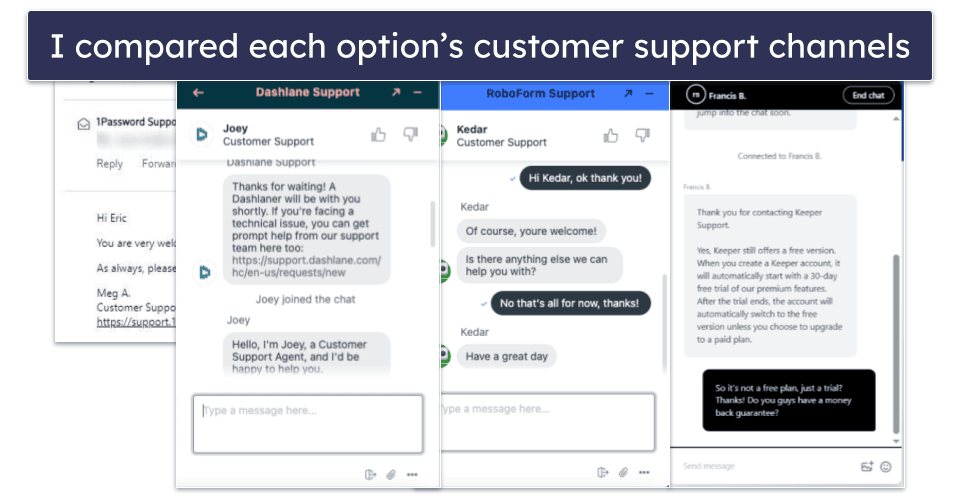
- I checked out customer support options. I made sure that each password manager provided business customers with some combination of email, phone, and live chat support. Many even have live technicians who can help onboard new employees.
- I looked for cost-effective products. I ensured that my picks were reasonably priced while delivering powerful security features. I looked at initial and recurring subscription prices, plans, money-back guarantees, and more.
Top Brands That Didn’t Make the Cut
- Password Boss. Password Boss is an excellent password manager with many extra features, but its business plans simply don’t offer as much network protection.
- Sticky Password. Much like Password Boss, Sticky Password is a great option and one that I’d recommend for personal use. However, its single business plan isn’t nearly as suited for protecting larger organizations as my top picks.
- CyberArk. Though geared toward enterprises, I can’t recommend CyberArk over the other options on this list. Mainly because it’s expensive and not particularly easy to use.
Frequently Asked Questions
What is network security?
Network security refers to all the features and policies designed to protect your network and its data from unauthorized access, cyber threats, and breaches. This includes firewalls, encryption, intrusion detection systems, VPNs, secure authentication methods, and of course, a strong password manager.
In this case, a secure password manager directly bolsters your network security by protecting against unauthorized access. On top of that, each password manager will offer its own additional network protection tools, i.e., Dashlane offers an integrated VPN that encrypts incoming and outgoing data.
Why do you need a password manager for your business?
A password manager improves your company’s security by generating, storing, and automatically filling strong passwords. This prevents anyone at your company from losing important passwords while at the same time bolstering its defenses against data breaches.
The best business-focused password managers offer centralized control, allowing IT admins to enforce security policies, enable multi-factor authentication (MFA), and monitor access logs. This reduces human error, strengthens security, and simplifies team credential management.
What password manager has the best network security?
All the password managers I recommended above have great network security. So it depends on your needs which one would be the most suitable for you. My favorite is RoboForm due to its simplicity, overall network security, advanced form-filling, and affordability. That said, 1Password and Dashlane come close, so they’re also options to consider.
What features make your network secure?
The best password managers have a number of features to enhance network security. The inclusion of logs and security audits means that admins can monitor networks from a birds-eye view. Enforcing strong password policies makes it far less likely that hackers will compromise any of your secrets. SSO integration can improve your overall security by reducing the number of login points.
A few password managers also bundle essential tools for your network protection. For example, Dashlane includes a VPN that encrypts your network data, while 1Password offers firewall rules and secret key authentication. Altogether, these tools serve to reinforce your company and prevent unauthorized access.