


Sam Boyd
Updated on: January 4, 2026
Fact-checked by Kate Davidson
-
🥇 TotalAV
. Offers near-perfect malware detection rates, some of the best web protection for Amazon Fire devices, and an excellent virtual private network (VPN).
Even with FireOS’s built-in security, Amazon Fire tablets still need solid antivirus protection. FireOS is essentially a customized version of Android, so it faces the same risks: malware hidden in sideloaded apps, phishing links from the open web, unsafe third-party app stores, and privacy-invasive trackers. If you regularly install apps outside Amazon’s store or use your Fire tablet for more than just streaming, an antivirus becomes genuinely essential.
To determine the best antivirus apps for Fire tablets, I personally tested the most popular options. Many big names like Norton and Bitdefender don’t support FireOS, but I found a few that work seamlessly and provide excellent protection.
After weeks of hands-on testing, I picked the 3 best antivirus apps for Amazon Fire in 2026. They’re affordable, easy to use, and full of essential security features, including real-time malware protection, anti-phishing protection, app scanning, privacy monitoring, anti-theft measures, and more. Each works with different generations of Amazon Fire tablets, including the latest models. My top pick is TotalAV, but all the products on my list will effectively protect your Fire tablet.
Quick Summary of the Best Antiviruses for Amazon Fire in 2026


Note: Amazon Fire tablets used to be called Kindle Fires. In 2014, Amazon did some rebranding to make a clearer distinction between its e-readers and tablets. Since then, the e-readers have kept the label “Kindle”, and the tablets have simply become “Fires”. You’ll still sometimes see current-generation Fires referred to as Kindle Fires, even though it’s technically incorrect.
This article covers Amazon Fire tablets made after 2014. Kindle devices (like current-generation Paperwhites and Kindle Fires made before 2014) won’t be able to run any of the antiviruses on this list. The same is true for Fire TV Sticks, Amazon’s TV streaming devices.
🥇 1. TotalAV — Best Overall Antivirus for Amazon Fire
Approved by our experts

TotalAV offers the strongest all-around protection for Amazon Fire tablets in 2026. It uses a powerful cloud-based scanning engine and advanced heuristics to safeguard your tablet against the latest malware threats. TotalAV took around 5 minutes to scan each of my Fire models, and it detected 99% of my malware samples, including trojans, fleeceware, dangerous apps, and ransomware. It also ran smoothly on the Fire HD 10 and the Fire Max 11 without any performance issues or extra battery drain.
- Near-perfect malware detection rate
- Secure built-in VPN
- Fast Fire tablet scanning
- Data breach monitoring
- Requires sideloading
TotalAV’s Fire app includes:
- Real-time antivirus protection.
- VPN (virtual private network).
- Device optimization.
- Web protection.
- Secure search.
- Data breach monitoring.
- App Lock.
- Wi-Fi scanning tool.

I particularly like TotalAV’s VPN, which provides access to over 90 server locations around the world. I tested it by connecting to servers quite far from my current location and hardly noticed any slowdown compared to my speeds without a VPN. I was also able to stream high-quality videos without buffering. But while TotalAV’s VPN is one of the best antivirus-bundled VPNs on the market, it still isn’t quite as good as standalone VPNs such as ExpressVPN, which has more than 100 server locations worldwide.
Its web protection also impressed me. It reliably blocked most phishing and malicious sites I tried to open on my Fire tablet. I like that the feature works automatically, protecting you when using browsers like Silk or Chrome.
TotalAV’s device optimization tools also work well on Amazon Fire tablets. They help free up storage by removing junk files, clearing cached data, and closing background processes that slow down FireOS, which makes older Fire models run noticeably smoother.
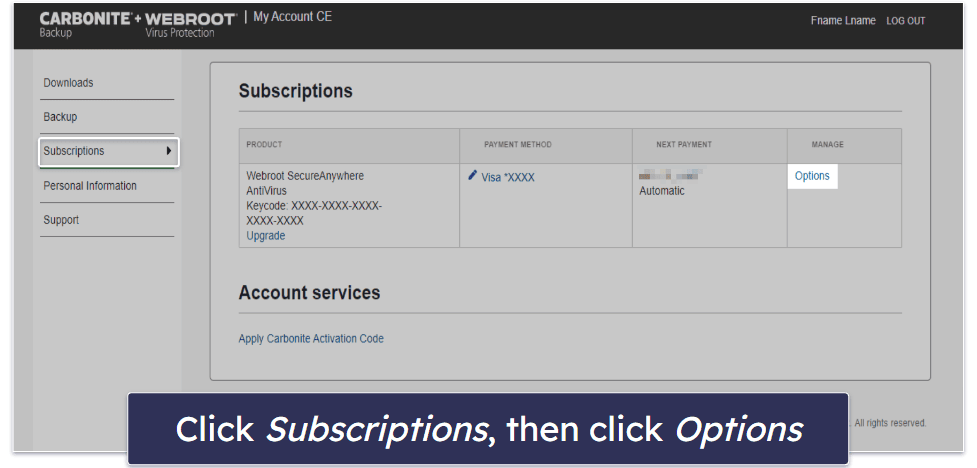
Installing TotalAV on Amazon Fire is also very easy, even though you can’t download and install it from within the Amazon App Store. Instead, you can install it from your web dashboard, just as you would when installing TotalAV software on a PC or Mac. You’ll need to allow installations from unknown sources before installing TotalAV’s APK from your online dashboard. However, this is safe because you’re downloading it directly from TotalAV’s official website, not a third-party site.
TotalAV has 3 plans that can protect FireOS devices. There’s Premium (£19.00 / year), which protects 3 devices but lacks VPN protection, Internet Security (£39.00 / year), which protects 6 devices and adds the VPN (TotalAV is the only antivirus app for Fire tablets that comes with a VPN for Amazon Fire!), and Total Security (£49.00 / year), which protects up to 8 devices. I recommend Internet Security, as it provides all of TotalAV’s best features, including the VPN and a safe browser. Total Security adds an ad blocker and password vault, but neither is compatible with Fire tablets, so it’s not a great plan for most Fire users.
Bottom Line:
TotalAV provides excellent anti-malware protection, a secure VPN, and good web protection tools. The scanner detected 99% of the malware samples I added to my Fire and the web protection blocked most of the phishing websites I visited on my Fire tablet. TotalAV also provides a really good VPN that lets you stream high-quality video from a worldwide server network without slowdown. All of TotalAV’s plans come with a 30-day money-back guarantee.
🥈 2. ESET — Best Additional Features for Amazon Fire


ESET Mobile Security delivers powerful malware protection and smart security tools for Amazon Fire tablets. I really like its comprehensive Security Audit tool, which checks app permissions, privacy risks, and potential vulnerabilities, alerting you to anything suspicious. This makes it an excellent choice if you regularly install apps from third-party stores.
- Detailed security audit tool
- Reliable payment protection
- Shows device activity remotely
- Anti-theft is limited on Fire
- VPN unavailable on Fire
ESET’s cloud-based malware scanner uses real-time analysis and machine learning to instantly block new threats. In my tests, it detected 98% of malware samples targeting both Android and FireOS, including trojans, ransomware, and spyware.
I like the Security Audit tool, as it’s more customizable than most. It checks app permissions to make sure you aren’t sharing more information or control than necessary with third-party applications. You can use it to get a simple list of your apps that record videos, read messages, and make purchases. There’s also a Device Monitoring page that alerts you to apps that come from unknown sources or have debug mode enabled (which is potentially dangerous).
ESET Mobile Security offers some great extra features, too, such as:
- Anti-theft tools.
- Phishing protection.
- Payment protection.
- Network inspection tool.
- Adware detector.
- App Locker.

The Payment Protection feature works perfectly on Amazon Fire. It automatically opens your banking and shopping pages in a secure browser space that prevents keylogging, screen captures, and other financial risks. During my tests, it kicked in every time I accessed a payment page, which made online checkout feel much safer.
Most older Fire tablets lack GPS hardware, but newer models like the Fire Max 11 do include it. Because of this, anti-theft location accuracy varies by model — ESET’s location tracking may not work fully on older Fire devices. However, you can still lock your device remotely, send a message to the screen, or view recent activity, which is helpful if your tablet is misplaced.
The Network Inspector worked well, too, and I could see a list of all devices connected to my Wi-Fi network and whether or not they had any vulnerabilities. ESET does provide a separate VPN app for Android, but I couldn’t find it on the Amazon App Store, so it’s unlikely that Fire users will be able to use it.
ESET is very easy to install on Amazon Fire tablets. You can download it directly from the Amazon App Store, and the setup process only takes a couple of minutes. There’s no need to sideload anything — it installs just like any other FireOS app. However, it’s worth noting that ESET doesn’t support 32-bit builds, so it won’t work on older Amazon Fire tablets that still rely on 32-bit architecture.
ESET offers both free and premium plans. The free plan only offers ESET’s on-demand virus scanner, while the ESET Mobile Security plan includes every feature listed above for as little as £9.58 / year for 1 device. I think it’s worth choosing the paid plan for the network inspection tool alone — it’s a great way to keep your Amazon Fire safe from exploit attacks.
Bottom Line:
ESET offers reliable malware protection, security auditing tools, anti-theft tools, and a secure payment protection feature. While the anti-theft tools don’t fully work on Fire, ESET’s still a great option for users looking to protect themselves from exploit attacks, and it’s only £9.58 / year for 1 device, with the option to buy an additional 24 licenses. ESET offers a 30-day free trial and a 30-day money-back guarantee, giving you plenty of time to test its premium product.
🥉 3. Dr.Web Anti-Virus — Best for Deep, Customizable Scans on Fire Tablets


Dr.Web Anti-Virus is a solid, low-cost option for Fire tablets that need basic malware protection. It isn’t as fast as ESET or TotalAV (scans took about 15 minutes per test), but it successfully detected 94% of malware samples on my Fire device, including spyware and trojans.
- Effective secure firewall
- Customizable scan options
- Reliable URL filter
- Slow scan speeds
- No web dashboard
Dr.Web Anti-Virus has:
- On-demand malware scanner.
- URL filter.
- Anti-theft tools.
- Secure firewall.
- Security audit tool.
The secure firewall allowed me to control which apps could access the internet. I blocked internet access to some bloatware apps that come preinstalled on Fire devices and noticed a slight performance improvement on my tablet, which was pretty cool
The scanner excels at identifying and handling suspicious files. It’s also customizable — you can choose whether to scan your whole device or specific folders or files. It can even scan files as you transfer them onto your Fire from your laptop or other device.
There’s also a security audit tool that alerts you if any of your apps have higher permissions that allow them to bypass Dr.Web’s filters. It can detect hidden applications with administrative permissions and vulnerable settings, too, but it’s not as feature-rich as ESET’s security auditing tool.
However, lots of Dr.Web features don’t work on Fire devices. The anti-theft tools, for example, let you monitor your tablet remotely but can’t be used to track its location (although, to be fair, that’s not Dr.Web’s fault: Amazon Fire tablets simply don’t come with GPS tracking). It’s also disappointing that you can’t manage your protections from a web-based dashboard (TotalAV lets you do this easily).
Like ESET, installing Dr.Web on an Amazon Fire is straightforward — you can download it directly from the Amazon Appstore. The setup takes just a few minutes, and the app guides you through granting all the necessary permissions so that the scanner, firewall, and audit tool function properly.
The full version of Dr.Web gets you the firewall, security auditing tool, and more at just £22.87 / year for 1 year. You can choose to protect 1 or 5 devices. There’s a 14-day free trial of Dr.Web’s Android version that you can use to test it before committing to the paid plan.
Bottom Line:
Dr.Web Anti-Virus has a pretty good malware scanner, firewall, and security audit tool, but it doesn’t include a web-based dashboard or extras like a VPN. Unfortunately, Dr.Web only offers a 48-hour money-back policy, and it doesn’t guarantee users a refund. That said, there’s a 14-day free trial of Dr.Web’s mobile version.
Quick Comparison Table
Testing Methodology: Comparison & Ranking Criteria
To determine the best antivirus software for Fire Tablets in 2026, I implemented our tried and tested methodology — assessing each product’s malware detection capabilities, user interface, web security features, and overall value. Here’s a detailed look at the criteria used to evaluate and rank the antivirus solutions for optimal protection and usability on Fire OS devices.
- I tested malware detection technologies. I evaluated the effectiveness of different antivirus software in detecting a wide range of malware threats, including trojans, rootkits, worms, ransomware, keyloggers, and zero-day attacks. I specifically looked at solutions that use advanced technologies like cloud-based scanning, heuristic analysis, and machine learning. For instance, TotalAV’s cloud-based engine and heuristic analysis were tested, along with ESET’s combination of cloud scanning and machine learning capabilities.

- I examined internet security features. Given the vulnerabilities while browsing on Fire OS’s Silk browser, I tested the effectiveness of each antivirus’s web protection tools. This included evaluating secure search features, anti-phishing protections, and URL filters. Solutions such as TotalAV’s secure search, ESET’s anti-phishing, and Dr.Web’s URL filter were scrutinized to ensure they offer superior protection compared to Amazon Silk’s default security settings.
- I assessed the value for money. When searching for an antivirus solution, it’s essential to seek out a good range of features on a monthly or annual plan. It’s a bonus if the antivirus comes with a free trial or a money-back guarantee, so you can take it for a spin without any strings attached.


Top Brands That Didn’t Make the Cut
- Bitdefender. Bitdefender is a great Android antivirus that has a 100% malware detection rate, provides excellent web protection, and offers a wide range of useful features like system optimization tools, parental controls, and a VPN. That said, it doesn’t offer an app that works with Amazon Fire.
- Malwarebytes. Malwarebytes is another antivirus tool that’s been removed from the Amazon App Store and is no longer supported. You might be able to find a download of it online, but it won’t be updated regularly and won’t keep you safe from the latest security threats.
- Norton. Norton is one of my favorite Android antiviruses. It includes a ton of good protections, such as excellent malware scanning, an app advisor, password manager, and really good Wi-Fi security. However, Norton doesn’t have a Fire app at this time.
Frequently Asked Questions
Can you get viruses on Fire devices?
Many malware files can affect Fire tablets, including ransomware, adware, and fleeceware. While you’re not likely to accidentally download any viruses or malware from the official Amazon App Store, Fire devices do allow you to install applications from unknown sources — meaning shady developers can create malicious apps that target Fire OS-based devices.
There’s also a possibility of accidentally downloading malware on your Fire that can attack more vulnerable operating systems like Windows and Mac. That’s why it’s super important you download and install a Fire-compatible antivirus program, such as TotalAV.
How to tell if your Fire has a virus?
Is your Fire running slowly, displaying pop-up ads, or crashing frequently? Then chances are you have malware installed on your device. You should also look out for applications you don’t recognize that have mysteriously appeared on your home screen, as well as unusual toolbars or favorites in your browser.
However, the best way to determine whether your Fire has a virus is to run a system scan on your tablet with a comprehensive, reliable antivirus suite such as TotalAV.
How to remove the FBI virus from Fire devices?
You need to scan your tablet using one of our top antivirus apps for Amazon Fire if you’re receiving constant pop-ups with fake FBI warnings. Doing this will find whatever application or malicious file on your tablet is causing the warnings and remove it.
If the virus scan fails, you can try a factory reset. However, doing this will remove all your files and apps — so use this method only as a last resort. Before attempting a factory reset, try to back up any important files on your Amazon Fire.
Once your tablet is restored, install an antivirus app like TotalAV, to prevent it from getting reinfected.
Can I run Google Play antivirus apps on my Fire?
Yes, you can run Google Play apps on Fire, but I wouldn’t recommend it. Many of the top Android antiviruses (including Norton) have made it clear they don’t support FireOS.
During testing, I experienced frequent crashes, slower performance, and unreliable malware-scanning results when sideloading Android antivirus apps. Your best option is to pick an antivirus with native Fire support.
Do you need an antivirus for Amazon Fire tablets?
I recommend installing antivirus software to protect your Fire tablet. The biggest reason is to protect yourself from phishing attempts. Though there are far fewer viruses targeting Fire devices, this doesn’t mean they’re 100% safe. Given that FireOS is very similar to Android, malware aimed at smartphones can still infect FireOS.
There’s a lot more to staying safe online than simply avoiding viruses. I’d argue that the bigger threat these days is phishing. Any device that can access the internet is susceptible to phishing attempts, a type of attack that can steal your accounts and personal information. The antiviruses on this list are affordable and come with effective protection against phishing attempts and viruses alike.
How to run virus scans on Fire tablets?
Running a virus scan on Fire tablets is easy. First, pick a Fire tablet-compatible antivirus and purchase a plan. I recommend TotalAV, which has a number of excellent security features, including near-perfect malware detection rates, a secure VPN, and really good web protections. However, ESET is a good choice too.
Once you’ve purchased a subscription, run the installation wizard on your tablet to set it up. In some cases, you’ll have to reach out to customer support to get a version of the antivirus that can run on Amazon Fire (usually in the form of an APK file). Either way, once the installation is complete, look for the option to initiate a full scan of your tablet. During this scan, your antivirus will search for and quarantine any malicious files on your Fire tablet.











